Road warrior with EAP and User Manager
CLI reference:/ip/ipsec/identity/ip/ipsec/mode-config/ip/ipsec/settings/radius/user-manager/certificate
With EAP, the users of an IKEv2 server log in with a user name and a password. The router passes the authentication to a RADIUS server. This page uses User Manager, the RADIUS server of RouterOS, on the same router. The computers and phones of the users need no client certificate, and their built-in IKEv2 clients work.
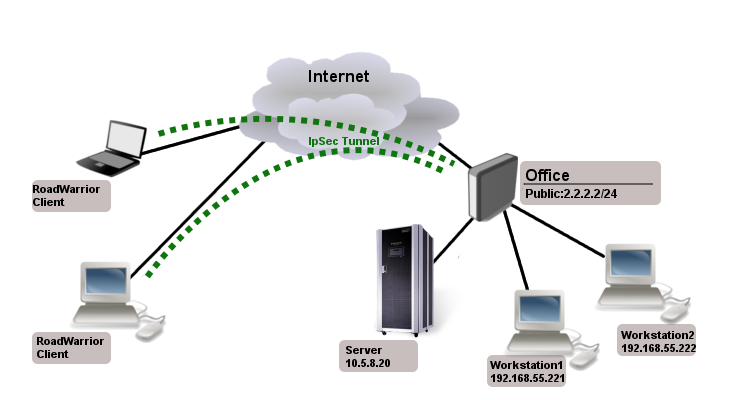
What you need
- A DNS name for the public address of the router. IP Cloud gives one.
- TCP port 80 of the router reachable from the internet, for the certificate. If the router is behind NAT, forward the port.
- The
user-managerpackage on the router.
Get a certificate
EAP-MSCHAPv2 needs a TLS handshake, so the server needs a certificate that the clients can check. A Let's Encrypt certificate is checked by most systems without any setup on the client. Get one with /certificate/add-acme for the DNS name of the router: Certificates describes the command. The certificate authority checks the name through TCP port 80 of the router, so this port must be open from the internet while the certificate is made and renewed, and it is the port of the www service: do not leave management access open to the internet on it.
The certificate then exists in the certificate store:
/certificate/print detail where name~"letsencrypt"
Set up User Manager
Let the router itself send RADIUS requests to User Manager, enable User Manager with the certificate, and add a user. Use the name of the certificate on your router:
/user-manager/router/add name=local address=127.0.0.1 \
    shared-secret=Radius-Secret-2
/user-manager/set enabled=yes \
    certificate="letsencrypt_2021-04-09T07:10:55Z"
/user-manager/user/add name=user1 password=Example-pass-1
Add the RADIUS client for IPsec with the same secret:
/radius/add address=127.0.0.1 secret=Radius-Secret-2 service=ipsec
Set up the IKEv2 server
The profile, the proposal, the pool, the mode config, the policy template and the peer are the same as for certificates:
/ip/ipsec/profile/add name=ike2
/ip/ipsec/proposal/add name=ike2 pfs-group=none
/ip/pool/add name=ike2-pool ranges=192.168.77.2-192.168.77.254
/ip/ipsec/mode-config/add name=ike2-conf address-pool=ike2-pool \
    address-prefix-length=32
/ip/ipsec/policy/group/add name=ike2-policies
/ip/ipsec/policy/add template=yes group=ike2-policies \
    proposal=ike2 src-address=0.0.0.0/0 dst-address=192.168.77.0/24
/ip/ipsec/peer/add name=ike2 exchange-mode=ike2 passive=yes \
    profile=ike2
The identity uses auth-method=eap-radius and the certificate of the server:
/ip/ipsec/identity/add peer=ike2 auth-method=eap-radius \
certificate="letsencrypt_2021-04-09T07:10:55Z" \
generate-policy=-strict mode-config=ike2-conf \
policy-template-group=ike2-policies
In the firewall, accept IKE and ESP from the internet: see Firewall and routing for IPsec for the rules.
When a user is connected, the server shows the user name and the address of the client. In this output the user is tst:
[admin@Office1] > /ip/ipsec/active-peers/print
Flags: R - RESPONDER
Columns: ID, STATE, UPTIME, PH2-TOTAL, REMOTE-ADDRESS, DYNAMIC-ADDRESS
#   ID   STATE        UPTIME  PH2-TOTAL  REMOTE-ADDRESS  DYNAMIC-ADDRESS
0 R tst  established  5s              1  203.0.113.2     192.168.77.253
For a split tunnel and DNS servers, see Road warrior with certificates: the mode config settings are the same.
Connect a RouterOS client
A RouterOS router can also be the client. It needs the CA that signed the server certificate as a trusted certificate; in this example the CA certificate has the name ca on the client. The profile, the proposal, the policy group, the template, the mode config and the peer are the same as for a client with a certificate; the identity has the user name and the password:
/ip/ipsec/identity/add peer=office auth-method=eap \
eap-methods=eap-mschapv2 username=user1 \
password=Example-pass-1 certificate=ca \
generate-policy=-strict mode-config=ike2-rw \
policy-template-group=ike2-rw
The log of the client has EAP authorized and peer authorized when the login succeeds.
Give a user a fixed address
The RADIUS attribute Framed-IP-Address gives a user a fixed address:
/user-manager/user/set [find name=user1] shared-users=1 \
    attributes=Framed-IP-Address:192.168.77.100
Take the fixed address out of the pool of the other users, and keep shared-users=1 for this user: two sessions cannot have the same address.
Send accounting
The router sends RADIUS accounting for IPsec users by default. To also record the traffic while a session is open, set an interval for the updates. With many sessions, use a longer interval to save CPU:
/ip/ipsec/settings/set interim-update=1m
Read more
- IPsec: how IKE works, the menus, the algorithms
- Road warrior with certificates: split tunnel, DNS, clients of other systems
- User Manager
- RADIUS
- Troubleshooting