EoIP
CLI reference:/interface/eoip/interface/eoipv6
Ethernet over IP (EoIP) is a MikroTik RouterOS protocol that creates an Ethernet tunnel between two routers over an IP network. It is based on GRE encapsulation (RFC 1701 and RFC 1702) and transports full Ethernet frames across routed IP infrastructure, effectively extending one Layer 2 network between remote sites. EoIP uses its own GRE protocol type, so an EoIP tunnel interconnects only with another RouterOS EoIP endpoint — not with generic GRE or Ethernet-over-GRE tunnels.
The EoIP tunnel interface appears as a virtual Ethernet interface in RouterOS. Added to a bridge, it forwards all Ethernet traffic — broadcasts, multicast and non-IP protocols — as if the endpoints were connected by a physical Ethernet link. RouterOS connects the two endpoints over any IP transport (a direct link or the internet), so EoIP is typically used to bridge LAN segments across a routed network or a wireless link, and to extend a LAN across an encrypted tunnel when combined with IPsec.
EoIP is configured in the /interface/eoip (over IPv4) and /interface/eoipv6 (over IPv6) menus.
How the tunnel works
The router puts the whole Ethernet frame — destination and source MAC addresses, EtherType and payload — inside a GRE packet (outer IP protocol 47) and sends it to the remote tunnel endpoint. The receiving router decapsulates it and injects the original frame into its local bridge. The tunnel carries whatever the bridge on the other end sends: broadcasts, ARP, RSTP and other protocol frames travel through the tunnel, so the bridged networks behave like one Ethernet segment.
The router considers the tunnel running (the R flag) after the remote end has answered. Keepalive keeps it that way: the router probes the remote end every keepalive interval, and when the peer does not answer for interval × retries, the running flag is removed. Keepalive is enabled by default (10s,10); the minimum interval is 1 second, and setting it to a disabled value (0,0, off, none) is rejected. It can be turned off by unsetting the keepalive property (/interface/eoip/unset <name> keepalive for IPv4 tunnels or the same on /interface/eoipv6) — with keepalive off, the running flag is not removed when the peer stops answering. For faster failover, shorten the interval: with keepalive=1s,2 a dead peer is detected within about two seconds.
Each tunnel is identified by tunnel-id (any value from 0 to 65535). Both ends must use the same tunnel-id for traffic to pass — with mismatched ids the router drops the tunneled frames. The running flag alone does not prove the ids match: with mismatched tunnel-ids both ends still show the running flag while no traffic passes.
EoIP adds 42 bytes to every tunneled frame it sends (8-byte GRE header with key, 14-byte inner Ethernet header, 20-byte outer IP header). With the default mtu=auto the router sizes the tunnel accordingly: actual-mtu is 1458 on a 1500-byte path for EoIP over IPv4 (1444 for EoIP over IPv6), while l2mtu stays at 65535. With the default dont-fragment=no, a frame larger than the path can carry unfragmented is split into IP fragments on the outer packet (with dont-fragment=inherit and the DF bit set, the frame is dropped instead). The bridge forwards frames up to l2mtu (65535), so oversized frames reach the tunnel and are fragmented on the outer packet — keep the underlying path MTU large enough for the frames you bridge, and avoid relying on fragmentation where jumbo or full-size frames must cross the tunnel.
All EoIP properties are described in the /interface/eoip and /interface/eoipv6 CLI references.
MAC addresses
Give every tunnel on a bridge its own MAC address — spanning tree and MAC learning assume each bridge port has a distinct one. The tunnel's MAC address is auto-generated as a locally administered address (such as FE:...), and RouterOS accepts any value you set instead. Auto-generated addresses are not guaranteed unique across routers, so with several tunnels on a bridged setup, assign each a distinct address of your own:
/interface/eoip/set eoip-main mac-address=02:00:5E:80:00:01
Set the locally administered bit (second bit of the first octet, as in 02:...) on addresses you assign yourself; the IANA-reserved range 00:00:5E:80:00:00 - 00:00:5E:FF:FF:FF is set aside for such private unicast addresses. Changing the MAC of a running tunnel briefly drops the running flag until the remote end answers again.
Encrypting the tunnel
Set ipsec-secret on both ends to encrypt the tunnel with a pre-shared key — RouterOS then creates a dynamic IPsec peer and policy for the tunnel automatically.
On /interface/eoip (IPv4), IPsec and fast path are mutually exclusive: set allow-fast-path=no on the tunnel first, otherwise the router rejects the ipsec-secret value. Removing the secret alone does not re-enable fast path — the block lingers until the tunnel is removed (which also removes the dynamic IPsec objects). /interface/eoipv6 has no allow-fast-path property, so IPsec works without that step.
Example: bridge two sites over a wireless link
This example bridges the LANs of two sites over a wireless point-to-point link, so both sites share one Layer 2 broadcast domain. Wireless stations cannot be bridged directly; without WDS, an EoIP tunnel over the wireless link achieves the same result.
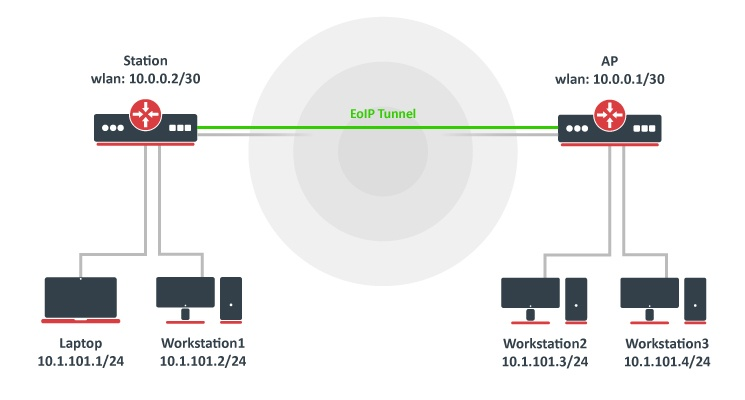
The wireless link between the routers is assumed to be established — only the EoIP and bridging configuration is shown here. The same commands work over any IP link between the routers, wired or over the internet.
Create the EoIP tunnel on the AP router:
/interface/eoip/add name=eoip-remote remote-address=10.0.0.2 tunnel-id=1
The names are arbitrary (eoip-remote on the AP, eoip-main on the station) — what matters is that both tunnel-ids match and each remote-address points at the other router.
Verify the tunnel is created — the R flag appears once the remote end answers:
/interface/eoip/print
The output on a running tunnel looks like this (match the R flag, mtu=auto with actual-mtu=1458 on a 1500-byte path, and the locally administered FE:... MAC):
Flags: R - RUNNING
0 R name="eoip-remote" mtu=auto actual-mtu=1458 l2mtu=65535
    mac-address=FE:7D:4A:93:14:56 arp=enabled arp-timeout=auto arp-accept=no
    loop-protect=default loop-protect-status=off loop-protect-send-interval=5s
    loop-protect-disable-time=5m local-address=0.0.0.0 remote-address=10.0.0.2
    tunnel-id=1 keepalive=10s,10 dscp=inherit clamp-tcp-mss=yes
    dont-fragment=no allow-fast-path=yes
Create the matching tunnel on the station router — the tunnel-id and the remote-address must point at the other end:
/interface/eoip/add name=eoip-main remote-address=10.0.0.1 tunnel-id=1
Bridge the local interfaces with the EoIP tunnel. Check which bridge already carries the LAN ports on each router:
/interface/bridge/port/print
On the AP router, add the EoIP interface to the bridge that carries the local LAN — the default RouterOS configuration already has one:
/interface/bridge/port/add bridge=bridge1 interface=eoip-remote
On the station router, add the EoIP tunnel to the same LAN bridge:
/interface/bridge/port/add bridge=bridge1 interface=eoip-main
On the default RouterOS configuration all LAN ports are already in the default bridge, so the EoIP tunnel only joins that bridge — an interface can belong to only one bridge, so do not create a second bridge for it. If a router instead starts from an empty configuration, create the bridge and add both the LAN port and the EoIP tunnel to it:
/interface/bridge/add name=bridge1
/interface/bridge/port/add bridge=bridge1 interface=ether2
/interface/bridge/port/add bridge=bridge1 interface=eoip-main
Once both sites share one broadcast domain, only one router may act as DHCP server and gateway — the default RouterOS configuration runs a DHCP server on its LAN bridge, so disable it on the second router.
Both sites are now in the same Layer 2 broadcast domain. Verify it by assigning addresses from one subnet to the bridge at each end and pinging across the tunnel — on the AP router:
/ip/address/add address=10.1.1.10/24 interface=bridge1
and on the station router:
/ip/address/add address=10.1.1.11/24 interface=bridge1
From the station router, a ping to the AP router's bridge address crosses the tunnel:
/ping 10.1.1.10
Troubleshooting
- The tunnel has no running flag. The remote end has not answered: check with
/ping <remote-address>that the tunnel endpoint is reachable, that the tunnel exists on both routers, and thatlocal-addressis set correctly. The running flag appears only after the remote end responds. - The running flag is up but nothing passes through. The most common cause is mismatched
tunnel-idvalues on the two ends — the bridge stays "up" but tunneled frames are dropped. Check thetunnel-idon both routers (/interface/eoip/print, valid values 0 to 65535) and make them match. Also check that nothing filters IP protocol 47 (GRE) between the endpoints and that the tunnel traffic is not NAT-ed. - Large traffic stalls or disappears. If the path between the endpoints cannot carry a full-size frame unfragmented, the tunnel fragments the outer packet, and some paths drop fragments or reorder them. Raise the path MTU where possible (for example jumbo frames on the connecting links) and avoid sizing the tunnel above the path.
- VLAN tags do not behave on large tagged traffic. On top of paths with a tight MTU, tagged VLAN frames add another 4 bytes on top of the EoIP overhead, and in some cases the MSS clamp does not apply to tagged traffic, so large TCP connections over the tunnel can stall. Carry tagged traffic only where the path MTU leaves room for the extra bytes, or lower the MSS at the endpoints.
- Duplicates, flapping or loops on the bridge. Bridged tunnels share the L2 domain, so every tunnel needs its own MAC address, and when several tunnels are bridged together spanning tree (RSTP) must be able to break the loop — it runs over the tunnel by default, so do not disable it.