Web Proxy
CLI reference:/ip/proxy/ip/proxy/access/ip/proxy/cache/ip/proxy/direct/ip/proxy/connections/ip/proxy/inserts/ip/proxy/lookups/ip/proxy/refreshes/ip/proxy/cache-contents
Sub-menu: /ip/proxy
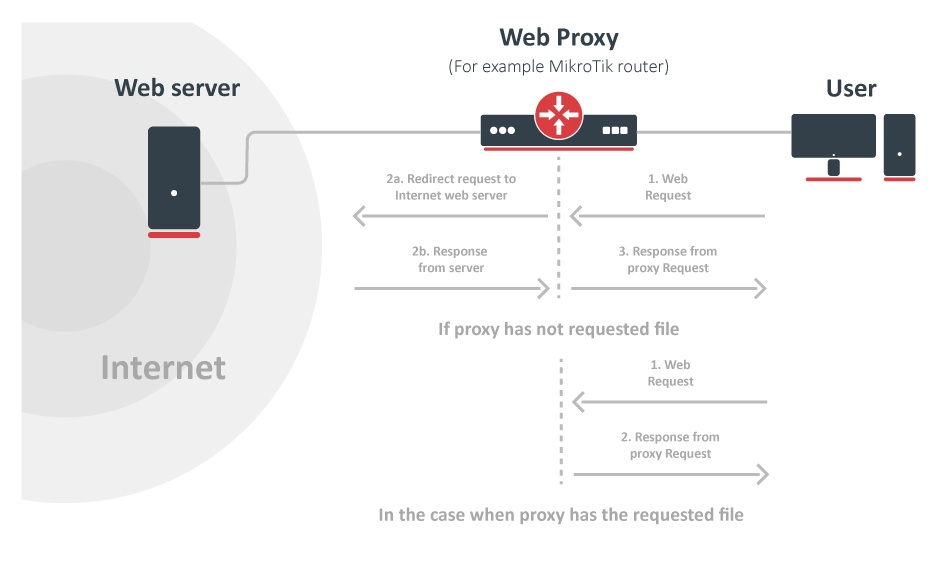
The web proxy accepts web requests from the clients on your network and fetches the content from the servers for them. Use it to:
- Allow, deny or redirect requests by client, host name, path or HTTP method.
- Cache plain HTTP content on the router, in RAM or on a disk.
- Send the requests through another proxy, the parent proxy.
Clients use the proxy in one of two ways. A regular proxy client, for example a browser with proxy settings, sends all its web requests to the proxy, HTTP and HTTPS. In transparent mode, a firewall rule redirects the plain HTTP connections of the clients to the proxy, and the clients need no settings.
HTTPS content is encrypted between the client and the server, so the proxy only relays it. The router can allow or deny an HTTPS connection by host name, address and port, but it cannot see the path of the request or cache the content, and it cannot take HTTPS connections in transparent mode. Filtering by path and caching work for plain HTTP only.
The web proxy is disabled by default. It is not available in the home and basic device modes.
Set up a regular proxy
Enable the proxy:
/ip/proxy/set enabled=yes
The proxy listens on TCP port 8080 on all IPv4 and IPv6 addresses of the router. To use other ports, set port, for example port=8080,3128.
In the proxy settings of the browser or the operating system, enter the address of the router, for example 192.168.88.1, and port 8080, for HTTP and for HTTPS. To test the proxy from a computer with curl:
curl -x https://192.168.88.1:8080 -I https://example.com/
Allow only your clients
A proxy that anyone can reach is an open proxy: others can send their traffic through it and hide where it comes from. The default firewall configuration drops connections to the router that do not come from the LAN, and this also protects the proxy. If your firewall accepts connections from other networks, drop the proxy connections that do not come from the LAN, for IPv4 and IPv6:
/ip/firewall/filter/add chain=input protocol=tcp dst-port=8080 in-interface-list=!LAN action=drop comment="web proxy: LAN only"
/ipv6/firewall/filter/add chain=input protocol=tcp dst-port=8080 in-interface-list=!LAN action=drop comment="web proxy: LAN only"
Move the rules above any rule that accepts these connections.
The proxy opens HTTPS tunnels (the CONNECT method) to any port. To allow tunnels only to the HTTPS port 443:
/ip/proxy/access/add method=CONNECT dst-port=!443 action=deny
Set up a transparent proxy
In transparent mode, a destination NAT rule redirects the HTTP connections of the clients to the proxy port, and the clients need no proxy settings:
/ip/proxy/set enabled=yes
/ip/firewall/nat/add chain=dstnat protocol=tcp dst-port=80 in-interface-list=LAN action=redirect to-ports=8080 comment="transparent web proxy"
The proxy connects to the host named in the request (the Host header), not to the address the client connected to.
Transparent mode works for plain HTTP only. Do not redirect HTTPS (port 443) to the proxy: the proxy does not accept TLS connections, and the redirected HTTPS connections fail.
The same proxy serves regular and transparent clients at the same time.
Check and troubleshoot
/ip/proxy/monitor shows whether the proxy runs, its open connections, and how many requests it answered from the cache (hits):
[admin@MikroTik] > /ip/proxy/monitor once
                 status: running
                 uptime: 35s
     client-connections: 0
     server-connections: 5
               requests: 313
                   hits: 69
             cache-used: 0KiB
         total-ram-used: 0KiB
  received-from-servers: 10090KiB
        sent-to-clients: 12126KiB
   hits-sent-to-clients: 1920KiB
/ip/proxy/connections/print lists the open connections: C for connections from clients and S for connections to servers.
To log every request, add a logging rule for the web-proxy topic:
/system/logging/add topics=web-proxy,!debug
Each request is logged with the address of the client, the method, the URL, the action of the access list, and whether the proxy answered from the cache:
web-proxy,account 192.168.88.10 GET https://example.com/  action=allow cache=MISS
web-proxy,account 192.168.88.10 CONNECT example.com:443  action=allow cache=MISS
Without !debug, the log also shows the headers of every request and response.
Common problems:
- The browser shows
ERROR: ForbiddenandAccess Denied: an access rule withaction=denymatched. Thehitscolumn of/ip/proxy/access/printshows which rule. - HTTPS sites do not open in transparent mode: transparent mode works for HTTP only. Redirect only port 80.
ERROR: Gateway Timeout: the proxy could not reach the server or the parent proxy. The page shows the reason, for exampleOperation timed out.- Nothing is answered from the cache: most sites use HTTPS, which the proxy cannot cache, and many HTTP responses are not cacheable. The conditions are listed in the cache section.
Filter requests
The access list /ip/proxy/access decides which requests the proxy serves. The router checks the rules from the top down, and the first rule that matches decides. A request that matches no rule is allowed. A rule matches when all its matchers match, and a rule without matchers matches every request.
Host names and paths match as follows:
- A value must match the whole host name or path.
dst-host=example.comdoes not matchwww.example.com. *matches any number of characters and?matches one character.dst-host=*.example.commatches all hosts inexample.com, but notexample.comitself.- Host names match regardless of case.
pathstarts with/and includes the query string.path=*.mp3matches/music/song.mp3, but not/music/song.mp3?id=1.- A value that starts with
:is a regular expression, and it matches any part of the value:dst-host=:adsmatches every host name that containsads. Use^and$to match the start and the end. - HTTPS requests have a host name and a port, but no path, so
pathrules never match them.
Deny a site and all its subdomains:
/ip/proxy/access
add dst-host=example.com action=deny
add dst-host=*.example.com action=deny
Deny downloads of some file types:
/ip/proxy/access
add path=*.exe action=deny
add path=*.zip action=deny
Deny a site for one network only:
/ip/proxy/access/add src-address=192.168.88.0/24 dst-host=*.example.net action=deny
Allow only some sites, and deny all others:
/ip/proxy/access
add dst-host=*.example.com action=allow
add action=deny
Instead of denying a request, the proxy can redirect the browser to another page. The client gets an HTTP 307 redirect to the URL in action-data:
/ip/proxy/access/add dst-host=*.example.net action=redirect action-data=http://intranet.example.com/blocked.html
Error page
The proxy answers a denied request with an error page (HTTP 403) that names cache-administrator as the contact, and it uses the same page for its other errors. To change the page, write the default template to the router's files:
/ip/proxy/reset-html
This creates webproxy/error.html. Edit the file or replace it with your own HTML, and the proxy uses the new page right away. The template can use these variables:
$(status)- The HTTP status, for exampleForbidden.$(url)- The requested URL.$(error)- The reason, for exampleAccess Denied.$(admin)- The value ofcache-administrator.$(signature)- A line with the time and the proxy address.
/ip/proxy/reset-html restores the default page.
Cache
The proxy stores the plain HTTP content it fetches and sends it to the next client that requests the same URL, without fetching it from the server again. The cache is on by default when the proxy runs, and it is in RAM.
The proxy stores a response when all of these are true:
- The request uses the
GETmethod, and the response has status 200 (OK) or 301 (Moved Permanently). Other responses, such as 302 redirects and 404 errors, are not stored. - The response has a
Last-Modifiedor anETagheader, and noExpiresheader. - The response is not marked
Cache-Control: no-storeorCache-Control: private. - The response is not larger than
max-cache-object-size(2048 KiB by default). - No
denyrule in/ip/proxy/cachematches the request.
The proxy answers from the cache without asking the server when the stored object has a Last-Modified header and its URL has no query string (?). For the other stored objects, it asks the server on every request whether the object has changed.
Most web content is sent over HTTPS, and much of the rest is created for each request, so the share of the traffic the cache can answer is usually small.
A response from the cache has the header X-Cache: HIT. The router also marks its packets with DSCP 4 (cache-hit-dscp), so you can match them in firewall and queue rules. The proxy does not store Set-Cookie headers, so a client never gets the cookies of another client.
Cache size and storage
With the default max-cache-size=unlimited, the RAM cache can use most of the free memory of the router. On a router that runs other services, set a limit in KiB, for example 64 MiB:
/ip/proxy/set max-cache-size=65536
To keep the cache on a disk, set cache-on-disk=yes and a path on the disk, for example on the USB disk usb1:
/ip/proxy/set cache-on-disk=yes cache-path=usb1/web-proxy
The directory in the path must exist. The router creates the cache as a web-proxy store in /file.
To use the proxy only for filtering, turn the cache off with max-cache-size=none.
Changing any proxy setting clears the cache. To clear it yourself, run /ip/proxy/clear-cache.
Exclude sites from the cache
The cache list /ip/proxy/cache works like the access list: the first matching rule decides, and action=deny stops the proxy from storing the responses. A request that matches no rule is cached. For example, to never cache the pages of one site:
/ip/proxy/cache/add dst-host=*.example.com action=deny
See what is in the cache
/ip/proxy/cache-contents/print lists the stored objects with their URL and size. Remove an entry to make the proxy fetch it again. The counters in /ip/proxy/lookups and /ip/proxy/inserts show how many requests the cache answered and how many objects it stored.
Parent proxy
To send the requests through another proxy, set its address and port:
/ip/proxy/set parent-proxy=192.0.2.10 parent-proxy-port=3128
All requests then go through the parent proxy, HTTP and HTTPS. When the parent proxy cannot be reached, the client gets an error page: the proxy does not connect to the server itself.
The direct list /ip/proxy/direct names the requests that go to the server without the parent proxy. The first matching rule decides: action=allow sends the request directly to the server, and action=deny sends it through the parent proxy. A request that matches no rule goes through the parent proxy. For example, to reach the servers of one domain directly:
/ip/proxy/direct/add dst-host=*.example.com action=allow
Technical details
Headers
The proxy adds these headers to the requests it sends to servers:
Via- The proxy, for example1.1 ::ffff:192.168.88.1 (Mikrotik HttpProxy).X-Forwarded-For- The address of the client. Each proxy on the way adds its client to the list.X-Proxy-ID- An identifier of the proxy.
With anonymous=yes, the proxy adds none of them, so servers do not learn the addresses of the clients.
Responses from the cache get the header X-Cache: HIT. A stored object the proxy checked with the server gets X-Cache-Lookup: HIT.
HTTP methods
The method matcher of the access, cache and direct lists takes the HTTP methods of RFC 9110:
| Method | Use | In the proxy |
|---|---|---|
GET | Get a page or file. | The only method whose responses the proxy caches. |
HEAD | Get only the headers of a page or file. | Always sent to the server. |
POST | Send data, for example a form, to the server. | Always sent to the server. |
PUT, DELETE | Store or delete a file on the server. | Sent to the server. |
OPTIONS, TRACE | Ask the server which methods it supports, or echo the request back. | Sent to the server. |
CONNECT | Open a tunnel through the proxy, used for HTTPS. | The proxy relays the tunnel. Rules can match its host name, address and port, but not a path. |
FTP
Regular proxy clients can also request ftp:// URLs. The proxy fetches them from the FTP server and returns directory listings as HTML pages.
Connection limits
max-client-connections limits the number of client connections, 600 by default. When the limit is reached, new requests wait until a connection is free.
All properties are described in the /ip/proxy CLI reference.