DHCP Relay
A DHCP relay forwards requests from DHCP clients on one network to a DHCP server on another network, and delivers the replies back to the clients. Use it when one central DHCP server serves several networks it is not directly connected to. For how a relay and the DHCP server work together, see DHCP concepts.
DHCPv4 Relay
Sub-menu: /ip/dhcp-relay
The DHCP relay listens for DHCP requests on its interface and forwards each request to every DHCP server listed in dhcp-server; it does not choose one of them. It writes local-address, or an address of its interface when local-address is not set, into the gateway address field (giaddr) of the forwarded request. The DHCP server uses this address to tell relays apart: set the server's relay property to the relay's address, as shown in the following example.
Properties
| Property | Description |
|---|---|
| add-relay-info (yes | no; Default: no) | Adds DHCP relay agent information if enabled according to RFC 3046. Agent Circuit ID Sub-option contains mac address of an interface, Agent Remote ID Sub-option contains MAC address of the client from which the request was received. |
| delay-threshold (time | none; Default: none) | If the secs field in the DHCP packet is smaller than delay-threshold, then this packet is ignored |
| dhcp-server (IPv4 address [IPv4]; Default: ) | List of DHCP servers' IP addresses which the DHCP requests should be forwarded to |
| interface (interface; Default: ) | Interface name the DHCP relay will be working on. |
| local-address (IP; Default: 0.0.0.0) | The unique IP address of this DHCP relay needed for the DHCP server to distinguish relays. If set to 0.0.0.0 - the IP address will be chosen automatically from addresses that are assigned to an interface a relay is running on |
| relay-info-remote-id (string; Default: ) | The specified string will be used to construct Option 82 instead of client's MAC address. Option 82 consists of: interface from which packets were received + client mac address or relay-info-remote-id |
| name (string; Default: ) | Descriptive name for the relay |
| local-address-as-src-ip (yes | no; Default: no) | Use local address as source address for Discover/Request packets sent to the DHCP server |
| disabled (yes | no; Default: no) | Whether the relay is disabled or not. By default, it is not disabled |
| dhcp-server-vrf (VRF; Default: main) | Specifies the VRF on which the DHCP relay should operate. |
Configuration Example
Let us consider that you have several IP networks 'behind' other routers, but you want to keep all DHCP servers on a single router. To do this, you need a DHCP relay on your network which will relay DHCP requests from clients to the DHCP server.
This example will show you how to configure a DHCP server and a DHCP relay that serves 2 IP networks - 192.168.1.0/24 and 192.168.2.0/24 that are behind a router DHCP-Relay.
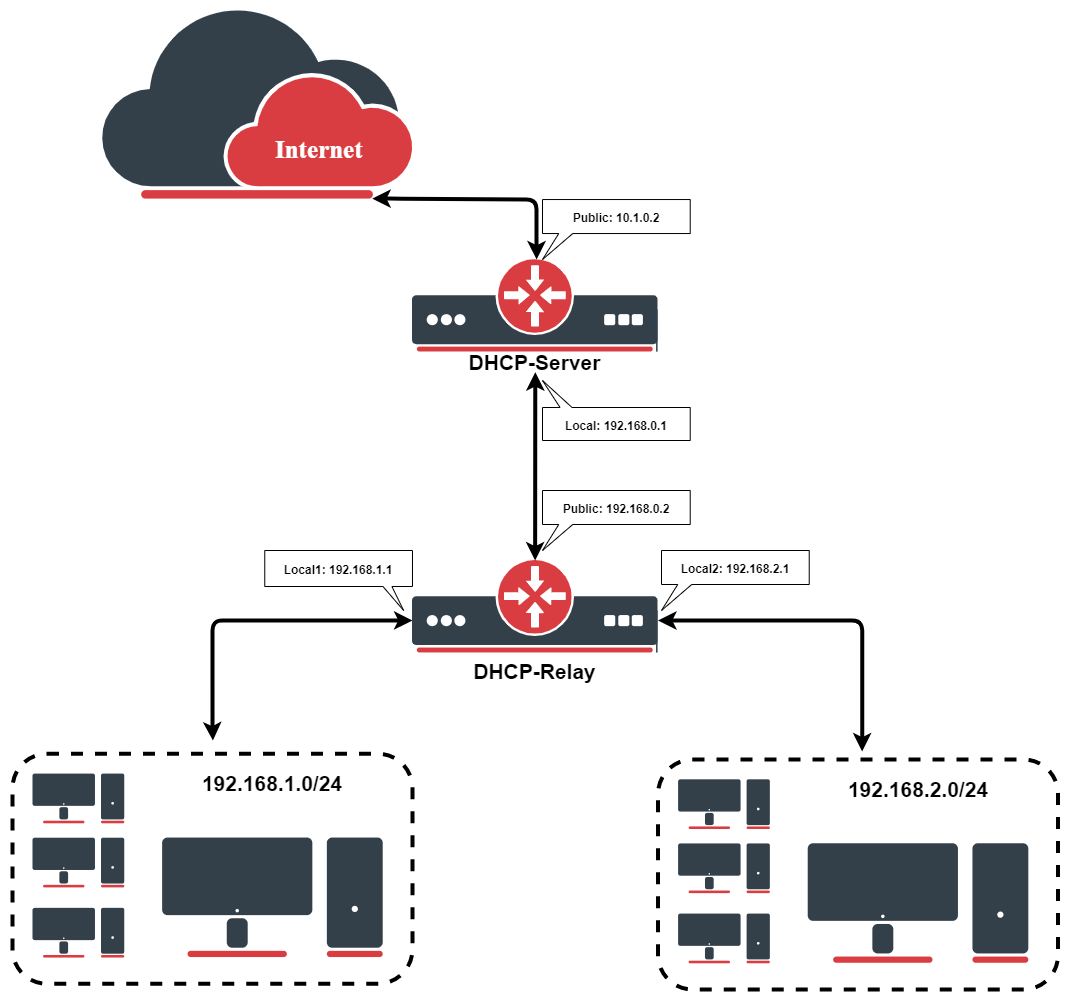
IP Address Configuration
IP addresses of DHCP-Server:
[admin@DHCP-Server] /ip/address> print
Flags: X - disabled, I - invalid, D - dynamic
 #   ADDRESS            NETWORK         BROADCAST       INTERFACE
 0   192.168.0.1/24     192.168.0.0     192.168.0.255   To-DHCP-Relay
 1   10.1.0.2/24        10.1.0.0        10.1.0.255      Public
[admin@DHCP-Server] /ip/address>
IP addresses of DHCP-Relay:
[admin@DHCP-Relay] /ip/address> print
Flags: X - disabled, I - invalid, D - dynamic
 #   ADDRESS            NETWORK         BROADCAST       INTERFACE
 0   192.168.0.2/24     192.168.0.0     192.168.0.255   To-DHCP-Server
 1   192.168.1.1/24     192.168.1.0     192.168.1.255   Local1
 2   192.168.2.1/24     192.168.2.0     192.168.2.255   Local2
[admin@DHCP-Relay] /ip/address>
DHCP Server Setup
To set up 2 DHCP Servers on the DHCP-Server router add 2 pools. For networks 192.168.1.0/24 and 192.168.2.0:
/ip/pool/add name=Local1-Pool ranges=192.168.1.11-192.168.1.100
/ip/pool/add name=Local2-Pool ranges=192.168.2.11-192.168.2.100
[admin@DHCP-Server] /ip/pool> print
 # NAME                                         RANGES
 0 Local1-Pool                                  192.168.1.11-192.168.1.100
 1 Local2-Pool                                  192.168.2.11-192.168.2.100
[admin@DHCP-Server] /ip/pool>
Create DHCP Servers:
/ip/dhcp-server/add interface=To-DHCP-Relay relay=192.168.1.1 \
   address-pool=Local1-Pool name=DHCP-1 disabled=no
/ip/dhcp-server/add interface=To-DHCP-Relay relay=192.168.2.1 \
   address-pool=Local2-Pool name=DHCP-2 disabled=no
[admin@DHCP-Server] /ip/dhcp-server> print
Flags: X - disabled, I - invalid
 #   NAME         INTERFACE     RELAY           ADDRESS-POOL LEASE-TIME ADD-ARP
 0   DHCP-1       To-DHCP-Relay 192.168.1.1     Local1-Pool  3d00:00:00
 1   DHCP-2       To-DHCP-Relay 192.168.2.1     Local2-Pool  3d00:00:00
[admin@DHCP-Server] /ip/dhcp-server>
Configure respective networks:
/ip/dhcp-server/network/add address=192.168.1.0/24 gateway=192.168.1.1 \
   dns-server=159.148.60.20
/ip/dhcp-server/network/add address=192.168.2.0/24 gateway=192.168.2.1 \
   dns-server=159.148.60.20
[admin@DHCP-Server] /ip/dhcp-server/network> print
 # ADDRESS            GATEWAY         DNS-SERVER      WINS-SERVER     DOMAIN
 0 192.168.1.0/24     192.168.1.1     159.148.60.20
 1 192.168.2.0/24     192.168.2.1     159.148.60.20
[admin@DHCP-Server] /ip/dhcp-server/network>
DHCP Relay Config
Configuration of DHCP-Server is done. Now let's configure DHCP-Relay:
/ip/dhcp-relay/add name=Local1-Relay interface=Local1 \
   dhcp-server=192.168.0.1 local-address=192.168.1.1 disabled=no
/ip/dhcp-relay/add name=Local2-Relay interface=Local2 \
   dhcp-server=192.168.0.1 local-address=192.168.2.1 disabled=no
[admin@DHCP-Relay] /ip/dhcp-relay> print
Flags: X - disabled, I - invalid
 #   NAME                        INTERFACE      DHCP-SERVER     LOCAL-ADDRESS
 0   Local1-Relay                Local1         192.168.0.1     192.168.1.1
 1   Local2-Relay                Local2         192.168.0.1     192.168.2.1
[admin@DHCP-Relay] /ip/dhcp-relay>
DHCP Relay with VRF (introduced in 7.15)
Let's take the previous setup but we'll consider that the interface to the DHCP server and interfaces to DHCP clients are added in a VRF:
/ip/vrf
add interfaces=To-DHCP-Server name=vrf_server
add interfaces=Local2 name=vrf2
add interfaces=Local1 name=vrf1
In the DHCP-relay configuration dhcp-server-vrf should be added:
/ip/dhcp-relay/set dhcp-server-vrf=vrf_server numbers=0,1
Due to VRF configuration there are several routing-tables - we should add additional routes:
/ip/route
add disabled=no distance=1 dst-address=192.168.0.0/24 gateway=To-DHCP-Server@vrf_server pref-src="" routing-table=vrf1 scope=10 suppress-hw-offload=no \
    target-scope=10
add disabled=no distance=1 dst-address=192.168.0.0/24 gateway=To-DHCP-Server@vrf_server pref-src="" routing-table=vrf2 scope=10 suppress-hw-offload=no \
    target-scope=10
add disabled=no dst-address=192.168.1.0/24 gateway=Local1@vrf1 routing-table=vrf_server suppress-hw-offload=no
add disabled=no distance=1 dst-address=192.168.2.0/24 gateway=Local2@vrf2 pref-src="" routing-table=vrf_server scope=30 suppress-hw-offload=no \
    target-scope=10
To achieve successful DHCP-server - DHCP-relay communication we should add NAT rules:
/ip/firewall/nat
add action=dst- chain=dstnat dst-address=192.168.2.1 dst-port=67 in-interface=To-DHCP-Server protocol=udp src-address=192.168.0.1 to-addresses=\
192.168.0.2
add action=dst- chain=dstnat dst-address=192.168.1.1 dst-port=67 in-interface=To-DHCP-Server protocol=udp src-address=192.168.0.1 to-addresses=\
192.168.0.2
DHCPv6 Relay
Sub-menu: /ipv6/dhcp-relay
The DHCPv6 relay forwards the DHCPv6 messages that clients on its interface send to the servers listed in dhcp-server. It wraps each client message in a Relay-Forward message, which also carries the client's link-local address, an Interface-ID option and, by default, the client link-layer address (option 79, set with dhcp-options). The link address field of the Relay-Forward message is :: unless you set link-address, for example to an address of the client network if the DHCPv6 server should identify the client's network by it. The server answers the relay, and the relay passes the reply back to the client. This way one DHCPv6 server can serve several networks without a direct connection to each of them.
The relay receives client messages on UDP port 547 and sends them to UDP port 547 of the servers. If the router filters incoming traffic, allow UDP port 547 from the clients and from the DHCPv6 servers.
Properties
| Property | Description |
|---|---|
| comment (string; Default: ) | Descriptive name of an item. |
| delay-threshold (time | none; Default: none) | If the secs field in the DHCP packet is smaller than delay-threshold, then this packet is ignored. |
| dhcp-server (IPv6 address [IPv6]%interface; Default: ) | A list of DHCP server IP addresses to which DHCP requests should be forwarded (optionally, the interface can also be specified together with the IPv6 address). |
| interface (interface; Default: ) | Interface name the DHCP relay will be working on. |
| name (string; Default: ) | Descriptive name for the relay |
| dhcp-options (DHCPv6 option; Default: client_mac) | A list of DHCPv6 options to be inserted by the relay into forwarded DHCPv6 packets. By default, relay inserts option 79. |
| disabled (yes | no; Default: no) | Whether the relay is disabled or not. By default, it is not disabled. |
| link-address (IPv6 address [IPv6]; Default: ::) | An IPv6 address that may be used by the server to identify the link on which the client is located. |
| store-relayed-bindings (yes | no; Default: no) | Inspects relayed DHCP advertisements and stores assigned prefixes. Should be used, for example, to avoid loss of routing information on relay reboot. By default, it is disabled. |