DHCPv6 Client
Sub-menu: /ipv6/dhcp-client
The DHCPv6 client requests IPv6 configuration from a DHCPv6 server. It is typically used on the interface towards an ISP, to receive a delegated prefix for the local networks. The request property selects what the client asks for, and one client can request more than one of these:
prefix: a delegated prefix (DHCPv6-PD). The client adds the received prefix to a dynamic IPv6 pool (pool-name), from which you can assign addresses to local interfaces and advertise them to hosts. The pool lifetime follows the delegated prefix and is extended each time the client renews it.address: an IPv6 address, which the client adds to its interface as a dynamic /128 address.info: only other settings, such as DNS servers, without an address or a prefix.
The received DNS servers are used by the router's DNS resolver (use-peer-dns). DHCPv6 does not provide a default gateway, but the client can add a default route towards the DHCPv6 server with add-default-route.
The client identifies itself with the router's DUID, which the router's DHCPv6 server also uses, and with an identity association identifier (IAID) based on the interface the client runs on. For how DHCPv6 differs from DHCP for IPv4, see DHCP concepts.
Configuration Examples
Simple DHCPv6 client
This simple example demonstrates how to enable a dhcp client to receive an IPv6 prefix and add it to the pool.
/ipv6/dhcp-client/add request=prefix pool-name=test- pool-prefix-length=64 interface=ether13
Detailed print should show the status of the client and we can verify if the prefix is received
[admin@x86-test] /ipv6/dhcp-client> print detail
Flags: D - dynamic, X - disabled, I - invalid
 0   interface=ether13 pool-name="test-ipv6" pool-prefix-length=64 status=bound
     prefix=2001:db8:7501:ff04::/62 expires-after=2d23h11m53s request=prefix
Notice that server gave us prefix 2001:db8:7501:ff04::/62 . And it should be also added to ipv6 pools
[admin@MikroTik] /ipv6/pool> print
Flags: D - dynamic
# NAME PREFIX REQUEST PREFIX-LENGTH
0 D test- 2001:db8:7501:ff04::/62 prefix 64
It works! Now you can use this pool, for example, for pppoe clients.
Use received prefix for local RA
Consider the following setup:
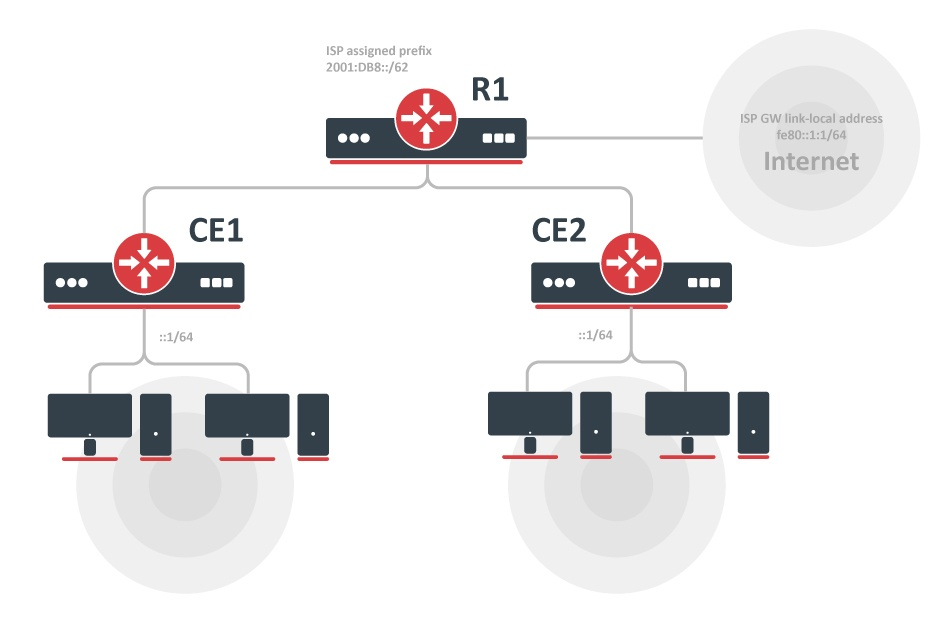
- ISP is routing prefix 2001:DB8::/62 to the router R1.
- Router R1 runs a DHCPv6 server to delegate /64 prefixes to the customer routers CE1 and CE2.
- DHCP client on routers CE1 and CE2 receives a delegated /64 prefix from the DHCP server (R1).
- Client routers use the received prefix to set up RA on the local interface.
Configuration
R1
/ipv6/route
add gateway=fe80::1:1%to-ISP

/ipv6/pool
add name=myPool prefix=2001:db8::/62 prefix-length=64

/ipv6/dhcp-server
add prefix-pool=myPool disabled=no interface=to-CE-routers lease-time=3m name=server1
CE1
/ipv6/dhcp-client
add interface=to-R1 request=prefix pool-name=my-
/ipv6/address
add address=::1/64 from-pool=my- interface=to-clients advertise=yes
CE2
/ipv6/dhcp-client
add interface=to-R1 request=prefix pool-name=my-
/ipv6/address/add address=::1/64 from-pool=my- interface=to-clients advertise=yes
Check the status
After configuration is complete, we can verify that each CE router received its own prefix
On the server:
[admin@R1] /ipv6/dhcp-server/binding> print
Flags: X - disabled, D - dynamic
 #   ADDRESS            DUID          IAID  SERVER   STATUS
 1 D 2001:db8:0:1::/64  0019d1393536   566  server1  bound
 2 D 2001:db8:0:2::/64  0019d1393535   565  server1  bound
On client:
[admin@CE1] /ipv6/dhcp-client> print
Flags: D - dynamic, X - disabled, I - invalid
# INTERFACE STATUS REQUEST PREFIX
0 to-R1 bound prefix 2001:db8:0:1::/64
[admin@CE1] /ipv6/dhcp-client> /ipv6/pool/print
Flags: D - dynamic
# NAME PREFIX PREFIX-LENGTH
0 D my- 2001:db8:0:1::/64 64
We can also see that an IPv6 address was automatically added from the prefix pool:
[admin@CE1] /ipv6/address> print
Flags: X - disabled, I - invalid, D - dynamic, G - global, L - link-local
# ADDRESS FROM-POOL INTERFACE ADVERTISE
0 G 2001:db8:0:1::1/64 my- to-clients yes
...
And pool usage shows that 'Address' is allocating the pool
[admin@CE1] /ipv6/pool/used> print
POOL PREFIX OWNER INFO
my- 2001:db8:0:1::/64 Address to-clients
Properties
| Property | Description |
|---|---|
| add-default-route (yes | no; Default: no) | Whether to add default IPv6 route after a client connects. |
| allow-reconfigure (yes | no; Default: no) | Allows receiving a Reconfigure (forcerenew) message from the DHCP server. |
| default-route-tables (table:distance; Default: default) | List of routing tables to which default route must be added. The table name can be prefixed with ":x" where x would be the distance for the route to be installed with. |
| comment (string; Default: ) | Short description of the client |
| disabled (yes | no; Default: no) | Whether the client is disabled. |
| interface (string; Default: ) | The interface on which the DHCPv6 client will be running. |
| pool-name (string; Default: ) | Name of the IPv6 pool in which the received IPv6 prefix will be added |
| pool-prefix-length (integer; Default: ) | Prefix length parameter that will be set for IPv6 pool in which the received IPv6 prefix is added. Prefix length must be greater than or equal to the length of the received prefix. If the value is unset, then the prefix will be added with the length as received from the server. |
| prefix-address-lists (string; Default: ) | Names of the firewall address lists to which the received prefix will be added. |
| prefix-hint (string; Default: ) | Include a preferred prefix length. |
| request (prefix, address; Default: ) | To choose if the DHCPv6 request will ask for the address or the IPv6 prefix, or both. |
| dhcp-options (options; Default: fqdn) | Select DHCPv6 options, use "fqdn" option by default which contains the hostname. |
| script (string; Default: ) | Run this script on the DHCP-client status change. Available variables:
|
| use-peer-dns (yes | no; Default: yes) | Whether to accept the DNS settings advertised by the IPv6 DHCP Server. |
| custom-duid (hex string; Default: ) | Allows specifying a custom DUID. |
| use-interface-duid (yes | no; Default: no) | According to the RFC, the DHCPv6 client generates a DUID based on the router's first interface MAC address, not the interface on which the client is configured. With this option enabled, you will override this requirement and the MAC address from the "interface" specified on the client will be used. |
| validate-server-duid (yes | no; Default: yes) | Allows ignoring an incorrectly formed DUID provided by the DHCPv6 server. Still checks that the minimal DUID length is correct. |
| custom-iapd-id (integer; Default: ) | Allows specifying a custom IAPD ID. |
| custom-iana-id (integer; Default: ) | Allows specifying a custom IANA ID. |
Read-only properties
| Property | Description |
|---|---|
| duid (string) | Auto-generated DUID that is sent to the server. DUID is generated using one of the MAC addresses available on the router. |
| request (list) | specifies what was requested - prefix, address, or both. |
| dynamic (yes | no) | Whether the client was created dynamically. |
| expires-after (time) | A time when the IPv6 prefix expires (specified by the DHCPv6 server). |
| invalid (yes | no) | Shows whether a configuration is invalid. |
| prefix (IPv6 prefix) | Shows the received IPv6 prefix from the DHCPv6-PD server |
| status (stopped | searching | requesting... | bound | renewing | rebinding | error | stopping) | Shows the status of DHCPv6 Client:
|
| reconfigure-key (string) | Reconfiguration authentication key |
| reconfigure-last-counter (integer) | Count of received forcerenew messages |
| dhcp-server-v6 (IPv6 address) | The IPv6 address of the DHCPv6 server. |
| address (IPv6 address) | The IPv6 address received from the DHCPv6 server, followed by its remaining lifetime. |
Menu specific commands
| Property | Description |
|---|---|
| release (numbers) | Release the current binding and restart the DHCPv6 client |
| renew (numbers) | Renew current leases. If the renewal operation was not successful, the client tries to reinitialize the lease (i.e. it starts the lease request procedure (rebind) as if it had not received an IP address yet) |
Script
It is possible to add a script that will be executed when a prefix or an address is acquired and applied or expires and is removed using the DHCP client. There are separate sets of variables that will have the value set by the client depending on prefix or address status change as the client can acquire both and each of them can have a different effect on the router configuration.
Available variables for dhcp-client
- pd-valid - value - 1 or 0 - if the prefix is acquired and it is applied or not
- pd-prefix - value ipv6/num (ipv6 prefix with mask) - the prefix itself
- na-valid - value - 1 or 0 - if the address is acquired and it is applied or not
- na-address - value - ipv6 address - the address
IAID
To determine what IAID will be used, convert the internal ID of an interface on which the DHCP client is running from hex to decimal.
For example, the DHCP client is running on interface PPPoE-out1. To get the internal ID use the following command:
[admin@t36] /interface> :put [find name="pppoe-out1"]
*15
Now convert hex value 15 to decimal and you get IAID=21