VRRP Configuration Examples
CLI reference:/interface/vrrp/ip/address
These examples configure a redundant gateway with two RouterOS routers, R1 and R2. The examples use
ether5 as the LAN-facing interface; replace it with the interface or bridge that connects to the
LAN. The routers share the VRID, the virtual address and the advertisement interval, and both run the
same RouterOS version.
See VRRP for the protocol, the virtual MAC address, master election and preemption.
Basic setup
As long as R1 is available, it is the master and forwards all traffic for the virtual address. R2 is the backup and stays idle. If R1 fails, R2 becomes master and continues to answer for the same address, so the hosts' gateway setting does not change.
graph LR
    hosts["LAN hosts<br />gateway 192.168.1.1"] --> r1["<b>R1</b><br />192.168.1.10/24<br />priority 254<br />master"]
    hosts -.-> r2["<b>R2</b><br />192.168.1.20/24<br />priority 100<br />backup"]
R1 configuration
/ip/address/add address=192.168.1.10/24 interface=ether5
/interface/vrrp/add name=vrrp1 interface=ether5 vrid=49 priority=254
/ip/address/add address=192.168.1.1/32 interface=vrrp1
R2 configuration
/ip/address/add address=192.168.1.20/24 interface=ether5
/interface/vrrp/add name=vrrp1 interface=ether5 vrid=49
/ip/address/add address=192.168.1.1/32 interface=vrrp1
Both routers have the same VRID and the same virtual address. R1 has the higher priority and is the master. Name the VRRP interface explicitly on both routers so that the name does not depend on automatically assigned numbers.
Check the result
On R1:
/interface/vrrp/print detail
Flags: R - RUNNING; M - MASTER
0 RM name="vrrp1" mtu=1500 mac-address=00:00:5E:00:01:31 arp=enabled
     arp-timeout=auto interface=ether5 group-authority="" vrid=49 priority=254
     interval=1s preemption-mode=yes authentication=none on-backup=""
     on-master="" on-fail="" version=3 v3-protocol=ipv4 v3-checksum-as-v2=no
     sync-connection-tracking=no connection-tracking-mode=passive-active
On R2:
/interface/vrrp/print detail
Flags: B - BACKUP
0 B name="vrrp1" mtu=1500 mac-address=00:00:5E:00:01:31 arp=enabled
    arp-timeout=auto interface=ether5 group-authority="" vrid=49 priority=100
    interval=1s preemption-mode=yes authentication=none on-backup=""
    on-master="" on-fail="" version=3 v3-protocol=ipv4 v3-checksum-as-v2=no
    sync-connection-tracking=no connection-tracking-mode=passive-active
The virtual MAC address is the same on both routers. The master sends advertisements and answers ARP requests for 192.168.1.1 with this address; the backup only listens.
To test a failover, disable the VRRP interface on R1 (/interface/vrrp/disable [find name=vrrp1]) or
disconnect the interface it runs on. A disabled master sends an advertisement with priority 0, so R2
takes over at once; after a disconnect, R2 becomes master when the master-down timer expires:
On R2:
/interface/vrrp/print
Flags: R - RUNNING; M - MASTER
Columns: NAME, INTERFACE, MAC-ADDRESS, VRID, PRIORITY, INTERVAL, VERSION,
         V3-PROTOCOL, SYNC-CONNECTION-TRACKING
#    NAME   INTERFACE  MAC-ADDRESS        VRID  PRIORITY  IN  V  V3-P  SY
0 RM vrrp1  ether5     00:00:5E:00:01:31    49       100  1s  3  ipv4  no
Enable R1 again (/interface/vrrp/enable [find name=vrrp1]) or reconnect its interface. Preemption
is enabled by default, so R1 returns to the master role and R2 becomes backup. The virtual MAC
address does not change, so hosts keep the same gateway address in their ARP entry, and the new
master announces it.
Load sharing
In the basic setup R2 is idle while it is the backup. With two virtual routers, each router can be the master for one address and the backup for the other, so both routers forward traffic and each backs up the other. This example replaces the basic setup; remove its VRRP interfaces and addresses on both routers first.
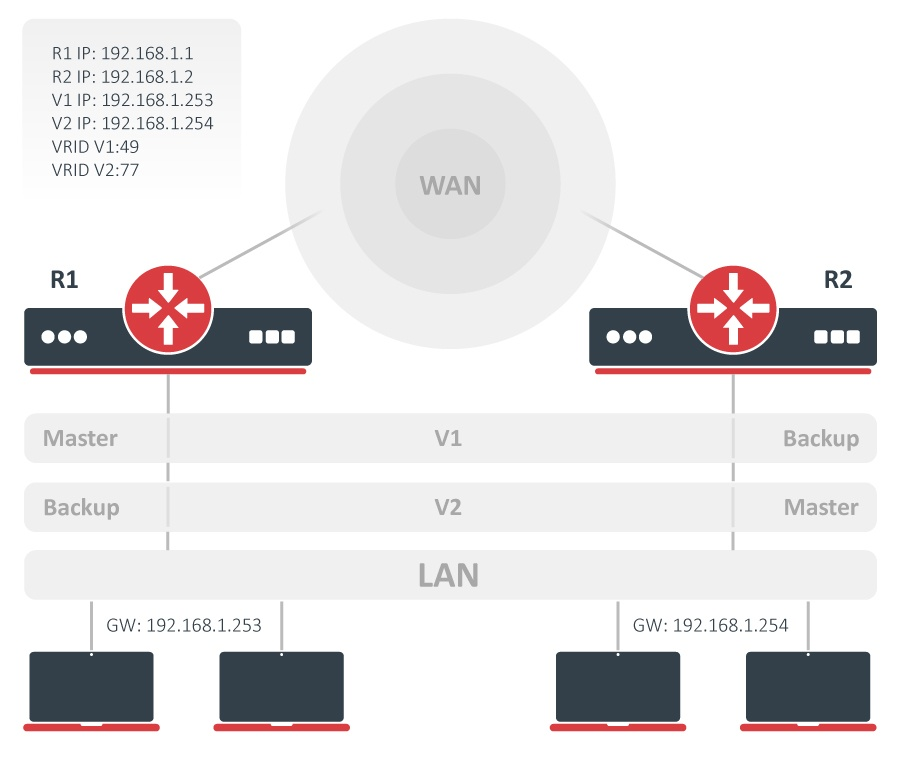
In V1, R1 is the master and R2 is the backup. In V2, the roles are reversed. If one router fails, the other takes over both virtual addresses. Each host uses one of the two addresses as its default gateway: some hosts use 192.168.1.253, the others use 192.168.1.254.
R1 configuration
/ip/address/add address=192.168.1.1/24 interface=ether5
/interface/vrrp/add name=vrrp1 interface=ether5 vrid=49 priority=254
/interface/vrrp/add name=vrrp2 interface=ether5 vrid=77
/ip/address/add address=192.168.1.253/32 interface=vrrp1
/ip/address/add address=192.168.1.254/32 interface=vrrp2
R2 configuration
/ip/address/add address=192.168.1.2/24 interface=ether5
/interface/vrrp/add name=vrrp1 interface=ether5 vrid=49
/interface/vrrp/add name=vrrp2 interface=ether5 vrid=77 priority=254
/ip/address/add address=192.168.1.253/32 interface=vrrp1
/ip/address/add address=192.168.1.254/32 interface=vrrp2
Both virtual addresses are configured on both routers. The priorities give R1 the master role for VRID 49 and R2 the master role for VRID 77.
Check the result
On R1:
/interface/vrrp/print
Flags: R - RUNNING; M - MASTER, B - BACKUP
Columns: NAME, INTERFACE, MAC-ADDRESS, VRID, PRIORITY, INTERVAL, VERSION,
         V3-PROTOCOL, SYNC-CONNECTION-TRACKING
#    NAME   INTERFACE  MAC-ADDRESS        VRID  PRIORITY  IN  V  V3-P  SY
0 RM vrrp1  ether5     00:00:5E:00:01:31    49       254  1s  3  ipv4  no
1  B vrrp2  ether5     00:00:5E:00:01:4D    77       100  1s  3  ipv4  no
On R2:
/interface/vrrp/print
Flags: R - RUNNING; M - MASTER, B - BACKUP
Columns: NAME, INTERFACE, MAC-ADDRESS, VRID, PRIORITY, INTERVAL, VERSION,
         V3-PROTOCOL, SYNC-CONNECTION-TRACKING
#    NAME   INTERFACE  MAC-ADDRESS        VRID  PRIORITY  IN  V  V3-P  SY
0  B vrrp1  ether5     00:00:5E:00:01:31    49       100  1s  3  ipv4  no
1 RM vrrp2  ether5     00:00:5E:00:01:4D    77       254  1s  3  ipv4  no
Traffic to 192.168.1.253 uses R1 and traffic to 192.168.1.254 uses R2 while both routers are available.
VRRP without preemption
A router with a higher priority takes over when it becomes available. This is not always wanted, for example when the current master should keep the role until it fails. Disable preemption on the VRRP interfaces:
/interface/vrrp/set [find] preemption-mode=no
Run the command on both routers, so the behavior does not depend on which router is master. The command changes every VRRP interface on the router.
With the basic setup, R1 starts as master and R2 as backup. Disable the VRRP interface on R1
(/interface/vrrp/disable [find name=vrrp1]); R2 becomes master. Enable it again
(/interface/vrrp/enable [find name=vrrp1]); R1 returns as backup, and R2 keeps the master role even
though R1 has the higher priority:
On R1:
/interface/vrrp/print
Flags: B - BACKUP
Columns: NAME, INTERFACE, MAC-ADDRESS, VRID, PRIORITY, INTERVAL, VERSION,
         V3-PROTOCOL, SYNC-CONNECTION-TRACKING
#   NAME   INTERFACE  MAC-ADDRESS        VRID  PRIORITY  IN  V  V3-P  SY
0 B vrrp1  ether5     00:00:5E:00:01:31    49       254  1s  3  ipv4  no
On R2:
/interface/vrrp/print
Flags: R - RUNNING; M - MASTER
Columns: NAME, INTERFACE, MAC-ADDRESS, VRID, PRIORITY, INTERVAL, VERSION,
         V3-PROTOCOL, SYNC-CONNECTION-TRACKING
#    NAME   INTERFACE  MAC-ADDRESS        VRID  PRIORITY  IN  V  V3-P  SY
0 RM vrrp1  ether5     00:00:5E:00:01:31    49       100  1s  3  ipv4  no