SFQ
CLI reference:/queue/type
Stochastic Fairness Queuing (SFQ) sorts packets into flows and lets the flows take turns. One flow that sends much data does not take the whole rate from the other flows.
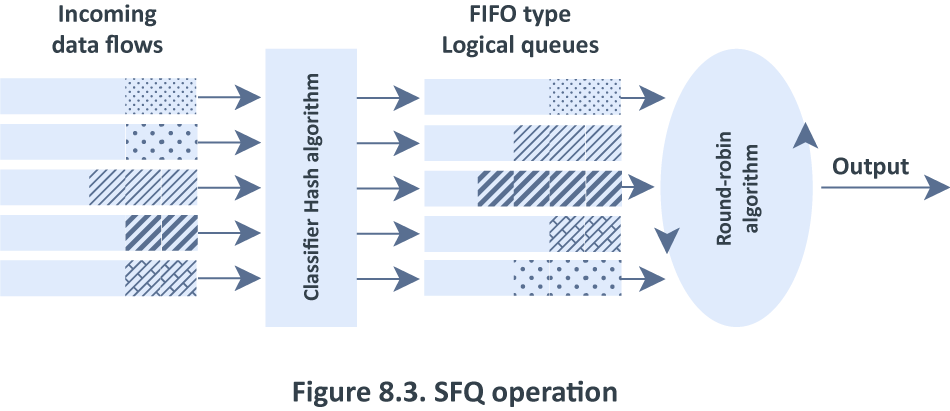
SFQ identifies a flow by the source address, the destination address and the ports. It has no rate limit of its own and no setting for the rate of a flow. To give each device its own rate limit, use PCQ.
SFQ has two settings:
sfq-allot- the number of bytes that a flow sends in one turn. The default is 1514.sfq-perturb- the time in seconds after which SFQ changes how it sorts packets into flows. The default is 5.
An SFQ queue holds up to 127 packets for all flows together.
The default queue types wireless-default and hotspot-default are SFQ types.
Use SFQ on a rate limit
This example creates an SFQ queue type and uses it for a rate limit on the whole LAN.
Simple queues do not limit FastTracked connections, and the default configuration has a FastTrack rule for established connections. The first two lines of the example disable this rule. See Simple queue for other ways to take traffic off FastTrack.
/ip/firewall/filter
disable [find action=fasttrack-]
/queue/type
add name=sfq-wan kind=sfq
/queue/simple
add name=lan target=192.168.88.0/24 max-limit=20M/100M \
queue=sfq-wan/sfq-wan
Check that the queue counts the traffic of the LAN:
/queue/simple/print bytes where name=lan
Columns: NAME, TARGET, BYTES, TOTAL-BYTES
# NAME  TARGET           BYTES          TOTAL-BYTES
0 lan   192.168.88.0/24  712596/703484            0
Read more
- Queue types - all kinds and the default queue types.
/queue/typeCLI reference - all properties.