Mangle
CLI reference:/ip/firewall/mangle
Mangle is a kind of 'marker' that marks packets for future processing with special marks. Many other facilities in RouterOS make use of these marks, e.g. queue trees, NAT, routing. They identify a packet based on its mark and process it accordingly. The mangle marks exist only within the router, and they are not transmitted across the network.
Additionally, the mangle facility is used to modify some fields in the IP header, like TOS (DSCP) and TTL fields.
Firewall mangle rules consist of five predefined chains that cannot be deleted:
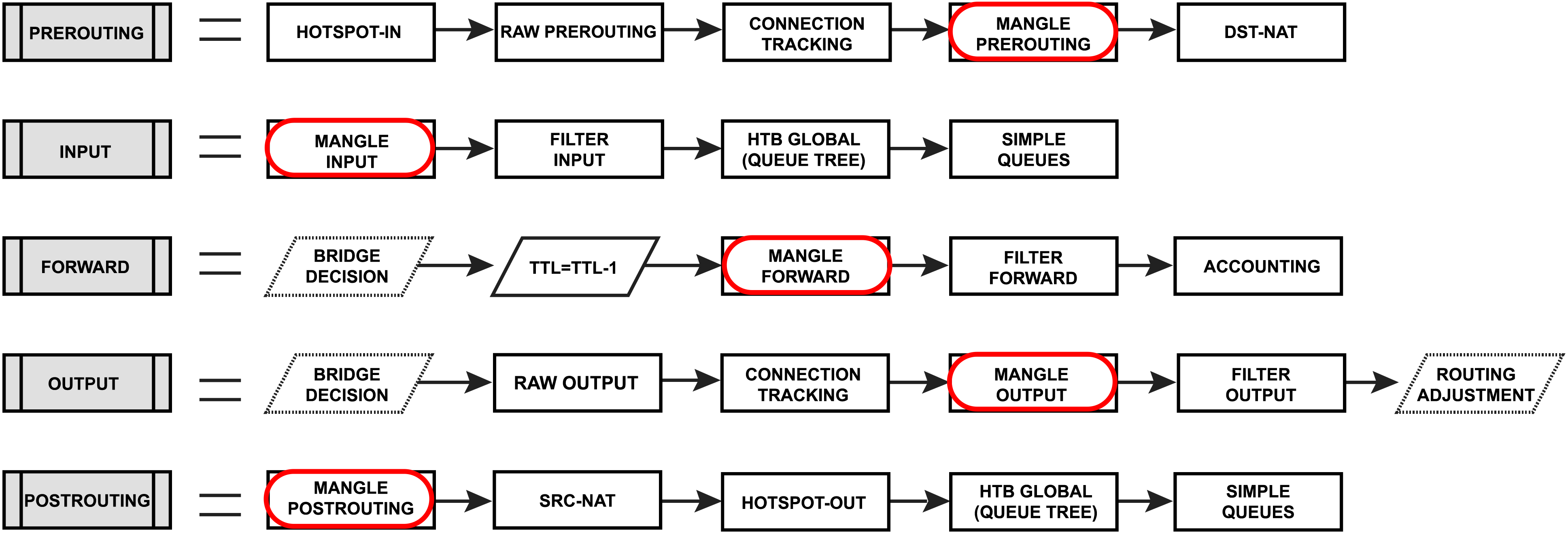
- The PREROUTING chain: Rules in this chain apply to packets as they just arrive on the network interface.
- The INPUT chain: Rules in this chain apply to packets just before they’re given to a local process.
- The OUTPUT chain: The rules here apply to packets just after they’ve been produced by a process.
- The FORWARD chain: The rules here apply to any packets that are routed through the current host.
- The POSTROUTING chain: The rules in this chain apply to packets as they just leave the network interface.
Configuration example
Change MSS
It is a known fact that VPN links have a smaller packet size due to encapsulation overhead. A large packet with MSS that exceeds the MSS of the VPN link should be fragmented before being sent via that kind of connection. However, if the packet has a Don't Fragment flag set, it cannot be fragmented and should be discarded. On links that have broken path MTU discovery (PMTUD), this may lead to a number of problems, including problems with FTP and HTTP data transfer and e-mail services.
In the case of a link with broken PMTUD, a decrease of the MSS of the packets coming through the VPN link resolves the problem. The following example demonstrates how to decrease the MSS value via mangle:
/ip/firewall/mangle/add out-interface=pppoe-out protocol=tcp tcp-flags=syn action=change-mss new-mss=1300 chain=forward tcp-mss=1301-65535
Marking Connections
Sometimes it is necessary to perform some actions on the packets belonging to a specific connection (for example, to mark packets from/to specific host for queues), but inspecting each packet's IP header is quite an expensive task. We can use connection marks to optimize the setup a bit.
/ip/firewall/mangle
add chain=forward in-interface=local src-address=192.168.88.123 connection-state=new action=mark- new-connection-mark=client_conn
add chain=forward connection-mark=client_conn action=mark-packet new-packet-mark=client_p
Warning: Packet marks are limited to a maximum of 4096 unique entries. Exceeding this limit will cause an error "bad new packet mark".