CSS106 (RB260) series Manual
Features
| Features | Description |
|---|---|
| Forwarding | Full non-blocking wirespeed switching Up to 2k MAC entries in the Host table Forwarding Database works based on SVL or IVL Port Isolation Port Lock Jumbo frame support - 9198 bytes |
| Spanning Tree Protocol | RSTP support |
| Multicast Forwarding | IGMP Snooping support |
| Mirroring | Port-based mirroring |
| VLAN | Fully compatible with IEEE802. Port-based VLAN VLAN filtering |
| Quality of Service (QoS) | Ingress traffic limiting (by ACL) Egress traffic limiting |
| Access Control List | Ingress ACL tables Up to 32 ACL rules (limited by SwOS) Classification based on ports, L2, L3, L4 protocol header fields ACL actions include filtering, forwarding, and modifying the protocol header fields |
Connecting to the switch
Open your web browser and enter the IP address of your switch (192.168.88.1 by default) and a login screen will appear. The switch can also run a DHCP client, see if a different IP address has been assigned by the DHCP server.
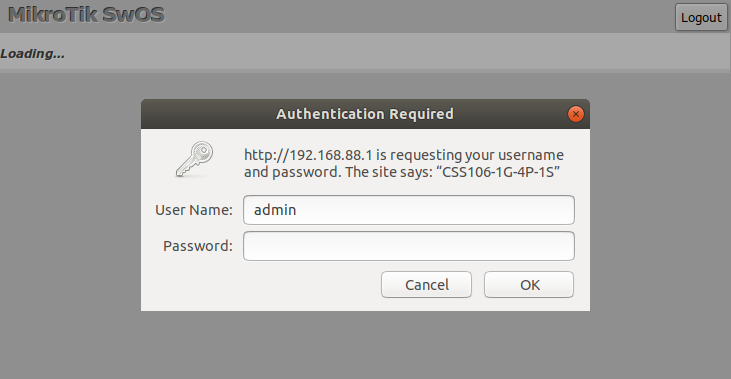
SwOS default IP address: 192.168.88.1, user name: admin and there is no password.
MikroTik Neighbor Discovery can be used to discover the IP address of the Mikrotik switch. LLDP is not supported.
Interface Overview
SwOS interface menu consists of several tabs: Link, SFP, Forwarding, RST, Statistics, Errors, VLAN, VLANs, Hosts, IGMP Groups, SNMP, ACL, System and Upgrade.
Description of buttons in SwOS configuration tool:
- Append - add a new item to the end of the list
- Apply All - applies current configuration changes
- Cut - removes an item from the list
- Clear - reset properties of the item
- Discard Changes - removes unsaved configuration
- Insert - add a new item to the list (places it before current item)
- Sort - sort VLAN table by VLAN-IDs; sort host table by MAC addresses
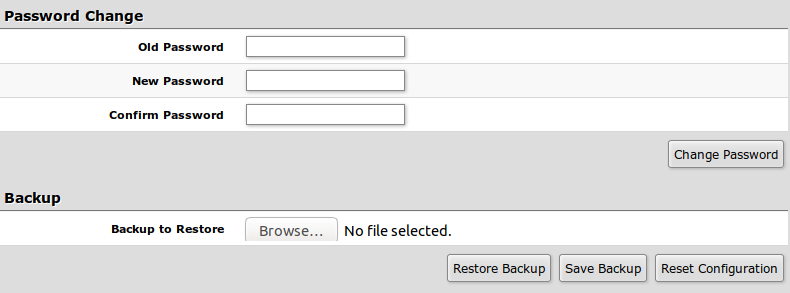
- Change Password - changes the password of the switch
- Logout - logout from the current switch
- Reboot - reboot the switch
- Reset Configuration - reset configuration back to factory defaults
- Choose File - browse for upgrade or backup file
- Upgrade - upgrade the firmware of the switch using the selected file
- Download & Upgrade - automatically try to download and upgrade the firmware, the PC which is running a web browser should be able to access the Internet
- Restore Backup - restore switch using a selected backup file
- Save Backup - generate and download backup file from the switch
Note: Each RouterBOARD switch series have their own firmware which cannot be installed on other series models! CSS106-5G-1S (RB260GS) and CSS106-1G-4P-1S (RB260GSP) supports SwOS v2.0 and newer. When upgrading the device, it will first load primary firmware and then make an upgrade. In case a wrong firmware file is chosen, the device will continue to operate with primary firmware and you will be able to choose the correct file.
System
System Tab performs the following functions:
- General information about switch
- Switch management
- Configuration reset
- Backup and restore configuration
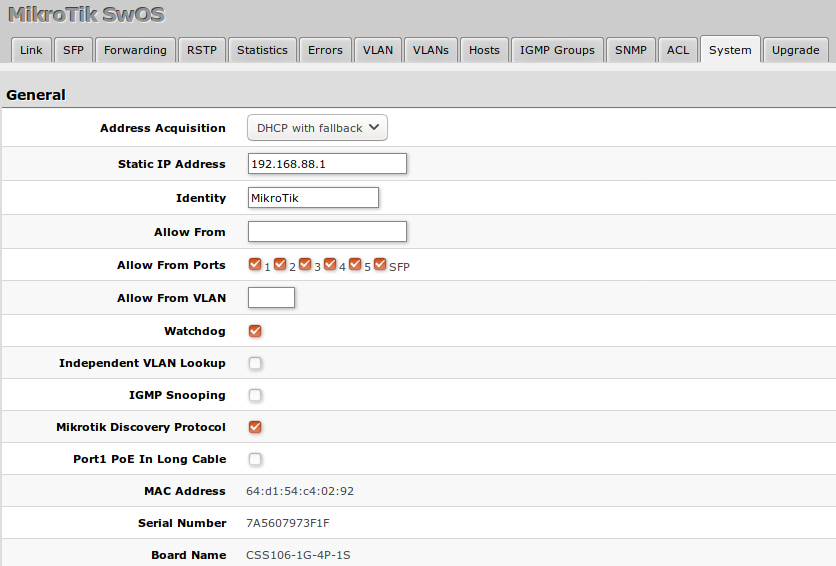
Note: SwOS uses a simple algorithm to ensure TCP/IP communication - it just replies to the same IP and MAC address packet came from. This way there is no need for Default Gateway on the device itself.
| Property | Description |
|---|---|
| Address Acquisition | Specify which address acquisition method to use:DHCP with fallback - switch is trying to request an IPv4 address from a DHCP server. If the requests are unsuccessful, then the switch can be accessed using a Static IP Address valuestatic - address is set as a Static IP Address value (IPv4 only)DHCP only - switch uses DHCPv4 client to acquire address |
| Static IP Address | IP address of the switch in case of Address Acquisition is set as DHCP with fallback or static |
| Identity | Name of the switch (for Mikrotik neighbor discovery protocol) |
| Allow From | IP address or network from which the switch is accessible. Default value is 0.0.0.0/0 - any address. |
| Allow From Ports | List of switch ports from which the service is accessible |
| Allow From VLAN | VLAN ID from which the service is accessible. Make sure to first configure VLANs and VLAN pages |
| Watchdog | Enable or disable system watchdog. It will reset CPU of the switch in case of fault condition |
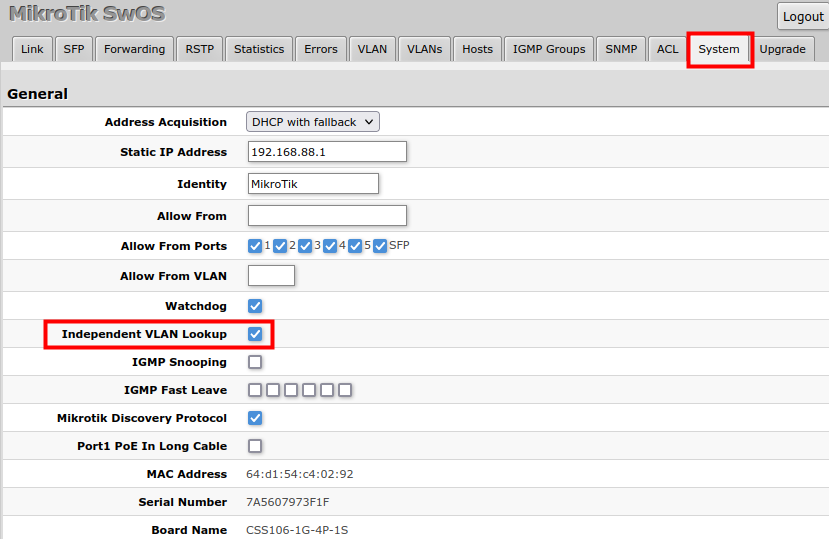
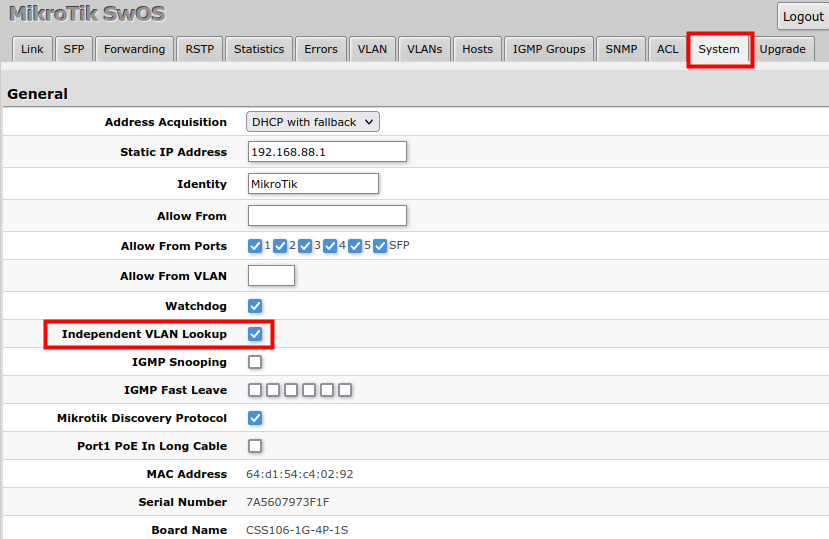
| Independent VLAN Lookup | Enable or disable independent VLAN lookup in the Host table for packet forwarding |
| IGMP Snooping | Enable or disable IGMP Snooping |
| IGMP Fast Leave | Enables or disables IGMP fast leave feature on the switch port. This property only has an effect when IGMP Snooping is enabled |
| Mikrotik Discovery Protocol | Enable or disable Mikrotik neighbor discovery protocol |
| Port1 PoE In Long Cable | If enabled, it will turn off short detection on all PoE out ports to allow the use of longer ethernet cables. This is potentially dangerous setting and should be used with caution. (CSS106-1G-4P-1S model) |
| MAC Address | MAC address of the switch (read-only) |
| Serial Number | Serial number of the switch (read-only) |
| Board Name | MikroTik model name (read-only) |
| Voltage | Shows the input voltage measured in volts (read-only, CSS106-1G-4P-1S model) |
| Temperature | Shows PCB temperature in celsius temperature scale (read-only, CSS106-1G-4P-1S model) |
Password and Backup
Link
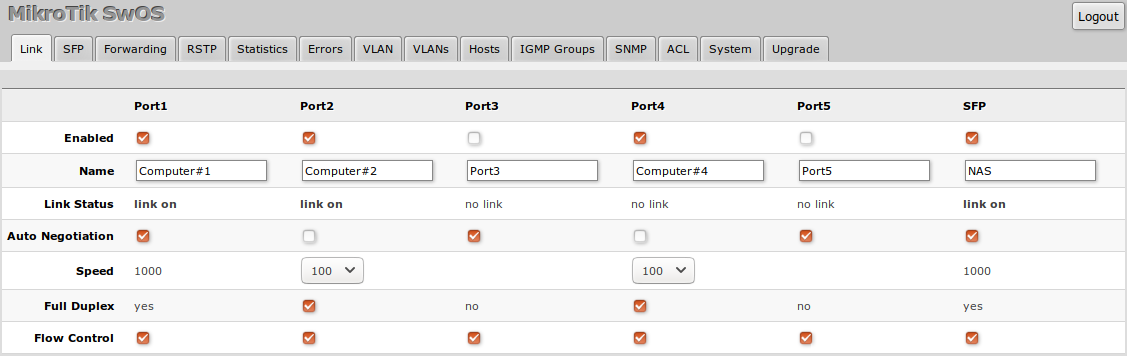
Link Tab allows you to:
- Configure Ethernet and SFP ports
- Monitor status of Ethernet and SFP ports
| Property | Description |
|---|---|
| Enabled | Enable or disable port |
| Name | Editable port name |
| Link Status | Current link status (read-only) |
| Auto Negotiation | Enable or disable auto-negotiation (some SFP modules may require it disabled in order to work) |
| Speed | Specify speed setting of the port (requires auto-negotiation to be disabled) |
| Full Duplex | Specify the duplex mode of the port (requires auto-negotiation to be disabled) |
| Flow control | Enable or disable 802.3x Flow control |
Note: Using SFP+ 1m/3m DAC cable or S-RJ01 module, the device always shows that the link is established even if nothing is connected on another end.
The switch supports Jumbo frames up to 9198 bytes. Manually decreasing the MTU settings is not supported for SwOS devices.
PoE
PoE settings change Power over Ethernet output on CSS106-1G-4P-1S port2-port5 and show PoE status and measurements.
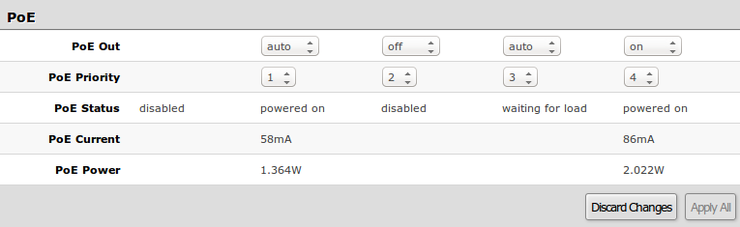
| Property | Description |
|---|---|
| PoE Out | Sets PoE out mode of the port:off - all detection and PoE out is turned offauto - detection is done regarding resistance on the spare pairs to check if the port has PoE capability. For a port to be turned on measured value should be within a range from 3kΩ to 26.5kΩon - PoE out is enabled regardless of the resistance on the port. Use this with caution as that can damage connected equipment!calibr - manual port PoE out recalibration. It may be necessary if there are occasional problems with powering connected devices. |
| PoE Priority | Port priority for PoE out supply. If the installation is going over available power budget, the port with the lowest priority is going to be turned off first. 1 - the highest priority port; 4 - the lowest priority port |
| PoE Status | Current PoE out status of the port:disabled - PoE out is turned offwaiting for load - auto mode detects out of range resistance to turn on PoE outpowered on - PoE out is turned onshort circuit - if it is detected, PoE out is turned off to ensure that there is no additional damage on the powered device and no damage on powering devicevoltage too low - not enough voltage supplied to turn on the device with PoE outcurrent too low - not enough current supplied to turn on the device with PoE outwaiting for cable disconnect - manual recalibration with calibr has detected connected device and waits for disconnection to complete the recalibration process |
| PoE Current | Shows current usage on the port measured in milliamperes |
| PoE Power | Shows PoE out power on the port measured in watts |
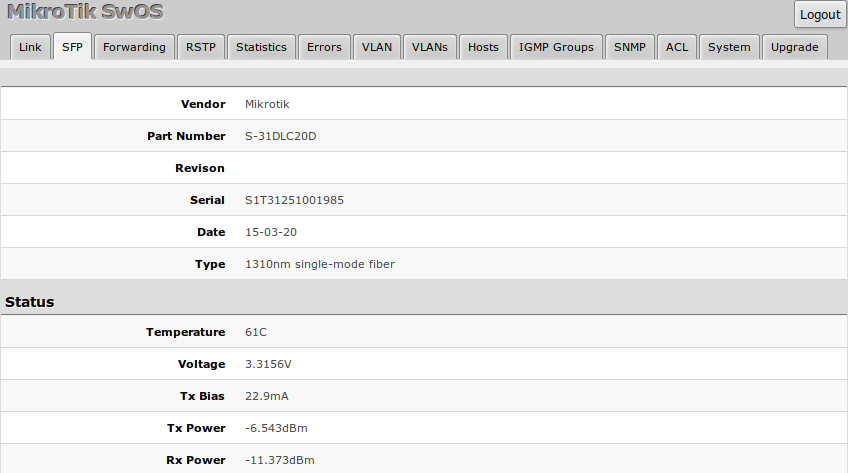
SFP
The SFP tab allows you to monitor the status of SFP modules.
Forwarding
Forwarding Tab provides advanced forwarding options among switch ports, port isolation, port locking, port mirroring and egress bandwidth limit features. Ingress rate per port and rate for broadcast traffic can be configured with Access Control List by setting Rate. ACL must have one port per entry to provide bandwidth limiting properly.
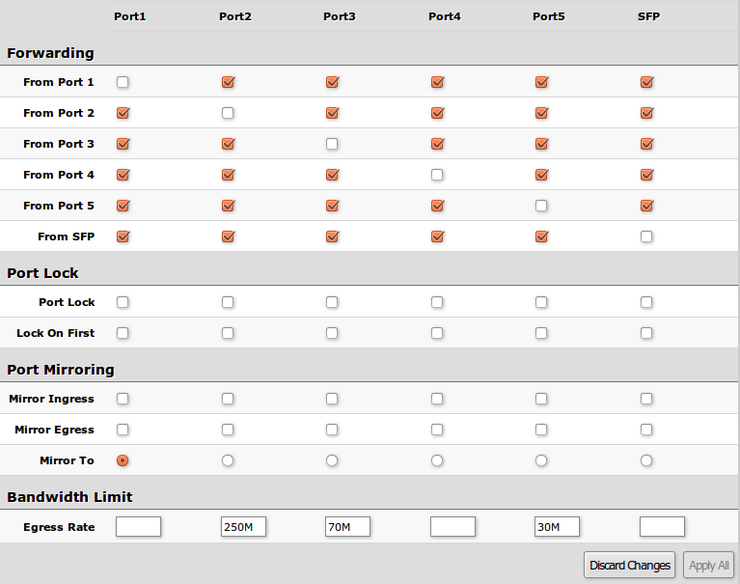
| Property | Description |
|---|---|
| Forwarding | Forwarding table - allows or restricts traffic flow between specific ports |
| Port Lock | Port Lock - Enables or disables MAC address learning on this port. When the option is enabled, it will restrict MAC address learning and static MAC addresses should be configuredLock On First - enable or disable MAC address learning on this port (MAC address from the first received packet will still be learned) |
| Port Mirroring | Mirror Ingress - whether traffic entering this port must be copied and forwarded to the mirroring target portMirror Egress - whether traffic leaving this port must be copied and forwarded to the mirroring target portMirror To - mirroring target port |
| Bandwidth Limit | Egress Rate - limit traffic leaving this port (bps) |
RSTP
Per-port and global RSTP configuration and monitoring are available in the RSTP menu.
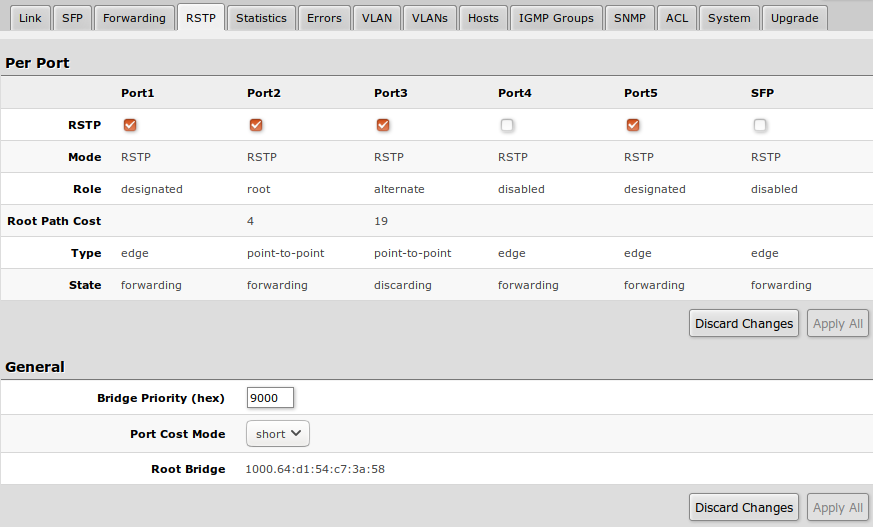
| Property | Description |
|---|---|
| RSTP | Enable or disable STP/RSTP functionality on this port |
| Mode | Shows STP/RSTP functionality mode on a specific port (read-only):RSTPSTP |
| Role | Shows specific port role (read-only):root - port that is facing towards the root bridge and will be used to forward traffic from/to the root bridgealternate - port that is facing towards root bridge, but is not going to forward traffic (a backup for root port)backup - port that is facing away from the root bridge, but is not going to forward traffic (a backup for non-root port)designated - port that is facing away from the root bridge and is going to forward trafficdisabled - port that is not strictly part of STP (RSTP functionality is disabled) |
| Root Path Cost | Shows root path cost for ports that are facing root bridge (read-only) |
| Type | edge - ports that are not supposed to receive any BPDUs, should be connected to end station (read-only)point-to-point - ports that operate in full-duplex links, can be part of STP and operate in forwarding state (read-only) |
| State | Shows each port state (read-only):forwarding - port participates in traffic forwarding and is learning MAC addresses, is receiving BPDUsdiscarding - port does not participate in traffic forwarding and is not learning MAC addresses, is receiving BPDUlearning - port does not participate in traffic forwarding, but is learning MAC addresses |
| Bridge Priority (hex) | RSTP bridge priority for Root Bridge selection |
| Port Cost Mode | There are two methods for automatically detecting RSTP port cost depending on link speed.short: 10G - 2; 1G - 4; 100M - 10; 10M - 100long: 10G - 2000; 1G - 20000; 100M - 200000; 10M - 2000000 |
| Forward Reserved Multicast | Whether to forward IEEE reserved multicast MAC address that are in the 01:80:C2:00:00:0x range. Switches compliant with R/M/STP standards should refrain from forwarding these packets. If you enable this setting, SwOS will forward reserved multicast MAC packets and disable RSTP: - the switch will not process incoming BPDUs (Bridge Protocol Data Units) - it will also not send its own BPDUs - Bridge Priority and per-port RSTP configuration settings will no longer have any effect. Enabling forwarding of reserved MAC addresses may affect certain protocols relying on these addresses. It is advisable to enable forwarding only when absolutely necessary, such as in transparent bridging setups (e.g., extending long links, using bridge as media converters, or conducting network analysis). Notable MAC addresses and protocol examples (used by RouterOS): 01:80:C2:00:00:00 - Spanning Tree Protocol (STP)01:80:C2:00:00:01 - Ethernet Flow Control01:80:C2:00:00:02 - Link Aggregation Control Protocol (LACP)01:80:C2:00:00:03 - Dot1x client and server01:80:C2:00:00:08 - Spanning Tree Protocol (for 802.1ad bridges, using ether-type=0x88a8)01:80:C2:00:00:0D - Multiple VLAN Registration Protocol (for 802.1ad bridges, using ether-type=0x88a8)01:80:C2:00:00:0E - Link Layer Discovery Protocol, Multi-chassis Link Aggregation Group and Precision Time ProtocolThe Flow Control MAC address 01:80:C2:00:00:01 is an exception — it does not get forwarded by SwOS. |
| Root Bridge | The priority and MAC address of the selected Root Bridge in the network (read-only) |
Statistics, Errors
Provides detailed information about received and transmitted packets.
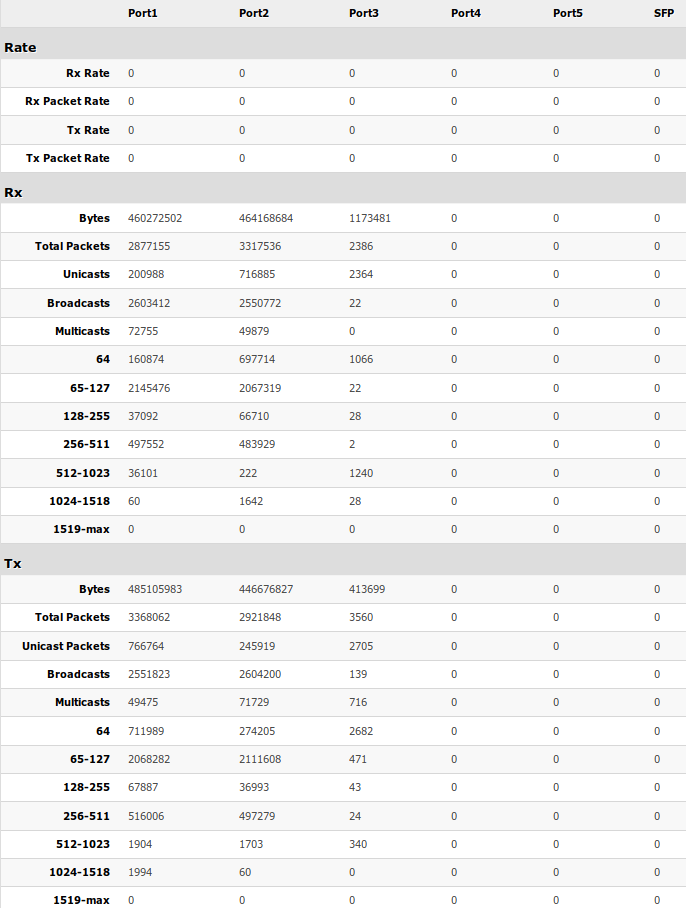

VLAN and VLANs
VLAN configuration for switch ports.
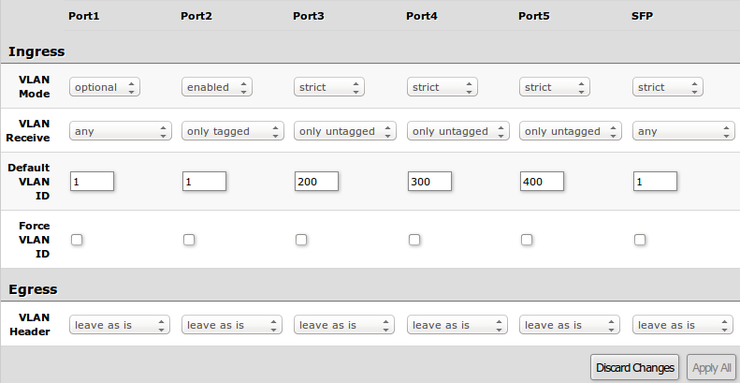
| Property | Description |
|---|---|
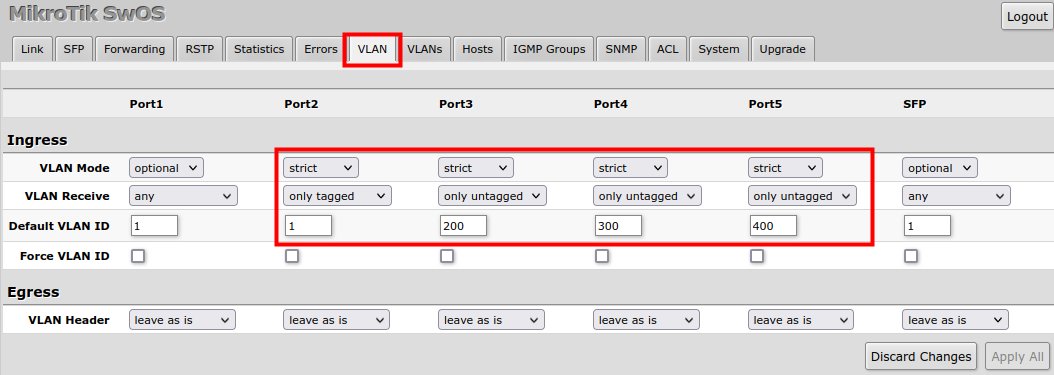
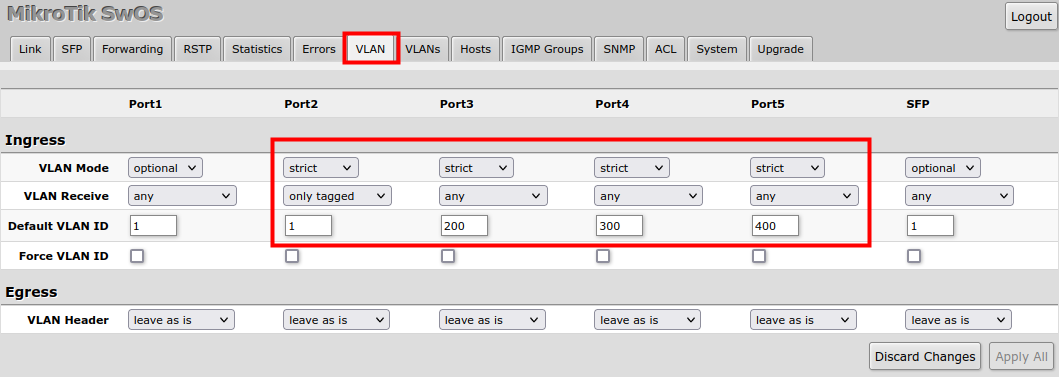
| VLAN Mode | VLAN mode for ingress port:disabled - VLAN table is not used; switch ignores VLAN tag part of tagged packetsoptional - Handle packets with VLAN tag ID that is not present in VLAN table just like packets without VLAN tagenabled - Drop packets with VLAN tag ID that is not present in VLAN table. Packets without VLAN tag are treated as tagged packets with Default VLAN IDstrict - Same as enabled, but also checks VLAN support for inbound interface (drop packets with VLAN tag ID and ingress port that are not present in VLAN table) |
| VLAN Receive | Defines the type of allowed packets on ingress port:any - allows tagged and untagged packets on a certain portonly tagged - allows only packets with a VLAN tagonly untagged - allows only packets without a VLAN tag |
| Default VLAN ID | The switch will treat both untagged and "Default VLAN ID" tagged ingress packets as they are tagged with this VLAN ID. It is also used to untag egress traffic if the packet's VLAN ID matches "Default VLAN ID". The VLAN tag itself will only be added if there is VLAN Header = add if missing specified on the egress port |
| Force VLAN ID | Whether to apply Default VLAN ID to incoming packets with VLAN tag |
| VLAN Header | leave as is - if VLAN header is present it remains unchangedalways strip - if VLAN header is present it is removed from the packetadd if missing - if VLAN header is not present it is added to the packet (VLAN ID will be Default VLAN ID of ingress port) |
Note: CSS106 devices running SwOS version 2.12 can filter RSTP BPDU packets when enabling VLAN filtering on ports (VLAN Mode enabled or strict). With SwOS version 2.13, it is recommended to set VLAN Receive to any on trunk ports.
Note: VLAN modes
enabledandstrictrequire VLAN ID 1 in the VLANs table to allow access of untagged traffic to the switch itself.
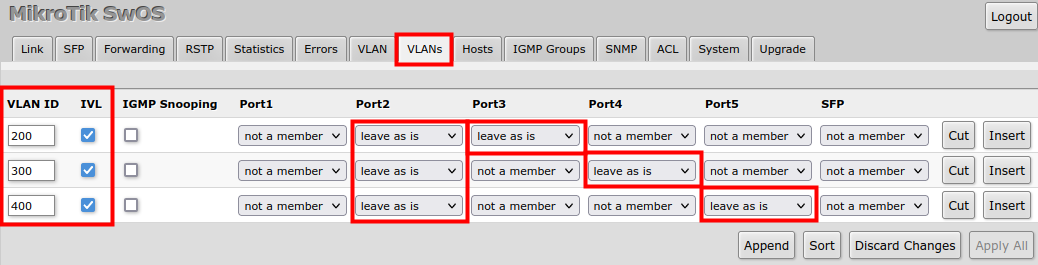
VLAN table specifies forwarding rules for packets that have an IEEE 802.1Q tag. Basically, the table contains entries that map specific VLAN tag IDs to a group of one or more ports. Packets with VLAN tags leave the switch through one or more ports that are set in the corresponding table entry. VLAN table works together with destination MAC lookup to determine egress ports. VLAN table supports up to 250 entries.
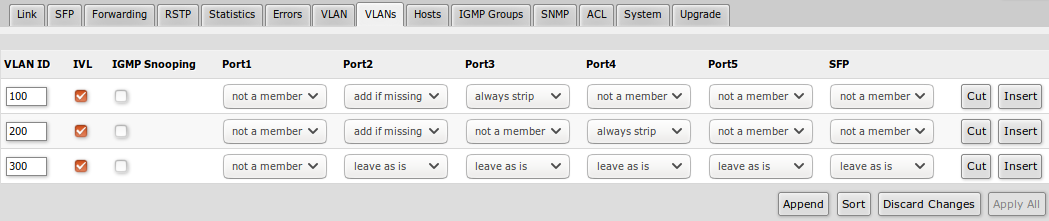
| Property | Description |
|---|---|
| VLAN ID | VLAN ID of the packet |
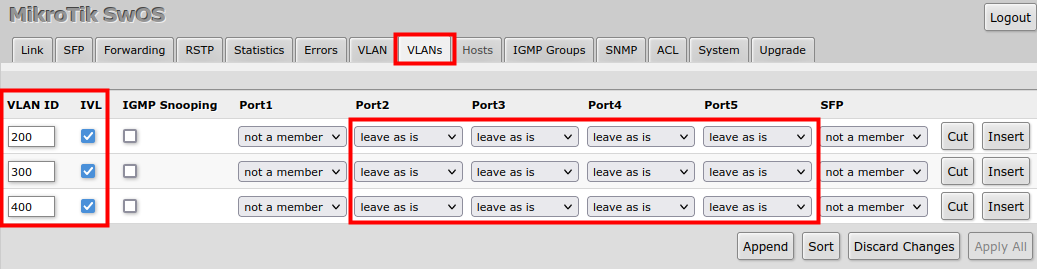
| IVL | Enables or disables independent VLAN learning (IVL) |
| IGMP Snooping | Enables or disables IGMP Snooping on the defined VLAN. When enabled, the switch will listen to IGMP Join and Leave requests from the defined VLAN and only forward traffic to ports which have sent IGMP membership requests from the defined VLAN. When disabled, the switch will flood all VLAN member ports with Multicast traffic. |
| Ports | Each port has individual VLAN header options for each VLAN ID. Depending on VLAN mode, if lookup is done in this table, the egress action of packets is processed by this option. The egress option from the VLAN tab is ignored. |
VLAN Configuration Examples
Trunk and Access Ports
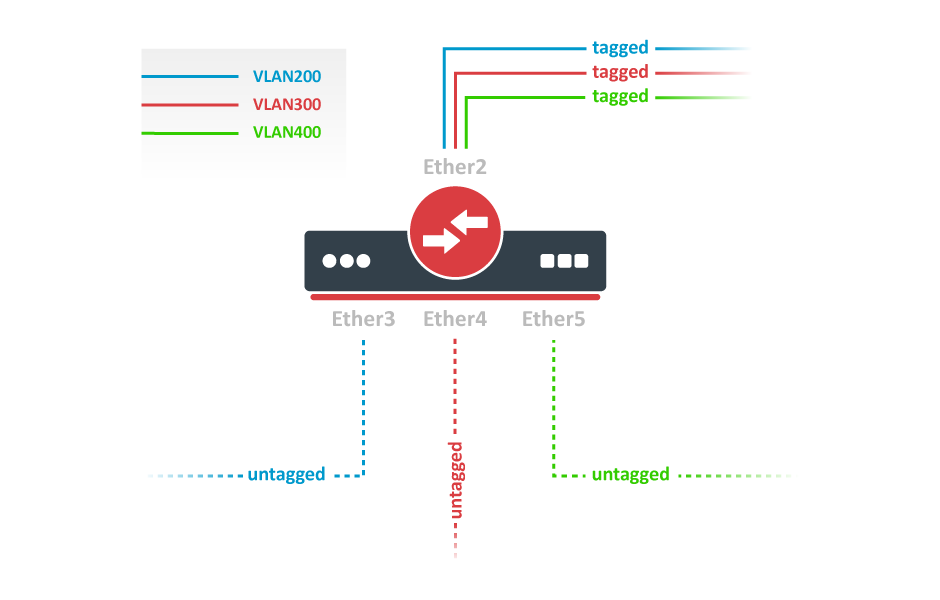
- In the System menu enable independent VLAN learning (IVL).
- In the VLANs menu add VLAN entries, specify port membership, and enable IVL. The default "leave as is" port setting can be used; the tagging and untagging behavior can be changed with the "Default VLAN ID" setting, see the next step.
- In the VLAN menu configure Default VLAN ID on planned access ports (untagged), select the correct VLAN Receive setting (Port2 only tagged, Port3-5 only untagged), and enable strict VLAN filtering to ensure only allowed VLANs can pass through the ports.
Note: CSS106 devices running SwOS version 2.12 can filter RSTP BPDU packets when enabling VLAN filtering on ports (VLAN Mode enabled or strict). With SwOS version 2.13, it is recommended to set VLAN Receive to any on trunk ports.
Trunk and Hybrid Ports
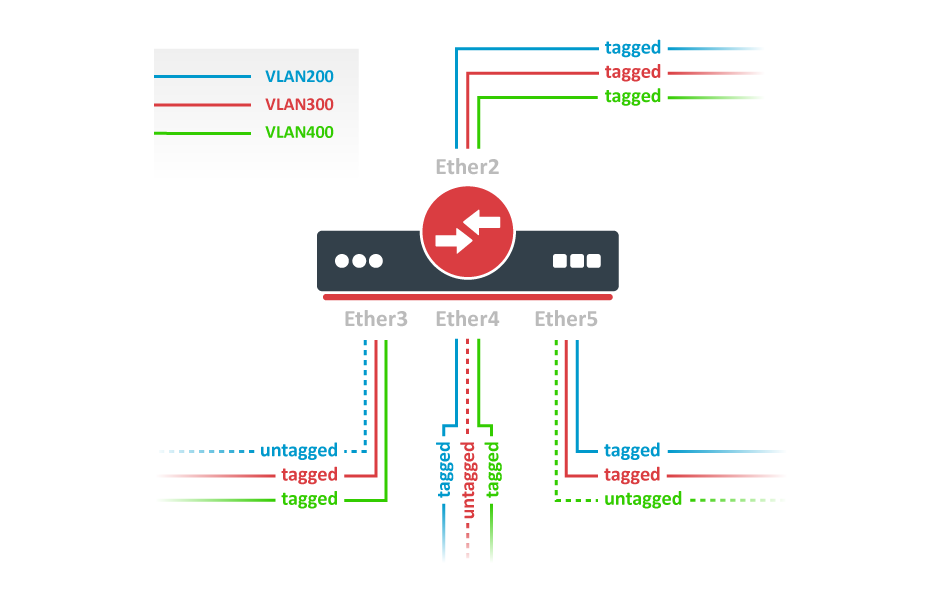
- In the System menu enable independent VLAN learning (IVL).
- In the VLANs menu add VLAN entries, specify port membership, and enable IVL. The default "leave as is" port setting can be used; the tagging and untagging behavior can be changed with the "Default VLAN ID" setting, see the next step.
- In the VLAN menu configure Default VLAN ID on planned hybrid ports (for untagged VLAN), select the correct VLAN Receive setting (Port2 only tagged, Port3-5 any), and enable strict VLAN filtering to ensure only allowed VLANs can pass through the ports.
Note: CSS106 devices running SwOS version 2.12 can filter RSTP BPDU packets when enabling VLAN filtering on ports (VLAN Mode enabled or strict). With SwOS version 2.13, it is recommended to set VLAN Receive to any on trunk ports.
Management Access
In this example, switch management access on VLAN 200 will be created. The configuration scheme is the same as "Trunk and Access Ports" and steps 1., 2., 3. are identical. The additional 4th step requires specifying the management VLAN ID in the System menu. After applying the configuration, the switch will only respond to tagged VLAN 200 packets on Port2 and untagged packets on Port3. The DHCP client will also work in the specified VLAN ID.
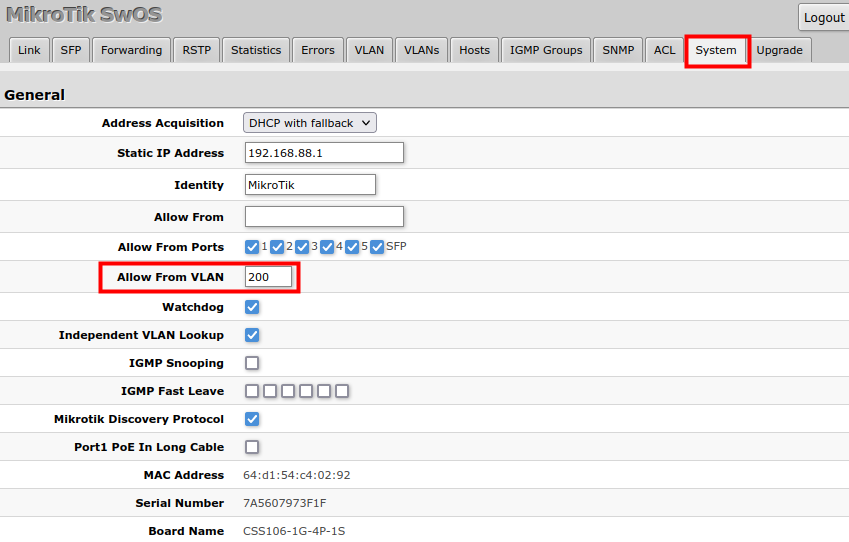
Warning: Changing management VLAN can completely disable access to the switch management if VLAN settings are not correctly configured. Save a configuration backup before changing this setting and use Reset in case management access is lost.
Hosts
This table represents dynamically learned MAC address to port mapping entries. It can contain two kinds of entries: dynamic and static. Dynamic entries get added automatically — this is also called a learning process: when a switch receives a packet from a certain port, it adds the packet's source MAC address X and port it received the packet from to the host table, so when a packet comes in with destination MAC address X it knows to which port it should forward the packet. If the destination MAC address is not present in the host table then it forwards the packet to all ports in the group (flood). Dynamic entries take about 5 minutes to time out.
CSS106 series switches support 2048 host table entries.

| Property | Description |
|---|---|
| Port | Ports the packet should be forwarded to (read-only) |
| MAC | Learned MAC address (read-only) |
| VLAN ID | Learned VLAN ID (read-only) |
Static Hosts
Static entries will take over dynamic entries if a dynamic entry with the same MAC address already exists. Adding a static entry also provides access to additional functionality.
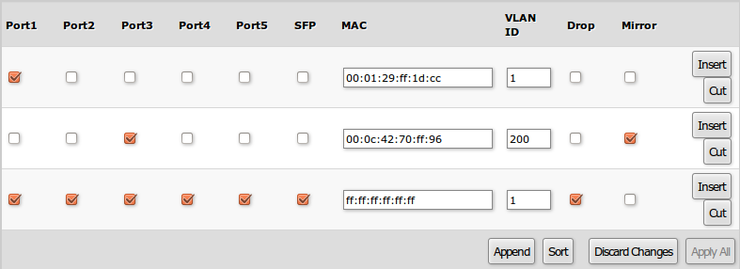
| Property | Description |
|---|---|
| Ports | Ports the packet should be forwarded to |
| MAC | MAC address |
| VLAN ID | VLAN ID |
| Drop | Packet with certain MAC address coming from certain ports can be dropped |
| Mirror | Packet can be cloned and sent to mirror-target port |
IGMP Groups
IGMP Snooping which controls multicast streams and prevents multicast flooding is implemented in SwOS starting from version 2.5. The feature allows a switch to listen in the IGMP conversation between hosts and routers.
First, enable the option under the System tab.
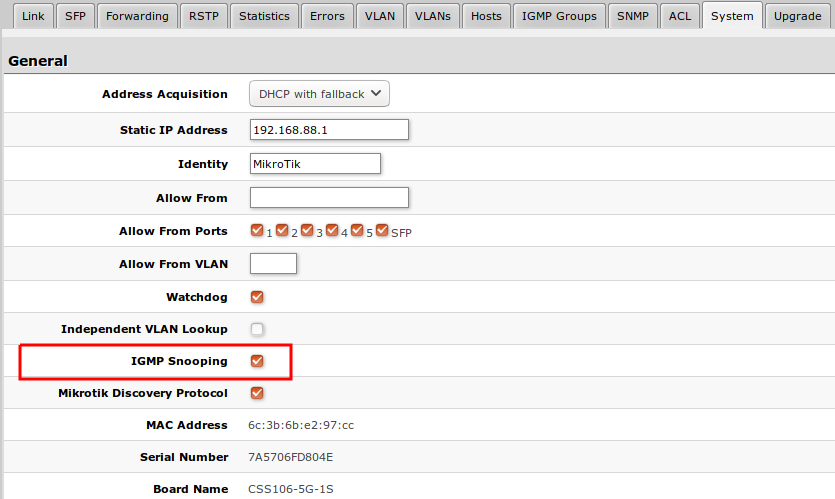
Available IGMP snooping data can be found under the IGMP Group tab.

Possibility to enable or disable IGMP Snooping for a specific VLAN ID.

SNMP
SwOS supports SNMP v1 and v2c (the Response for GetRequest, GetNextRequest and GetBulkRequest) and uses IF-MIB, SNMPv2-MIB, BRIDGE-MIB and MIKROTIK-MIB (only for health, PoE-out and SFP diagnostics). SNMP traps and writing SwOS configuration are not supported.
Available SNMP data:
- System information
- System uptime
- Port status
- Interface statistics
- Host table information

| Property | Description |
|---|---|
| Enabled | Enable or disable SNMP service |
| Community | SNMP community name |
| Contact Info | Contact information for the NMS |
| Location | Location information for the NMS |
ACL
An access control list (ACL) rule table is a very powerful tool allowing wire-speed packet filtering, forwarding, and VLAN tagging based on L2, L3, and L4 protocol header field conditions. SwOS allows you to implement a limited number of access control list rules (32 simple rules where only L2 conditions are used; 16 rules where both L2 and L3 conditions are used; or 8 advanced rules where all L2, L3, and L4 conditions are used). Each rule contains a conditions part and an action part.
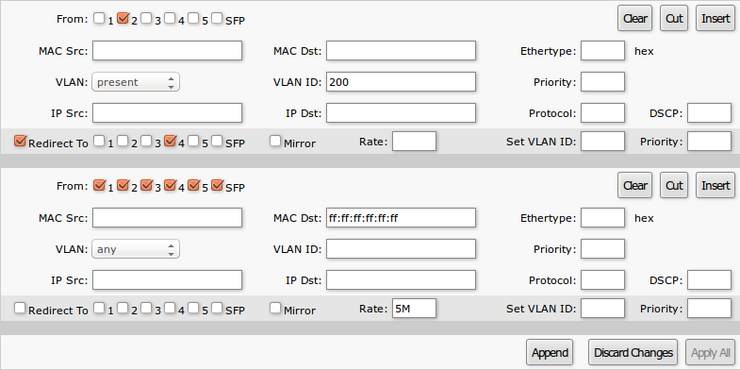
Conditions parameters
| Property | Description |
|---|---|
| From | The port that the packet came in from |
| MAC Src | Source MAC address and mask |
| MAC Dst | Destination MAC address and mask |
| Ethertype | Protocol encapsulated in the payload of an Ethernet Frame |
| VLAN | VLAN header presence: any / present / not present |
| VLAN ID | VLAN tag ID |
| Priority | Priority in VLAN tag |
| IP Src (IP/netmask:port) | Source IPv4 address, netmask, and L4 port number |
| IP Dst (IP/netmask:port) | Destination IPv4 address, netmask, and L4 port number |
| Protocol | IP protocol |
| DSCP | IP DSCP field |
Action parameters
| Property | Description |
|---|---|
| Redirect To | Whether to force new destination ports (if "Redirect To" is enabled and no ports are specified in "Redirect To Ports", a packet will be dropped) |
| Redirect To Ports | Redirect destination ports |
| Mirror | Clones packet and sends it to mirror-target port |
| Rate | Limits bandwidth (bps) |
| Set VLAN ID | Changes the VLAN tag ID, if VLAN tag is present |
| Priority | Changes the VLAN tag priority bits, if VLAN tag is present |
Reset
The CSS106-5G-1S and CSS106-1G-4P-1S have built-in backup SwOS firmware which can be loaded in case standard firmware breaks or upgrade fails:
- Holding the Reset button for a few seconds while the device is booting will reset the configuration and load backup firmware.
- After loading backup firmware, it is possible to connect to 192.168.88.1 (or a leased address from a DHCP server) using a web browser and install new SwOS firmware.