PPTP
Point-to-Point Tunneling Protocol (PPTP) is a legacy VPN protocol designed to encapsulate PPP traffic for remote access connections. PPTP is widely supported by many operating systems and network devices, making it simple to deploy and configure in environments where compatibility is a priority.
Due to multiple known cryptographic and protocol-level vulnerabilities, PPTP is not considered secure for protecting sensitive or untrusted network traffic. Its use is generally limited to compatibility scenarios, testing environments, or networks where encryption strength is not a primary requirement.
PPTP does not support IPv6 transport or IPv6 traffic forwarding.
PPTP uses TCP port 1723 for tunnel management and Generic Routing Encapsulation (GRE, IP protocol 47) for data transport, as assigned by the Internet Assigned Numbers Authority (IANA). For PPTP to operate correctly through firewalls or routers, TCP port 1723 and GRE traffic must be permitted and properly forwarded.
PPTP supports PPP authentication, encryption, and accounting mechanisms for each client session. Authentication and accounting can be performed locally or through an external RADIUS server.
PPTP Client
Properties
| Property | Description |
|---|---|
| add-default-route (yes | no; Default: no) | Whether to add PPTP remote address as a default route. |
| allow (mschap2 | mschap1 | chap | pap; Default: mschap2, mschap1, chap, pap) | Allowed authentication methods. |
| connect-to (IP; Default: ) | Remote address of the PPTP server |
| default-route-distance (byte [0..255]; Default: 1) | Sets the distance value applied to auto created default route, if add-default-route is also selected |
| dial-on-demand (yes | no; Default: no) | Connects to the PPTP server only when outbound traffic is generated. If selected, then route with gateway address from 10.112.112.0/24 network will be added while the connection is not established. |
| disabled (yes | no; Default: yes) | Whether the interface is disabled or not. By default it is disabled |
| keepalive-timeout (integer; Default: 60) | Sets keepalive timeout in seconds. |
| max-mru (integer; Default: 1450) | Maximum Receive Unit. Max packet size that the PPTP interface will be able to receive without packet fragmentation. |
| max-mtu (integer; Default: 1450) | Maximum Transmission Unit. Max packet size that the PPTP interface will be able to send without packet fragmentation. |
| mrru (disabled | integer; Default: disabled) | Maximum packet size that can be received on the link. If a packet is bigger than tunnel MTU, it will be split into multiple packets, allowing full size IP or Ethernet packets to be sent over the tunnel. |
| name (string; Default: ) | Descriptive name of the interface. |
| password (string; Default: "") sensitive | Password used for authentication. |
| profile (name; Default: default-encryption) | |
| user (string; Default: ) | User name used for authentication. |
PPTP Server
Sub-menu: /interface/pptp-server
An interface is created for each tunnel established to the given server. There are two types of interfaces in the PPTP server's configuration:
- Static interfaces are added administratively if there is a need to reference the particular interface name (in firewall rules or elsewhere) created for the particular user.
- Dynamic interfaces are added to this list automatically whenever a user is connected and their username does not match any existing static entry (or in case the entry is active already, as there can not be two separate tunnel interfaces referenced by the same name).
Dynamic interfaces appear when a user connects and disappear once the user disconnects, so it is impossible to reference the tunnel created for that user in router configuration (for example, in the firewall), so if you need persistent rules for that user, create a static entry for him/her. Otherwise, it is safe to use a dynamic configuration.
In both cases PPP users must be configured properly - static entries do not replace PPP configuration.
Properties
| Property | Description |
|---|---|
| authentication (pap | chap | mschap1 | mschap2; Default: mschap1,mschap2) | Authentication methods that server will accept. |
| default-profile (name; Default: default-encryption) | |
| enabled (yes | no; Default: no) | Defines whether PPTP server is enabled or not. |
| keepalive-timeout (time; Default: 30) | If the server during the keepalive period does not receive any packet, it will send keepalive packets every second five times. If the server does not receive response from the client, then disconnect after 5 seconds. Logs will show 5x "LCP missed echo reply" messages and then disconnect. |
| max-mru (integer; Default: 1450) | Maximum Receive Unit. Max packet size that PPTP interface will be able to receive without packet fragmentation. |
| max-mtu (integer; Default: 1450) | Maximum Transmission Unit. Max packet size that PPTP interface will be able to send without packet fragmentation. |
| mrru (disabled | integer; Default: disabled) | Maximum packet size that can be received on the link. If a packet is bigger than tunnel MTU, it will be split into multiple packets, allowing full size IP or Ethernet packets to be sent over the tunnel. |
Example
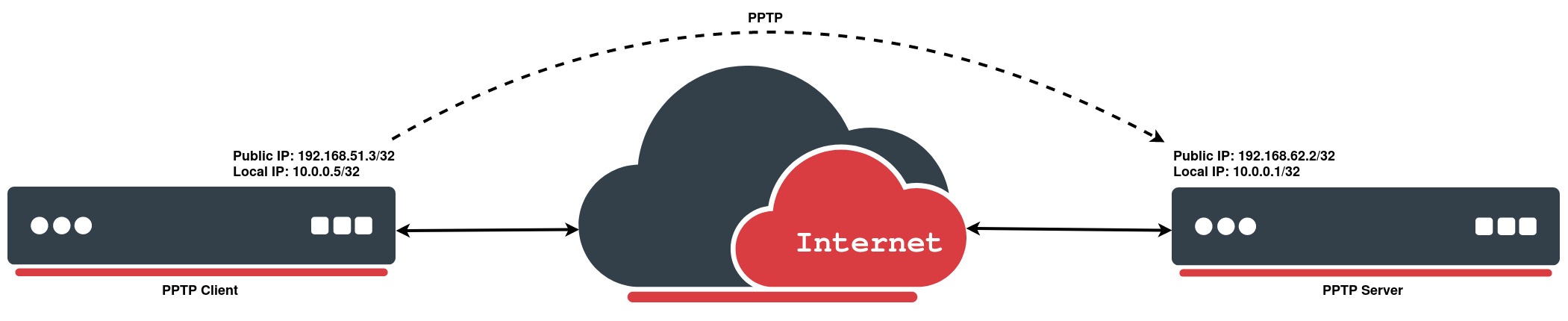
PPTP Client
The following example demonstrates how to set up a PPTP client with username "MT-User", password "StrongPass" and server 192.168.62.2:
[admin@MikroTik] > /interface/pptp-client/add connect-to=192.168.62.2 disabled=no name=pptp-out1 password=StrongPass user=MT-User
[admin@MikroTik] > /interface/pptp-client/print
Flags: X - disabled; R - running
 0  R name="pptp-out1" max-mtu=1450 max-mru=1450 mrru=disabled connect-to=192.168.62.2 user="MT-User"
      password="StrongPass" profile=default-encryption keepalive-timeout=60 add-default-route=no
      dial-on-demand=no allow=pap,chap,mschap1,mschap2
PPTP Server
On the other side we simply enable the PPTP server and create a PPP secret for a particular user:
[admin@MikroTik] > /interface/pptp-server/server/set enabled=yes
[admin@MikroTik] > /ppp/secret/add local-address=10.0.0.1 name=MT-User password=StrongPass profile=default-encryption remote-address=10.0.0.5 service=pptp
[admin@MikroTik] > pptp-server print
Flags: D - dynamic; R - running
Columns: NAME, USER, MTU, CLIENT-ADDRESS, UPTIME, ENCODING
# NAME USER MTU CLIENT-ADDRESS UPTIM ENCODING
0 DR <pptp-MT-User> MT-User 1450 192.168.51.3 44m8s MPPE128 stateless