GRE
Generic Routing Encapsulation (GRE) is a tunneling protocol originally developed by Cisco to encapsulate a wide variety of network layer protocols over an IP network. It creates a virtual point-to-point link between tunnel endpoints, allowing different protocol traffic to be carried across routed infrastructure.
GRE operates as a stateless tunnel, similar in behavior to IPIP and EoIP. Because no session state is maintained between endpoints, traffic may continue to be forwarded toward a remote endpoint even if it becomes unreachable, which can result in blackholed traffic until routing reconverges or the tunnel state changes.
In RouterOS, GRE interfaces are implemented as virtual interfaces and can be used in both routed and bridged network designs depending on the required topology.
To improve failure detection, RouterOS includes an optional keepalive mechanism for GRE tunnels. Keepalive monitors the reachability of the remote endpoint and can automatically disable the tunnel interface when the peer stops responding, reducing the risk of traffic being sent into an inactive tunnel.
GRE tunnel adds a 24-byte overhead (4-byte gre header + 20-byte IP header). GRE tunnel can forward only IP and IPv6 packets (ethernet type 800 and 86dd). Do not use the "Check gateway" option "arp" when a GRE tunnel is used as a route gateway.
Sub-menu: /interface/gre
Properties
| Property | Description |
|---|---|
| allow-fast-path (yes | no; Default: yes) | Whether to allow FastPath processing. Must be disabled if IPsec tunneling is used. |
| clamp-tcp-mss (yes | no; Default: yes) | Controls whether to change the MSS size for received TCP SYN packets. When enabled, a router will change the MSS size for received TCP SYN packets if the current MSS size exceeds the tunnel interface MTU (taking into account the TCP/IP overhead). The received encapsulated packet will still contain the original MSS, and only after decapsulation the MSS is changed. |
| comment (string; Default: ) | Short description of the tunnel. |
| disabled (yes | no; Default: no) | Enables/disables the tunnel. |
| dont-fragment (inherit | no; Default: no) | Whether to include the DF bit in related packets: no - fragment if needed, inherit - use the Don't Fragment flag of the original packet. (Without Don't Fragment: inherit - the packet may be fragmented). |
| dscp (inherit | integer [0-63]; Default: ) | Set the dscp value in the Gre header to a fixed value or inherit from the dscp value taken from tunnelled traffic |
| ipsec-secret (string; Default: ) sensitive | When a secret is specified, the router adds a dynamic IPsec peer to remote-address with a pre-shared key and policy (by default phase2 uses sha1/aes128cbc). |
| keepalive (integer[/time],integer 0..4294967295; Default: 10s,10) | Tunnel keepalive parameter sets the time interval in which the tunnel running flag will remain even if the remote end of the tunnel goes down. If the configured time and retries fail, the interface running flag is removed. Parameters are written in the following format: KeepaliveInterval,KeepaliveRetries where KeepaliveInterval is the time interval and KeepaliveRetries is the number of retry attempts. By default keepalive is set to 10 seconds and 10 retries. |
| l2mtu (integer [0..65536]; Default: 65535) | Layer2 Maximum transmission unit. |
| local-address (IP; Default: 0.0.0.0) | IP address that will be used for the local tunnel end. If set to 0.0.0.0 then the IP address of the outgoing interface will be used. |
| mtu (integer [0..65536]; Default: 1476) | Layer3 Maximum transmission unit. |
| name (string; Default: ) | Name of the tunnel. |
| remote-address (IP; Default: ) | IP address of the remote tunnel end. |
Setup example
The goal of this example is to get Layer 3 connectivity between two remote sites over the internet
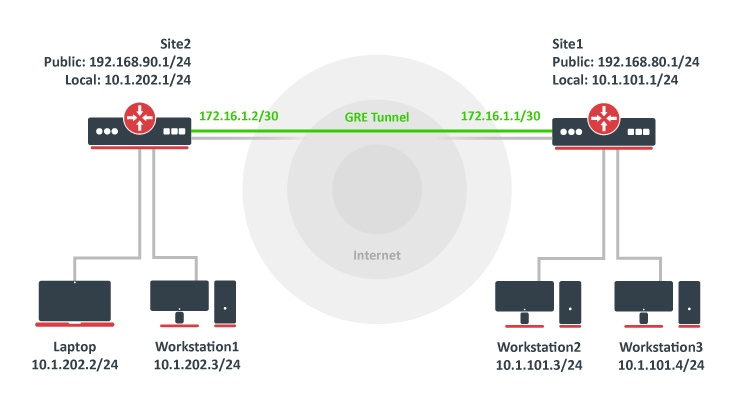
We have two sites, Site1 with a local network range 10.1.101.0/24 and Site2 with a local network range 10.1.202.0/24.
The first step is to create GRE tunnels. A router on site 1:
/interface/gre/add name=myGre remote-address=192.168.90.1 local-address=192.168.80.1
A router on site 2:
/interface/gre/add name=myGre remote-address=192.168.80.1 local-address=192.168.90.1
As you can see, tunnel configuration is quite simple.
In this example, a keepalive is not configured, so the tunnel interface will have a running flag even if the remote tunnel end is not reachable
Now we just need to set up tunnel addresses and proper routing. A router on site 1:
/ip/address/add address=172.16.1.1/30 interface=myGre
/ip/route/add dst-address=10.1.202.0/24 gateway=172.16.1.2
A router on site 2:
/ip/address/add address=172.16.1.2/30 interface=myGre
/ip/route/add dst-address=10.1.101.0/24 gateway=172.16.1.1
At this point, both sites have Layer 3 connectivity over the GRE tunnel.