MLPPP over single and multiple links
Standards: RFC 1990
Multi-Link Point to Point Protocol (MP, Multi-Link PPP, MultiPPP or MLPPP) is a method of splitting, recombining, and sequencing data across multiple logical data links.
In a situation where we have multiple DSL links between a pair of devices, performance by “widening the pipe” between two devices can be increased by using Multi-Link PPP, without going to a newer, more expensive technology.
Large packets are actually split into bits and sent evenly over ALL logical data links. This is done instantaneously with NO loss of bandwidth. It is important to understand that the other end of the link needs to use the same protocol to recombine your data.
Multilink is based on an LCP option negotiation that allows indicating to its peer that it is capable of combining multiple physical links.
MLPPP over single link
Typically the size of the packet sent over a PPP link is reduced due to overhead. MP can be used to transmit and receive a full frame over a single ppp link. To make it work the Multilink Protocol uses additional LCP configuration options Multilink Maximum Received Reconstructed Unit (MRRU)
To enable Multi-link PPP over a single link you must specify MRRU (Maximum Receive Reconstructed Unit) option. If both sides support this feature there is no need for MSS adjustment (in firewall mangle). Studies show that MRRU is less CPU expensive than 2 mangle rules per client. MRRU allows you to divide packets into multiple channels therefore increasing possible MTU and MRU (up to 65535 bytes)
Under Windows it can be enabled in Networking tag, Settings button, "Negotiate multi-link for single link connections". Its MRRU is hard coded to 1614.
MTU will be reduced by 4 bytes to work properly when MPPE encryption is enabled
Configuration Example
Let's configure a pppoe server compatible with Windows clients and MRRU enabled.
[admin@RB800] /interface/pppoe-server/server> add service-name=myPPP interface=ether1 mrru=1614
[admin@RB800] /interface/pppoe-server/server> print
Flags: X - disabled
 0   service-name="myPPP" interface=ether1 max-mtu=1480 max-mru=1480 mrru=1614
     authentication=pap,chap,mschap1,mschap2 keepalive-timeout=10 one-session-per-host=no
     max-sessions=0 default-profile=default
In short - standard PPP link - just specify MRRU on both sides.
MLPPP over multiple links
MLPPP over multiple links allows creating a single PPP link over multiple physical connections. All PPP links must come from the same server (server must have MLPPP over multiple links support) and all PPP links must have the same user name and password.
And to enable MLPPP you just need to create a PPP client and specify multiple interfaces instead of a single interface. RouterOS has MLPPP client support only. Presently there is no MLPPP server support available.
Configuration Example
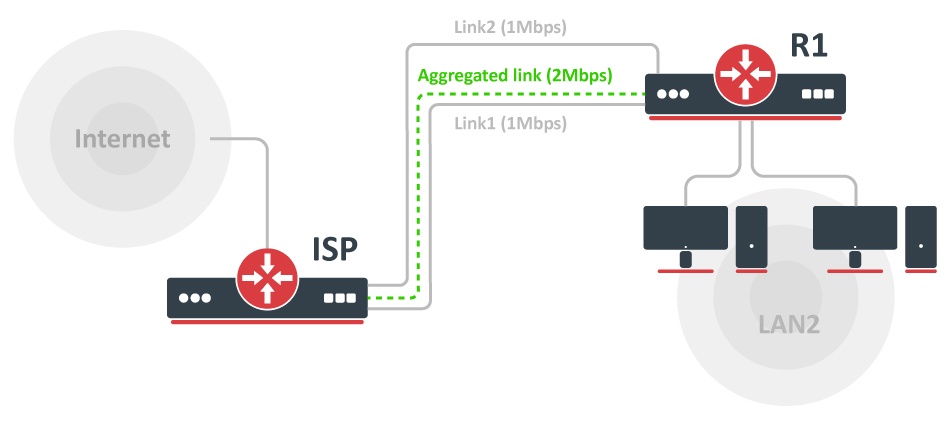
The ISP gives to its client two physical links (DSL lines) 1Mbps each. To get an aggregated 2Mbps pipe we have to set up MLPPP. Consider the ISP router is pre-configured to support MLPPP.
Configuration on the router (R1) is:
/interface/pppoe-client
   add service-name=ISP interface=ether1,ether2 user=xxx password=yyy disabled=no \
   add-default-route=yes use-peer-dns=yes
[admin@RB800] /interface/pppoe-client> print
Flags: X - disabled, R - running
 0    name="pppoe-out1" max-mtu=1480 max-mru=1480 mrru=disabled interface=ether1,ether2
      user="xxx" password="yyy" profile=default service-name="ISP" ac-name="" add-default-route=yes
      dial-on-demand=no use-peer-dns=yes allow=pap,chap,mschap1,mschap2
Now when the PPPoE client is connected, we can set up the rest of the configuration, local network address, enable DNS requests, set up masquerade and firewall
/ip/address/add address=192.168.88.1/24 interface=local
/ip/dns/set allow-remote-request=yes
/ip/firewall/nat
add chain=src- action=masquerade out-interface=pppoe-out1
/ip/firewall/filter
add chain=input connection-state=invalid action=drop \
comment="Drop Invalid connections"
add chain=input connection-state=established action=accept \
comment="Allow Established connections"
add chain=input protocol=icmp action=accept \
comment="Allow ICMP"
add chain=input src-address=192.168.88.0/24 action=accept \
in-interface=!pppoe-out1
add chain=input action=drop comment="Drop everything else"
For more advanced router and customer protection, check firewall examples.