NAT-PMP
NAT Port Mapping Protocol (NAT-PMP) is a protocol used for transparent peer-to-peer network connectivity of personal computers and network-enabled intelligent devices or appliances.
The Protocol operates by retrieving the external IPv4 address of a NAT gateway, thus allowing a client to make its external IPv4 address and port known to peers who may wish to communicate with it by creating dynamic NAT rules.
NAT-PMP uses UDP port number 5350 on the client, and 5351 on the server side.
There are two interface types for PMP: internal (the one local clients are connected to) and external (the one the Internet is connected to). A router may only have one active external interface with a 'public' IP address on it
A router can have only one active external interface with a 'public' IP address on it. The NAT-PMP internal interface can create NAT mapping for any subnet, not just the subnet present on the internal interface, so caution must be used when setting internal interfaces.
For more details on NAT PMP see RFC 6886
NAT-PMP configuration is accessible from the /ip/nat-pmp menu.
Configuration Example
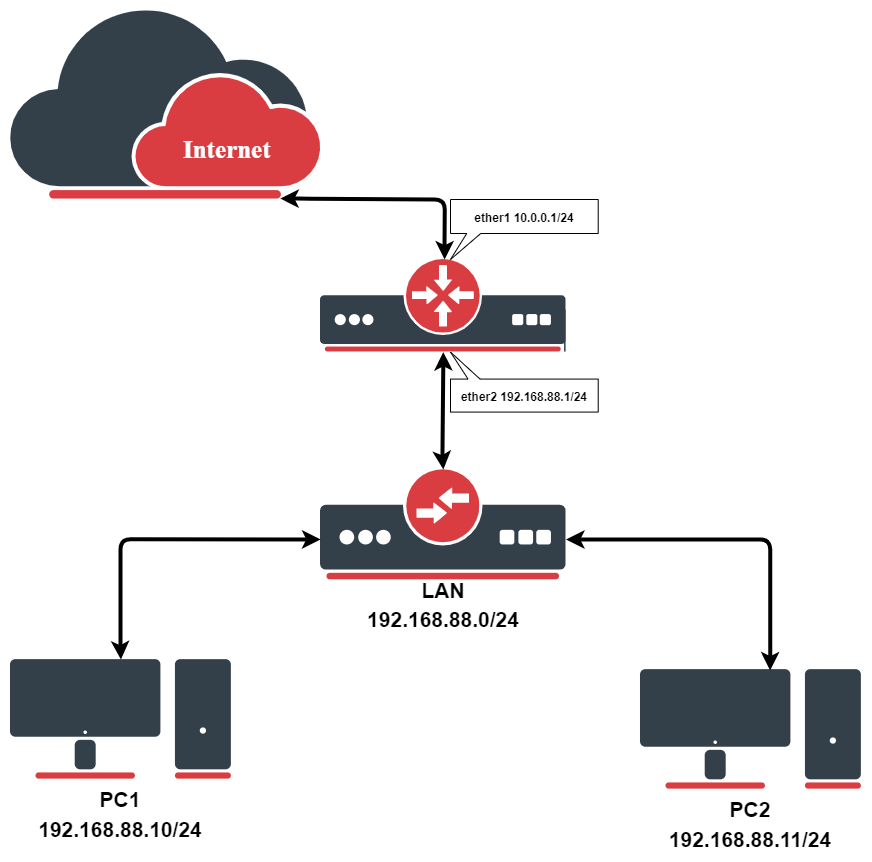
Let's consider that we already have this basic home setup illustrated above.
Before enabling PMP-NAT we need to masquerade outgoing LAN packets.
/ip/firewall/nat
add action=masquerade chain=srcnat out-interface=ether1
Now we can enable PMP and add internal, external interfaces:
/ip/nat-pmp/set enable=yes
/ip/nat-pmp/interfaces> add interface=ether1 type=external disabled=no
/ip/nat-pmp/interfaces> add interface=ether2 type=internal disabled=no
When the client from the internal interface side sends a PMP request, dynamic NAT rules are created on the router:
[admin@MikroTik] > ip firewall nat print
Flags: X - disabled, I - invalid, D - dynamic

0 chain=srcnat action=masquerade out-interface=ether1

1 D ;;; nat-pmp 192.168.88.10: ApplicationX
chain=dstnat action=dst-nat to-addresses=192.168.88.10 to-ports=55000 protocol=tcp
dst-address=10.0.0.1 in-interface=ether1 dst-port=55000

2 D ;;; nat-pmp 192.168.88.10: ApplicationX
chain=dstnat action=dst-nat to-addresses=192.168.88.10 to-ports=55000 protocol=udp
dst-address=10.0.0.1 in-interface=ether1 dst-port=55000
Properties
General properties
Available from the /ip/nat-pmp menu.
| Property | Description |
|---|---|
| enabled (yes | no; Default: no) | Enables NAT-PMP service |
NAT PMP Interfaces
Available from the /ip/nat-pmp/interfaces menu.
| Property | Description |
|---|---|
| interface (string; Default: ) | Interface name on which PMP will be running |
| type (external | internal; Default: no) | PMP interface type:
|
| forced-ip (Ip; Default: ) | Allows specifying what public IP to use if the external interface has more than one IP available. |
In more complex setups with VLANs, where the VLAN interface is part of the LAN, for PMP to work properly, the VLAN interface itself should be specified as the internal interface.