Traffic Generator
Traffic Generator is a tool that allows evaluating the performance of DUT (Device Under Test) or SUT (System Under Test).
The tool can generate and send RAW packets over specific ports. It also collects latency and jitter values, TX/RX rates, counts lost packets, and detects Out-of-Order (OOO) packets.
Traffic Generator can be used similarly to bandwidth test tool as well as generate packets that will be routed back to the packet generator for advanced status collection.
In a device which generates packets, it will not be possible to capture packets generated by the traffic-generator with a sniffer tool, torch, or firewall on the outgoing interface.
Since this tool could be used maliciously, it is possible to lock this functionality by entering the command '/system/device-mode/update traffic-gen=no' and holding the reset button afterwards.
General
Sub-menu: /tool/traffic-generator
This menu allows setting general traffic generator properties and contains commands to quickly start and stop the tool.
Properties
| Property | Description |
|---|---|
| latency-distribution-max (time; Default: 100us) | Maximal latency range for latency distribution measurements. Based on this value, RouterOS will decide what latency range to use as the latency-distribution-measure-interval property |
| measure-out-of-order (yes | no; Default: ) | Whether to measure Out-of-Order packets. The default value is based on CPU type (multi-core CPU default no; single-core CPU default yes). When the property is enabled on the multi-core device, a single stream will utilize only a single CPU core |
| stats-samples-to-keep (integer; Default: 100) | How many data examples to collect |
| test-id (integer [0..255]; Default: 0) |
Read-Only Properties
| Property | Description |
|---|---|
| latency-distribution-samples (integer) | Shows how many individual time periods the latency-distribution-measure-interval is divided into |
| latency-distribution-measure-interval (time) | Shows the total latency measurement range |
| running (yes | no) | Shows whether the traffic generator tool is started. |
Commands
| Property | Description |
|---|---|
| quick () | This command allows you to quickly start the packet generator and print the stats output to the terminal. The command also accepts several parameters that override settings in packet template and stream settings. Accepted parameters are duration, entries-to-show, freeze-frame-interval, id, interface, mbps, measure-out-of-order, packet-count, packet-size, port, pps, stream, test-id, tx-template
Parameters specified when running the quick command override configured values. If a parameter is specified only for one header then the value is multiplied for all the other headers (if required). |
| start () | Command starts the traffic generator tool in the background. It accepts one parameter test-id |
| stop () | Command stops the started traffic generator tool by the start command. |
| inject () | Inject raw data into the interface. |
| inject-pcap () | Inject raw data directly from a PCAP or PCAPNG file. Important: Starting with RouterOS 7.20, the sniffer tool saves captured packets in PCAPNG format. The traffic-generator inject-pcap feature supports PCAPNG format starting from RouterOS 7.21. |
Packet Template
Sub-menu: /tool/traffic-generator/packet-template
This sub-menu allows building packets based on the provided parameters. Based on the parameters you can build IP packets with VLAN tags and set UDP ports. A raw packet template is generated based on the provided parameters.
If you require more low-level packets or take full advantage of the traffic generator, then please use a raw-packet-template builder to build the packet.
If the same type of header is present in the packet more than once then header field values are passed as a comma-separated list. (For example, if there are two IP headers then source addresses are given like "IP-src=1.1.1.1,2.2.2.2").
For quicker header construction many of the header field values are assumed. For example, if the header stack is "mac, IP" then the traffic generator can assume that the mac-protocol value is "IP". Or if the "port" or "interface" setting is specified the traffic generator can assume "mac-src" to be the MAC address of the interface. Assumed values have distinct names that start with "assumed-" and are read-only. Manually specified values override assumed ones.
Assumed values are not automatically updated. New values are assumed after template edit. "packet-template set 0" is enough to trigger new assumed values
| Property | Description |
|---|---|
| comment (string; Default: ) | Short description of the packet you are building. |
| compute-checksum-from-offset (no-checksum | integer[0..4294967295]; Default: ) | Specifies the byte offset from where in the packet the 2-byte checksum will be calculated (Example: set to 14, to skip packet's Ethernet header when calculating checksum) |
| data (incrementing | random | specific-byte | uninitialized; Default: uninitialized) | Specifies how the packet payload will be filled:
|
| data-byte (hex [0..FF]; Default: 0) | A byte will be used to fill the packet payload. |
| interface (string; Default: ) | Optional parameter of the packet template. This is mutually exclusive with the "port" setting. Specifying "interface" allows users not to create a port entry for the interface in the port menu. In fact, a port entry is created dynamically. This is useful for running quick tests. |
| ip-dscp (list of integer[0..255] (max 16 times); Default: ) | Single or list of DS Fields that will be set in the IP header (DS Field contains the DSCP value and the ECN value) |
| ip-dst (list of IP/Netmask (max 16 times); Default: ) | List of destination IP addresses that will be used when generating IP headers. |
| ip-frag-off (list of integer[0..65535] (max 16 times); Default: ) | List of fragmentation offsets in the IP header. |
| ip-gateway (IP; Default: ) | In situations where the sender and receiver are the same device, it is impossible to determine the next-hop automatically from ip-dst. If ip-gateway is specified, the packet template will assume the destination mac address based on the resolved ip-gateway. |
| ip-id (list of integer [0..65535]; Default: ) | |
| ip-protocol (list of IP protocols (max 16 times); Default: ) | |
| ip-src (list of IP/Mask (max 16 times); Default: ) | |
| ip-ttl (list of integer [0..255] (max 16 times); Default: ) | |
| mac-dst (list of MAC/MASK (max 16 times); Default: ) | |
| mac-protocol (list of mac protocols (max 16 times); Default: ) | |
| mac-src (list of MAC/MASK (max 16 times); Default: ) | |
| name (string; Default: ) | Descriptive name of the template. |
| port (string; Default: ) | Optional parameter of the packet template. This suggests a port through which packets generated using this template should be sent out. Port can also be specified in other places such as in stream settings. This is mutually exclusive with the interface setting. |
| raw-header (string (max 16 times); Default: ) | Raw packet header as a string in hexadecimal format. |
| udp-dst-port (list of port [0..65535]/mask [0..FFFF] (max 16 times); Default: ) | |
| udp-src-port (list of port [0..65535]/mask [0..FFFF] (max 16 times); Default: ) | |
| vlan-id (; Default: ) | |
| vlan-priority (; Default: ) | |
| vlan-protocol (; Default: ) | |
| header-stack (list of ip | mac | raw | udp | vlan (max 16 times); Default: ip) | A sequence of headers that a generated packet should have. Currently supports:
The traffic generator suggests the first header for a packet template (in the port menu). But it is not enforced. |
Port Configuration
Sub-menu: /tool/traffic-generator/port
This menu allows configuring ports that will be associated with a specific interface and will be used to receive/send generated packets.
Properties
| Property | Description |
|---|---|
| disabled (yes | no; Default: no) | Whether the port is disabled and does not participate in receiving/sending the packets |
| name (string; Default: ) | Descriptive name of the port |
| interface (string; Default: ) | Name of the interface associated with the port. |
Read-Only Properties
| Property | Description |
|---|---|
| dynamic (yes | no) | Whether the port configuration is generated automatically. |
| first-header (ip | mac | raw | udp | vlan) | Shows the suggested first header for packets to be sent out of the specified interface. This information can be used when creating packet templates. |
| inactive (yes | no) | Whether the port is inactive and can't participate in tx/rx of the packets. |
Stats
Sub-menu: /tool/traffic-generator/stats
If the traffic generator is not running in quick mode then all statistics about the test are stored in this menu.
Latency Distribution
Sub-menu: /tool/traffic-generator/stats/latency-distribution
This sub-menu shows how many packets are received in a specific latency range. The latency range can be viewed by streams or by sequences (for example, print stream-num=3, print seq=10)
Here is an example output of the latency graph:
[admin@test-host] /tool/traffic-generator/stats/latency-distribution> print
 # LATENCY                 COUNT        SHARE GRAPH
 0 0-15.5us                    0           0%
 1 15.5us-31us                 0           0%
 2 31us-46.5us                 0           0%
 3 46.5us-62.1us               0           0%
 4 62.1us-77.6us               0           0%
 5 77.6us-93.1us               0           0%
 6 93.1us-109us                0           0%
 7 109us-124us                 0           0%
 8 124us-140us                 0           0%
 9 140us-155us                 0           0%
10 155us-171us                 0           0%
11 171us-186us                 4           0% *
12 186us-202us                29           0% *
13 202us-217us                90       0.001% *
14 217us-233us               302       0.004% *
15 233us-248us               630       0.009% *
16 248us-264us               789       0.011% *
17 264us-279us             1 384       0.021% -*
18 279us-295us             1 990        0.03% --*
19 295us-310us             2 966       0.045% ---*
20 310us-326us             4 089       0.062% -----*
21 326us-341us             4 958       0.075% ------*
22 341us-357us             6 059       0.091% -------*
23 357us-372us             6 660       0.101% --------*
24 372us-388us             8 320       0.126% ----------*
25 388us-403us             9 988       0.151% -------------*
26 403us-419us            11 781       0.178% ---------------*
27 419us-434us            12 512       0.189% ----------------*
28 434us-450us            13 836        0.21% -----------------*
29 450us-465us            15 681       0.238% --------------------*
30 465us-481us            17 740       0.269% ----------------------*
31 481us-496us            19 913       0.302% --------------------------*
32 496us-512us            21 106        0.32% ---------------------------*
33 512us-528us            22 848       0.346% -----------------------------*
34 528us-543us            25 059        0.38% --------------------------------*
35 543us-559us            26 593       0.403% ----------------------------------*
36 559us-574us            27 663       0.419% -----------------------------------*
37 574us-590us            29 351       0.445% -------------------------------------*
38 590us-605us            31 265       0.474% ----------------------------------------*
39 605us-621us            33 224       0.504% -------------------------------------------*
40 621us-636us            34 464       0.523% --------------------------------------------*
41 636us-652us            35 630        0.54% ----------------------------------------------*
42 652us-667us            37 245       0.565% ------------------------------------------------*
43 667us-683us            38 158       0.579% -------------------------------------------------*
44 683us-698us            38 626       0.586% --------------------------------------------------*
45 698us-714us            38 985       0.591% --------------------------------------------------*
46 714us-729us            39 061       0.592% --------------------------------------------------*
47 729us-745us            39 750       0.603% ---------------------------------------------------*
48 745us-760us            39 145       0.594% --------------------------------------------------*
49 760us-776us            39 162       0.594% --------------------------------------------------*
50 776us-791us            38 197       0.579% -------------------------------------------------*
51 791us-807us            37 811       0.573% -------------------------------------------------*
52 807us-822us            37 364       0.567% ------------------------------------------------*
53 822us-838us            36 770       0.558% -----------------------------------------------*
54 838us-853us            35 831       0.543% ----------------------------------------------*
55 853us-869us            35 380       0.536% ----------------------------------------------*
56 869us-884us            34 472       0.523% --------------------------------------------*
57 884us-900us            33 672       0.511% -------------------------------------------*
58 900us-915us            33 799       0.513% --------------------------------------------*
59 915us-931us            32 754       0.497% ------------------------------------------*
60 931us-946us            32 339        0.49% ------------------------------------------*
61 946us-962us            32 419       0.492% ------------------------------------------*
62 962us-977us            32 107       0.487% -----------------------------------------*
63 977us-993us            31 552       0.478% -----------------------------------------*
64 0-993us             1 221 523       18.54%
Properties
| Property | Description |
|---|---|
| count (integer) | Number of packets in the current latency range |
| graph (string) | graphical representation of share |
| latency (string) | latency range |
| share (percent) | Percentage of packets falling in this latency range. |
Stream Stats
Sub-menu: /tool/traffic-generator/stats/stream
This sub-menu stores statistics sorted by streams. Output is the same as in quick mode.
[admin@test-host] /tool/traffic-generator/stats/stream> print
 # SEQ    NUM     TX-PACKET   TX-RATE     RX-PACKET   RX-RATE   LOST-PACKET LOST-RATE
 0 1      3          43 064 499.5Mbps        25 180 292.0Mbps        17 884 207.4Mbps
 1 1      4          43 062 499.5Mbps        39 946 463.3Mbps         3 116  36.1Mbps
 2 1      TOT        86 126 999.0Mbps        65 126 755.4Mbps        21 000 243.6Mbps
 3 2      3          43 544 505.1Mbps        30 449 353.2Mbps        13 095 151.9Mbps
 4 2      4          43 543 505.0Mbps        42 982 498.5Mbps           561   6.5Mbps
 5 2      TOT        87 087 1010.2...        73 431 851.7Mbps        13 656 158.4Mbps

...

59 20     TOT        87 277 1012.4...        73 755 855.5Mbps        13 522 156.8Mbps
60 21     3          43 546 505.1Mbps        30 605 355.0Mbps        12 941 150.1Mbps
61 21     4          43 546 505.1Mbps        42 682 495.1Mbps           864  10.0Mbps
62 21     TOT        87 092 1010.2...        73 287 850.1Mbps        13 805 160.1Mbps
63 TOT    3         913 942 504.8Mbps       629 210 347.5Mbps       284 732 157.2Mbps
64 TOT    4         913 939 504.8Mbps       898 374 496.2Mbps        15 565   8.5Mbps
65 TOT    TOT     1 827 881 1009.6...     1 527 584 843.8Mbps       300 297 165.8Mbps
Port Stats
Sub-menu: /tool/traffic-generator/stats/port
This sub-menu stores statistics sorted by rx/tx ports.
[admin@test-host] /tool/traffic-generator/stats/port> print
 # SEQ    PORT        RX-UNK-PACKET    RX-UNK-BYTE RX-UNK...     TX-PACKET   TX-RATE     RX-PACKET
 0 1      port0:et...             0              0      0bps        43 064 499.5Mbps        39 946
 1 1      port1:et...             0              0      0bps        43 062 499.5Mbps        25 180
 2 1      TOT                     0              0      0bps        86 126 999.0Mbps        65 126
 3 2      port0:et...             0              0      0bps        43 544 505.1Mbps        42 982
 4 2      port1:et...             0              0      0bps        43 543 505.0Mbps        30 449
 5 2      TOT                     0              0      0bps        87 087 1010.2...        73 431
 6 3      port0:et...             0              0      0bps        43 540 505.0Mbps        42 615
 7 3      port1:et...             0              0      0bps        43 540 505.0Mbps        30 191
 8 3      TOT                     0              0      0bps        87 080 1010.1...        72 806
Raw Stats
Sub-menu: /tool/traffic-generator/stats/raw
This sub-menu stores raw statistics data.
[admin@test-host] /tool/traffic-generator/stats/raw> print
 # SEQ    PORT       NUM     TX-PACKET   TX-RATE     RX-PACKET   RX-RATE   LOST-PACKET LOST-RATE
 0 1      port0:e... 3          43 064 499.5Mbps             0      0bps        43 064 499.5Mbps
 1 1      port1:e... 3               0      0bps        25 180 292.0Mbps       -25 180 292.0Mbps
 2 1      TOT        3          43 064 499.5Mbps        25 180 292.0Mbps        17 884 207.4Mbps
 3 1      port0:e... 4               0      0bps        39 946 463.3Mbps       -39 946 463.3Mbps
 4 1      port1:e... 4          43 062 499.5Mbps             0      0bps        43 062 499.5Mbps
 5 1      TOT        4          43 062 499.5Mbps        39 946 463.3Mbps         3 116  36.1Mbps
 6 1      port0:e... TOT        43 064 499.5Mbps        39 946 463.3Mbps         3 118  36.1Mbps
 7 1      port1:e... TOT        43 062 499.5Mbps        25 180 292.0Mbps        17 882 207.4Mbps
 8 2      port0:e... 3          43 544 505.1Mbps             0      0bps        43 544 505.1Mbps
 9 2      port1:e... 3               0      0bps        30 449 353.2Mbps       -30 449 353.2Mbps
10 2      TOT        3          43 544 505.1Mbps        30 449 353.2Mbps        13 095 151.9Mbps
Streams
Properties
| Property | Description |
|---|---|
| disabled (yes | no; Default: no) | Whether the stream is disabled |
| mbps (integer [0..4294967295]; Default: 0) | Value in Megabits per second that the stream will try to generate. |
| name (string; Default: ) | Descriptive name of the stream. |
| num (integer [0..15]; Default: 0) | |
| packet-size (integer[1..65535] [-integer[1..65535]]; Default: 0) | Generated size of the packets in bytes. Can be set as the range for random packet size generation. |
| port (string; Default: ) | Name of the port from the Port menu that will be used to transmit packets. |
| pps (integer [0..4294967295]; Default: 0) | Packets per second that the stream will try to generate. |
| tx-template (string; Default: ) | Name of the packet template from packet-template or raw-packet-template menus used as the packet content source. |
Configuration Examples
IPsec tunnel performance test
Consider the following test setup
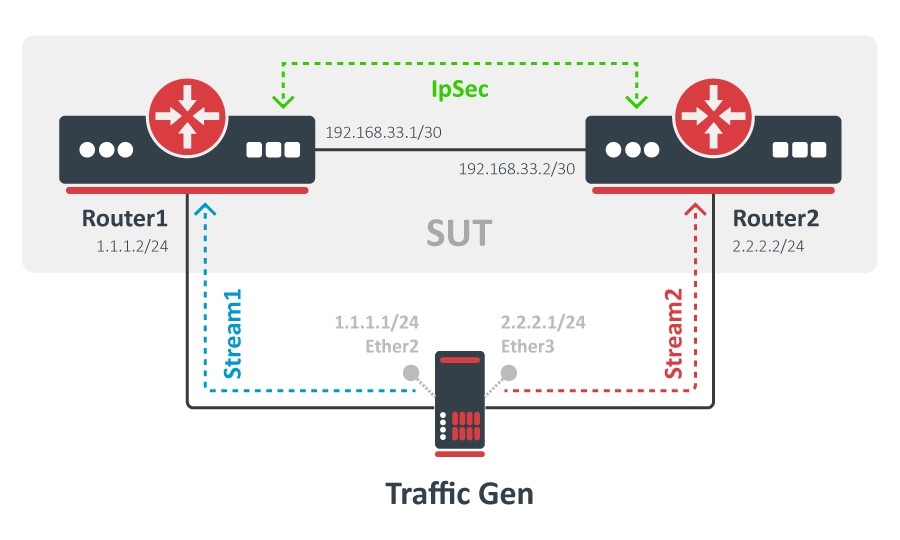
System Under Test (SUT) consists of two routers connected to a traffic generator server. The connection between both SUT routers is IPSec encrypted.
The traffic generator will run two streams:
- In a direction from 1.1.1.0/24 network to 2.2.2.0/24 network.
- In a direction from 2.2.2.0/24 network to 1.1.1.0/24 network.
R1 routing and IPsec setup
/ip/address
add address=192.168.33.1/30 interface=ether1
add address=1.1.1.2/24 interface=ether2

/ip/route
add dst-address=2.2.2.0/24 gateway=192.168.33.2

/ip/ipsec/proposal
set default enc-algorithms=aes-128

/ip/ipsec/peer
add address=192.168.33.2 secret=123

/ip/ipsec/policy
add sa-src-address=192.168.33.1 sa-dst-address=192.168.33.2 \
    src-address=1.1.1.0/24 dst-address=2.2.2.0/24 tunnel=yes
R2 routing and IPsec setup
/ip/address
add address=192.168.33.2/30 interface=ether1
add address=2.2.2.2/24 interface=ether2

/ip/route
add dst-address=1.1.1.0/24 gateway=192.168.33.1

/ip/ipsec/proposal
set default enc-algorithms=aes-128

/ip/ipsec/peer
add address=192.168.33.1 secret=123

/ip/ipsec/policy
add sa-src-address=192.168.33.2 sa-dst-address=192.168.33.1 \
    src-address=2.2.2.0/24 dst-address=1.1.1.0/24 tunnel=yes
Traffic generator server setup
/ip/address
add address=1.1.1.1/24 interface=ether2
add address=2.2.2.1/24 interface=ether3
First, we will define which ports will be used as traffic generator tx/rx ports.
/tool/traffic-generator/port
add disabled=no interface=ether2 name=port0
add disabled=no interface=ether3 name=port1
To construct the actual packet that will be generated, packet-template is used.
/tool/traffic-generator/packet-template
add header-stack=mac,,udp ip-dst=2.2.2.1/32 ip-gateway=1.1.1.2 ip-src=1.1.1.1/32 \
name=routing-1 port=port0
add header-stack=mac,,udp ip-dst=1.1.1.1/25 ip-gateway=2.2.2.2 ip-src=2.2.2.1/32 \
name=routing-2 port=port1
Notice that mac addresses were not specified since the template generator can assume the next-hop mac address automatically by sending ARP messages. Since we are doing routing and the destination IP is not directly reachable, we have set the ip-gateway parameter to determine the next-hop mac-address.
When running print you can see all assumed (detected) values including MAC addresses.
[admin@test-host] /tool/traffic-generator/packet-template> print
0 name="routing-1" header-stack=mac,,udp port=port0
assumed-mac-dst=00:0C:42:00:38:9D assumed-mac-src=00:0C:42:40:94:25
assumed-mac-protocol= assumed-ip-dscp=0 assumed-ip-id=0
assumed-ip-frag-off=0 assumed-ip-ttl=64 assumed-ip-protocol=udp
ip-src=1.1.1.1/32 ip-dst=2.2.2.1/32 assumed-udp-src-port=100
assumed-udp-dst-port=200 ip-gateway=1.1.1.2 data=uninitialized data-byte=0
1 name="routing-2" header-stack=mac,,udp port=port1
assumed-mac-dst=00:0C:42:00:38:D1 assumed-mac-src=00:0C:42:40:94:26
assumed-mac-protocol= assumed-ip-dscp=0 assumed-ip-id=0
assumed-ip-frag-off=0 assumed-ip-ttl=64 assumed-ip-protocol=udp
ip-src=2.2.2.1/32 ip-dst=1.1.1.1/32 assumed-udp-src-port=100
assumed-udp-dst-port=200 ip-gateway=2.2.2.2 data=uninitialized data-byte=0
For example, if any router in SUT were to change, the assumed mac-addresses would not be updated automatically. To update packet templates, simply issue the command:
/tool/traffic-generator/packet-template/set [find]
The last part is to configure streams
/tool/traffic-generator/stream
add disabled=no mbps=500 name=str1 id=3 packet-size=1450 port=port0 pps=0 \
    tx-template=routing-1
add disabled=no mbps=500 name=str3 id=4 packet-size=1450 port=port1 pps=0 \
    tx-template=routing-2
Notice that each stream has a unique id value. This value identifies stream packets, otherwise, the traffic generator will not work.
Now we are ready to run the test. In this case, quick mode will be used:
[admin@test-host] /tool/traffic-generator> quick mbps=450
SEQ    NUM     TX-PACKET   TX-RATE     RX-PACKET   RX-RATE        RX-OOO   LOST-PACKET LOST-RATE
37     4          39 488 458.0Mbps        39 270 455.5Mbps        15 509           218   2.5Mbps
37     TOT        78 976 916.1Mbps        76 485 887.2Mbps        22 529         2 491  28.8Mbps
38     3          38 957 451.9Mbps        37 657 436.8Mbps         7 078         1 300  15.0Mbps
38     4          38 958 451.9Mbps        38 402 445.4Mbps        14 763           556   6.4Mbps
38     TOT        77 915 903.8Mbps        76 059 882.2Mbps        21 841         1 856  21.5Mbps
39     3          38 816 450.2Mbps        37 893 439.5Mbps         7 307           923  10.7Mbps
39     4          38 815 450.2Mbps        38 642 448.2Mbps        15 110           173   2.0Mbps
39     TOT        77 631 900.5Mbps        76 535 887.8Mbps        22 417         1 096  12.7Mbps
40     3          39 779 461.4Mbps        37 415 434.0Mbps         7 136         2 364  27.4Mbps
40     4          39 780 461.4Mbps        39 567 458.9Mbps        15 908           213   2.4Mbps
40     TOT        79 559 922.8Mbps        76 982 892.9Mbps        23 044         2 577  29.8Mbps
41     3          39 218 454.9Mbps        37 089 430.2Mbps         7 075         2 129  24.6Mbps
41     4          39 218 454.9Mbps        38 663 448.4Mbps        15 752           555   6.4Mbps
41     TOT        78 436 909.8Mbps        75 752 878.7Mbps        22 827         2 684  31.1Mbps
42     3          39 188 454.5Mbps        37 906 439.7Mbps         6 729         1 282  14.8Mbps
42     4          39 187 454.5Mbps        38 954 451.8Mbps        15 565           233   2.7Mbps
42     TOT        78 375 909.1Mbps        76 860 891.5Mbps        22 294         1 515  17.5Mbps
TOT    3       1 645 468 454.4Mbps     1 568 201 433.1Mbps       280 174        77 267  21.3Mbps
TOT    4       1 645 464 454.4Mbps     1 626 896 449.3Mbps       627 480        18 568   5.1Mbps
TOT    TOT     3 290 932 908.9Mbps     3 195 097 882.4Mbps       907 654        95 835  26.4Mbps
Stats show throughput of each stream and total throughput of both streams, Out-of-order packet count, Loss rate, latency, and jitter.