Services
CLI reference:/ip/service/ip/service/webserver
The /ip/service menu lists the services the router offers for management and access: WinBox, SSH, Telnet, FTP, the web server, the API and the reverse proxy. Each service has a port, the addresses and the VRF it accepts clients from, and, for the TLS services, a certificate. You cannot add services, only change, disable and enable the existing ones.
The same menu also shows dynamic entries: the ports that other features and containers listen on, and the connections that are open to the router's services. Use the list to see which ports are open on the router and what the firewall has to allow or block.
For advice on which services to disable, how to change the SSH port and how to protect management access with the firewall, see Securing your router.
| Service | Default port | Used for |
|---|---|---|
ftp | 21 | FTP file transfer to and from the router's storage |
ssh | 22 | SSH access |
telnet | 23 | Telnet access |
www | 80 | The web server over HTTP: WebFig, the REST API and graphs |
www-ssl | 443 | The web server over HTTPS; needs a certificate, see Enable HTTPS |
winbox | 8291 | WinBox, the MikroTik mobile app and The Dude |
api | 8728 | The API |
api-ssl | 8729 | The API over TLS |
reverse-proxy | 443 | The reverse proxy; listens only while at least one enabled rule exists |
See what the router listens on
Dynamic entries show the ports that RouterOS features and containers listen on, and the open connections to the router's services:
/ip/service/print where dynamic
Flags: D - DYNAMIC; c - CONNECTION
Columns: NAME, PORT, PROTO, LOCAL, REMOTE
#    NAME       PORT  PROTO  LOCAL          REMOTE
3 Dc ssh          22  tcp    192.168.88.1   192.168.88.10:53163
4 D  resolver     53  tcp
5 D  resolver     53  udp
0 D  btest      2000  tcp
1 D  discover   5678  udp
2 D  cloud     54103  udp
- Entries with only the
Dflag are ports a feature listens on.NAMEis the feature or program, for exampleresolverfor the DNS server,btestfor the bandwidth test server,discoverfor neighbor discovery andcloudfor the local port the MikroTik cloud services use to talk to the cloud servers. - Entries with the
cflag are open connections to a service.LOCALis the router's address andREMOTEis the client's address and port. - Ports that containers listen on also show the
NETNSandCONTAINERcolumns: the network namespace and the name of the container.
An entry appears when a feature starts to listen. For example, the resolver entries on port 53 appear when you set allow-remote-requests=yes in /ip/dns. The router accepts connections on the ports of the dynamic entries and of the enabled services (the entries without the X flag in /ip/service/print). IP protocols without ports, such as GRE or OSPF, are not in the list; the tables at the end of this page list them. The ports where a feature waits for clients, such as resolver or btest, are the ones the firewall input chain has to allow for the clients that need them and block for everyone else; the default firewall already drops connections to them from the internet. You cannot change dynamic entries in /ip/service; change or disable the feature in its own menu instead.
Limit who can use a service
To accept WinBox and SSH connections only from the LAN and from VPN clients:
/ip/service/set winbox,ssh available-from=192.168.88.0/24,10.8.0.0/24
/ip/service/print proplist=name,,available-from where !dynamic
Flags: X - DISABLED, I - INVALID
Columns: NAME, PORT, AVAILABLE-FROM
 #   NAME           PORT  AVAILABLE-FROM
 6   ftp              21
 7   ssh              22  192.168.88.0/24
                          10.8.0.0/24
 8   telnet           23
 9   www              80
10 X www-ssl         443
11   reverse-proxy   443
12   winbox         8291  192.168.88.0/24
                          10.8.0.0/24
13   api            8728
14   api-ssl        8729
available-from takes a list of IPv4 and IPv6 prefixes, for example 10.5.101.0/24,2001:db8:fade::/64. An empty list means any address. A list with only IPv4 prefixes refuses all IPv6 clients; add the IPv6 prefixes that need access.
Include the address you manage the router from. After the change, the router refuses new connections from other addresses, including your own next login if it comes from outside the list.
A client from another address can still open the TCP connection, and the router then closes it without serving the client, so a port scan still finds the port open. available-from suits restricting access within trusted networks. To block access from the internet and other untrusted networks, drop the traffic in the firewall input chain, as described in Securing your router.
Run management services in a VRF
A management VRF keeps management access apart from the networks the router serves. To make WinBox and SSH available only through a dedicated management port, ether5, which has the management address (for example 10.99.0.1/24):
/ip/vrf/add name=mgmt interfaces=ether5
/ip/service/set winbox,ssh vrf=mgmt
A service listens only in its VRF. After this change, the router refuses WinBox and SSH connections to its addresses in the main routing table and serves them only through ether5. For more about VRFs, see VRF.
After the change, WinBox and SSH are reachable only through the interfaces of the VRF. A session that comes in through another interface, or through ether5 before it joins the VRF, is cut. Run both commands together, connect again through ether5, and keep another way in, such as MAC WinBox.
Manage services in WinBox
Open IP > Services. The list can also show dynamic listeners and active connections; open the configurable service row, such as winbox, rather than a dynamic connection entry. Use Find to locate the service by name.
- Check Port in the service dialog. Changing it changes the port clients must use to connect.
- Use the + control beside Available From to enter the client addresses or subnets that should have access, then select OK. Include the address of your management computer before restricting the service you are connected through. An empty list does not restrict client addresses.
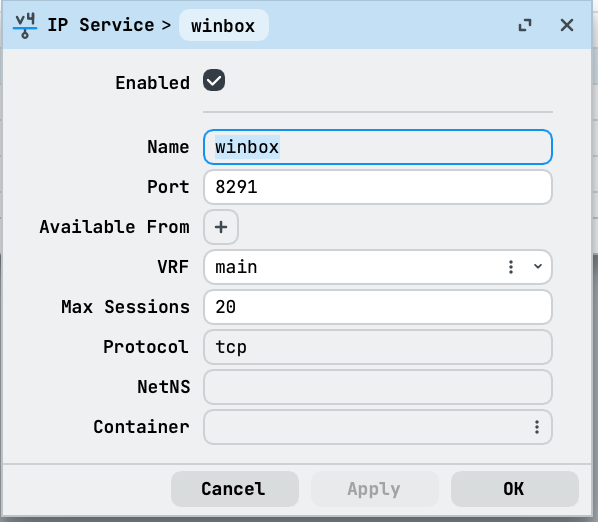
To turn an unused service off without changing its port, select its row in the Services list and select Disable. Select Enable to turn it on again.
Web server
The web server has separate settings for its parts: the home page, WebFig, graphs, the REST API, and the CRL, SCEP and ACME endpoints. The -plain settings control HTTP connections (the www service), and the -secure settings control HTTPS connections (the www-ssl service). All parts are enabled by default. For the settings, see the /ip/service/webserver CLI reference.
Protocols and ports
The following tables list the ports and IP protocols that RouterOS uses. Most ports are ones the router listens on when the feature is enabled. Some are client ports: the DHCP client receives replies on UDP port 68, and the DHCPv6 client on UDP port 546. The FTP server does not listen on TCP port 20: in active mode, its data connections come from that port. For OpenFlow, the router connects to the controller at the address and port set in controllers in /openflow, for example TCP port 6653, and does not listen on a port.
TCP ports
| Port | Used by |
|---|---|
| 21 | FTP (ftp service) |
| 22 | SSH (ssh service) |
| 23 | Telnet (telnet service) |
| 53 | DNS server, when allow-remote-requests=yes |
| 80 | HTTP (www service) |
| 179 | BGP |
| 443 | HTTPS (www-ssl service) and the reverse proxy (reverse-proxy service) |
| 646 | LDP transport session |
| 1080 | SOCKS proxy |
| 1194 | OpenVPN server |
| 1723 | PPTP server |
| 2000 | Bandwidth test server |
| 2828 | UPnP control, on the internal interfaces |
| 5246 | CAPsMAN for WiFi |
| 8080 | Web proxy, default port |
| 8291 | WinBox (winbox service) |
| 8728 | API (api service) |
| 8729 | API over TLS (api-ssl service) |
UDP ports
| Port | Used by |
|---|---|
| 53 | DNS server, when allow-remote-requests=yes |
| 67 | DHCP server |
| 68 | DHCP client (client port) |
| 69 | TFTP server |
| 123 | NTP server |
| 161 | SNMP |
| 500 | IKE for IPsec |
| 520 | RIP |
| 521 | RIPng |
| 546 | DHCPv6 client (client port) |
| 547 | DHCPv6 server |
| 646 | LDP hello messages |
| 1701 | L2TP |
| 1900 | UPnP discovery (SSDP), on the internal interfaces |
| 3799 | RADIUS incoming requests (CoA and disconnect) |
| 4500 | IPsec NAT traversal |
| 5246 | CAPsMAN control, for WiFi and for legacy wireless |
| 5247 | CAPsMAN data, for legacy wireless |
| 5350 | NAT-PMP announcements, which the router sends to clients at 224.0.0.1 |
| 5351 | NAT-PMP server |
| 5678 | MikroTik Neighbor Discovery Protocol (MNDP) |
| 20561 | MAC Telnet, MAC WinBox and MAC ping (MAC server) |
listen-port | WireGuard: the port set on each interface |
MAC Telnet, MAC WinBox and MAC ping work on layer 2: the packets are addressed to the router's MAC address and carry the IP addresses 0.0.0.0 and 255.255.255.255. The IP firewall does not stop them: the MAC server answers even when a filter rule drops UDP port 20561. To limit MAC access, set allowed-interface-list in /tool/mac-server.
IP protocols
| Protocol | Used by |
|---|---|
| 1 | ICMP |
| 2 | IGMP (IGMP proxy) |
| 4 | IPIP tunnels |
| 41 | IPv6 encapsulation (6to4) |
| 46 | RSVP for MPLS traffic engineering |
| 47 | GRE: PPTP, EoIP and GRE tunnels |
| 50 | ESP for IPsec |
| 51 | AH for IPsec |
| 58 | ICMPv6, including IPv6 Neighbor Discovery |
| 89 | OSPF |
| 103 | PIM (PIM-SM) |
| 112 | VRRP |
For all properties, see /ip/service and /ip/service/webserver in the CLI reference.