Partitions
CLI reference:/partitions
Partitioning is supported on ARM, ARM64, MIPS, TILE, and PowerPC RouterBOARD devices that use NAND flash.
RouterOS allows repartitioning of NAND flash, enabling:
- Separate RouterOS installations on each partition.
- The ability to specify primary and fallback partitions.
If one partition fails to boot (due to a failed upgrade, configuration issue, or software error), the next partition will automatically boot, providing a fallback. This feature acts as an interactive backup, allowing you to keep a verified, working installation and perform upgrades only on a secondary partition.
Once you've confirmed the new configuration is stable, you can use the "Save Config To" function to copy it to the other partitions.
Repartitioning of the NAND requires the latest bootloader version
Requirements and Limits
- Starting from RouterOS 7.20beta2, the minimum storage size for repartitioning is 128 MiB.
- Minimum RouterOS partition size during repartitioning: 60 MiB.
- The maximum number of allowed partitions is 8.
For devices where the Partitions menu is supposed to be hidden, but were previously repartitioned:
-
It will be possible to repartition into a single partition.
-
The Partitions menu will then be hidden after reboot.
Example
For a device with 128 MiB NAND that previously had 4*32 MiB partitions, where RouterOS fits within 32 MiB, the behavior after upgrading, starting from RouterOS 7.20beta2, will be as follows:
- It will continue using all 4 partitions with full partitioning options, as before repartitioning.
- In case of repartitioning, the only available options will be 1*128 MiB or 2*64 MiB partitions, and full partitioning features will remain available.
[admin@MikroTik] > /partitions/print
Flags: A - ACTIVE; R - RUNNING
Columns: NAME, FALLBACK-TO, VERSION, SIZE
# NAME FALL VERSION SIZE
0 AR part0  next         RouterOS v7.18.2 2025-03-11 11:59:04  128MiB
Starting from RouterOS version 7.17, you need to update the device-mode to use the partitions.
Inspect partitions in WinBox
Open Partition in the left menu:
- Check the partition name, Fallback To, and installed RouterOS version in the list. The
Aflag identifies the active boot partition, andRidentifies the running partition. The screenshot shows one partition,part0, with both flags. - The right panel contains Repartition, Copy To, Save Config To, and Restore Config From. These actions change storage or configuration; use the command descriptions to select the operation you intend to perform.
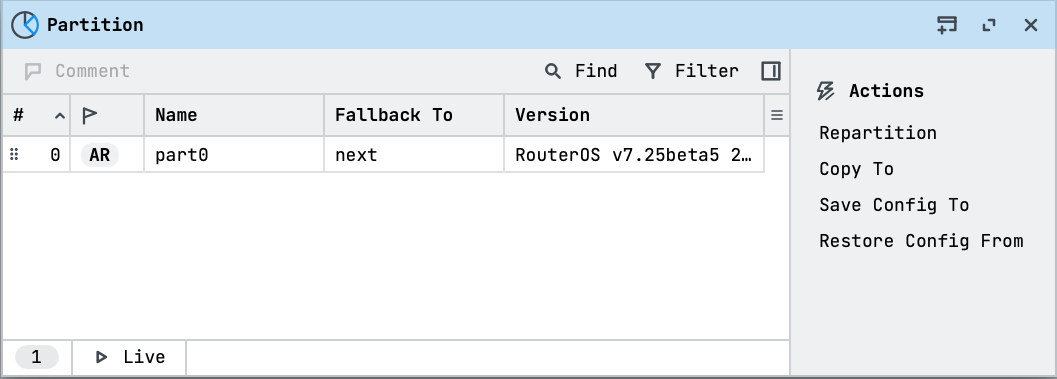
Viewing the list does not repartition the router. Repartition reformats storage and reboots the device, and Copy To replaces the contents of its destination. Check hardware support and device mode before planning a partition change.
Commands
| Property | Description |
|---|---|
| activate (partition) | Assigns another partition as Active. This option is available if the "partitions" setting is enabled in device mode (since RouterOS 7.17). |
| repartition (integer) | Will reboot the router and reformat the NAND, leaving only the active partition. |
| copy-to (partition) | Clone the running OS with the config to the specified partition. Previously stored data on the partition will be erased. |
| save-config-to (partition) | Clone running-config on a specified partition. Everything else is untouched. |
| restore-config-from (partition) | Copy config from the specified partition to the running partition |
Properties
| Property | Description |
|---|---|
| name (string; Default: ) | Name of the partition |
| fallback-to (etherboot | next | partition-name; Default: next) | What to do if an active partition fails to boot:
|
Read-only
| Property | Description |
|---|---|
| active (yes | no) | Partition is active |
| running (yes | no) | Currently running partition |
| size (integer[MiB]) | Partition size |
| version (string) | Current RouterOS version installed on the partition |