NTP
CLI reference:/system/ntp/client/system/ntp/client/servers/system/ntp/server/system/ntp/key/system/ntp/monitor-peers/system/ntp/client/reset-freq-drift
RouterOS includes a Network Time Protocol (NTP, RFC 5905) client and server in the main RouterOS package. The client synchronizes the router's clock with NTP servers, and the server distributes the router's time to other devices on the network. Both are disabled by default. NTP exchanges Universal Coordinated Time (UTC); the time zone and daylight saving rules for the displayed time are configured in /system/clock.
Synchronize the router's clock
Enable the client and set one or more servers:
[admin@MikroTik] > /system/ntp/client/set enabled=yes servers=192.168.88.1
[admin@MikroTik] > /system/ntp/client/print
         enabled: yes
            mode: unicast
         servers: 192.168.88.1
             vrf: main
      freq-drift: 0 PPM
          status: synchronized
   synced-server: 192.168.88.1
   synced-stratum: 3
   system-offset: 13.937 ms
To configure the client in WinBox, open System > NTP Client:
- Select Enabled and leave Mode at
unicastfor servers you query directly. - Enter the server address in NTP Servers, for example
192.168.88.1if that device provides NTP. Use the + control to add more servers, then select Apply. - Check Status. When it reads
synchronized, Synced Server, Synced Stratum, and System Offset show the selected source and its timing information. Select OK to close the dialog.
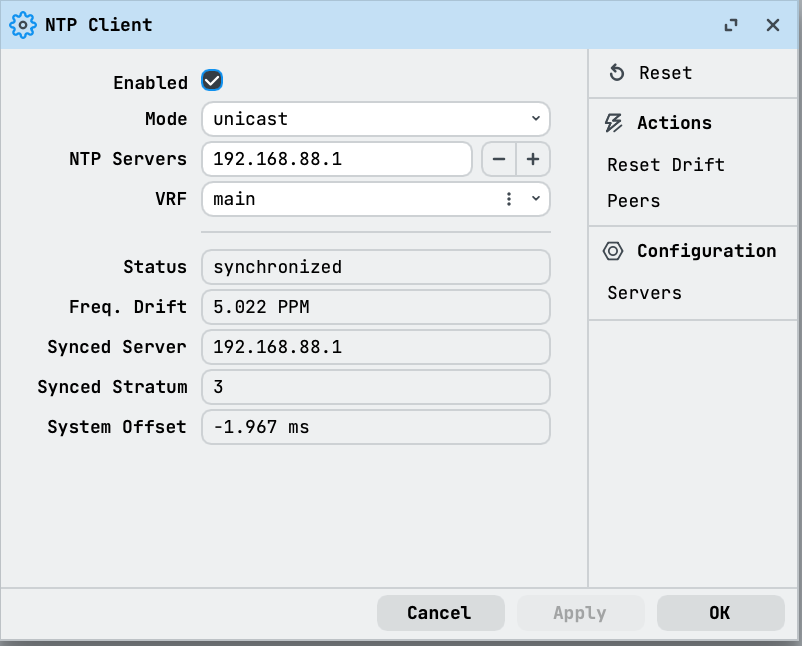
The status field shows the client state: stopped while the client is disabled, waiting while no server is usable, and synchronized when the clock follows synced-server. With several servers the client polls them all and picks the best one.
Servers can be IPv4 or IPv6 addresses, or domain names (which are resolved with /ip/dns; the result appears as resolved-address). Servers are managed in the /system/ntp/client/servers list. When the DHCP client has use-peer-ntp=yes (the default), servers received over DHCP appear in the list as dynamic entries, which cannot be edited:
[admin@MikroTik] > /system/ntp/client/servers/print
Flags: D - DYNAMIC
0   address=192.168.88.1 min-poll=6 max-poll=10 iburst=yes auth-key=none

1 D address=217.198.224.12 min-poll=6 max-poll=10 iburst=yes auth-key=none

2 D address=195.244.128.12 min-poll=6 max-poll=10 iburst=yes auth-key=none
The client queries a server in intervals between min-poll and max-poll, counted as powers of 2 in seconds (default between 64 s and 1024 s). Right after a server is added, the client sends a rapid burst of queries once a second (iburst) to get an initial estimate quickly.
The client works in unicast mode by default, querying each server directly. The broadcast, multicast and manycast modes instead get the time from servers that announce it on the local network. In manycast mode the client discovers servers by itself with multicast queries.
Serve time to other devices
Enable the server to answer time queries from the network:
[admin@MikroTik] > /system/ntp/server/set enabled=yes
In WinBox, open System > NTP Server:
- Select Enabled and select OK to allow clients to query the router's time. Configure the NTP client separately so the router has a synchronized source.
- Review Use Local Clock and Local Clock Stratum before enabling a fallback to the router's unsynchronized clock. Leave Use Local Clock cleared when you require an external time source.
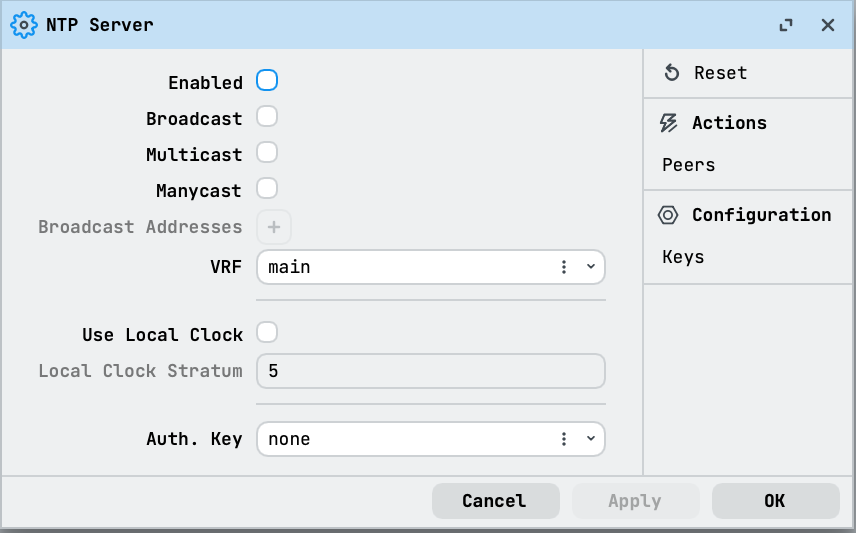
The server then distributes the router's own synchronized time. With broadcast=yes, the time is additionally sent to the addresses in broadcast-addresses; multicast=yes distributes it over multicast; manycast=yes takes part in manycast discovery.
With use-local-clock=yes, the router's unsynchronized clock is used as the time reference (at local-clock-stratum, 5 by default) when no NTP source is available. The router's clock drifts without external synchronization because its frequency varies with power management, temperature and hardware differences, so do not serve the local clock for precise timekeeping. Prefer a network time source.
When the local clock is the only reference, a client in this state shows status: using-local-clock and synced-server: 127.127.1.0.
Authenticate clients and servers
Symmetric keys configured in /system/ntp/key authenticate the time exchange. Create a key and select it on the client's server entry with auth-key:
[admin@MikroTik] > /system/ntp/key/add key-id=10 key-val=mysecret
[admin@MikroTik] > /system/ntp/client/servers/set 0 auth-key=10
The key value is sensitive: print and export never show it. A reply that fails authentication is rejected, the log shows peer rejected auth (crypto NAK), and the client stays in the waiting state.
Monitor synchronization
/system/ntp/monitor-peers shows the client's view of its time sources and refreshes continuously:
[admin@MikroTik] > /system/ntp/monitor-peers
 type="ucast-client" address=192.168.88.1 refid="195.244.128.12" stratum=3
 hpoll=6 ppoll=6 root-delay=15.96 ms root-disp=65.368 ms offset=13.937 ms
 delay=0.566 ms disp=0.123 ms jitter=0.02 ms
refid is the source the peer itself synchronizes to. A stratum of 16 means the peer is not synchronized.
The estimated frequency correction of the router's clock is shown as freq-drift in the client settings; reset it with /system/ntp/client/reset-freq-drift.
Technical details
NTP logging
Add a logging rule for the ntp topic to see the client's decisions and packet exchanges:
[admin@MikroTik] > /system/logging/add topics=ntp
Typical messages during startup and synchronization:
ntp,debug tx dst:192.168.88.1
ntp,debug rx src:192.168.88.1 dst:192.168.88.24
ntp,debug Message offset:0.027406 delay:0.000597 disp:0.000002
ntp,debug Resolved address: time.cloudflare.com -> 162.159.200.1
ntp,debug Checking peer (195.244.128.12). Peer is: NOT FIT, because p->leap == NOSYNC
ntp,debug No survivors for clock sync
ntp,debug System peer changed to: 195.244.128.12
ntp,debug peer rejected auth (crypto NAK)
A peer NOT FIT, because p->leap == NOSYNC is answering but is not synchronized itself. rootDist rejections indicate the source is too far from the root clock.
Client and server scopes
The client and the server are configured independently; enabling one does not require the other. Both have a vrf setting (main by default) that scopes which routing table the NTP traffic uses.
For all properties, see /system/ntp/client, /system/ntp/client/servers, /system/ntp/server, /system/ntp/key and /system/ntp/monitor-peers in the CLI reference.