IP Packing
CLI reference:/ip/packing
IP Packing collects the outgoing packets of an interface into larger packets (aggregation) and can also compress them. The router at the other end of the link unpacks them again. Both routers run RouterOS; packing is part of the system package. Use it on links where many small packets cost more than a few large ones.
TCP connections that the router itself opens over a packed link fail, for example a fetch or a bandwidth test. The unpacked TCP segments that carry data arrive with an incorrect checksum and are dropped, so the connections never complete. Ping passes. Test the traffic you need on a test link before you enable packing on a production link.
Prerequisites
-
Neighbor discovery runs on the interface on both routers:
discover-interface-listin/ip/neighbor/discovery-settingsincludes the interface. The default configuration discovers only on theLANinterface list, so a tunnel or a WAN interface needs a list that contains it. TheLANlist also decides what the default firewall trusts, so use a separate list for discovery rather than adding such an interface toLAN. For example, a list that holds theLANlist andether1:/interface/list/add name=discover include=LAN/interface/list/member/add list=discover interface=ether1/ip/neighbor/discovery-settings/set discover-interface-list=discover -
The two routers share a layer 2 link: a cable, a bridged wireless link or an EoIP tunnel. Packed packets travel in Ethernet frames, and neighbor discovery works on layer 2.
-
Both routers are configured symmetrically: what one router packs, the other unpacks. A router packs toward a neighbor only when that neighbor announces that it unpacks.
Configure packing
Router-A and Router-B are connected with a cable, on ether1 of Router-A and ether3 of Router-B. This example aggregates the packets that Router-A sends and leaves the packets from Router-B as they are.
On Router-A:
/ip/packing/add interface=ether1 packing=simple unpacking=none
On Router-B:
/ip/packing/add interface=ether3 packing=none unpacking=simple
To pack in both directions, set packing=simple unpacking=simple on both routers.
The default aggregated-size of 1500 bytes is the size that packing tries to reach before it sends a packet.
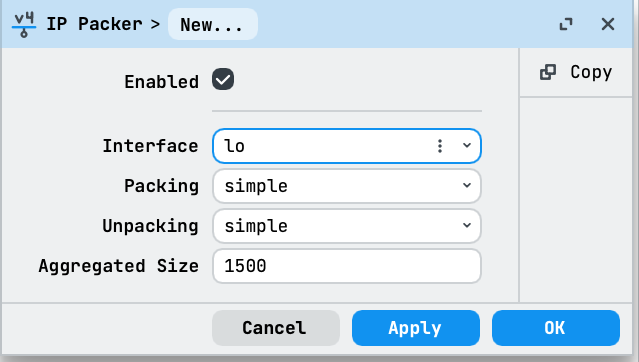
In WinBox, open IP > Packing and select New:
- Choose the link interface in Interface, such as
ether1on Router-A. The screenshot shows a new rule before the interface is selected. - Set Packing, Unpacking, and Aggregated Size to match the traffic direction and the settings on the other router. For Router-A in the example, use
simple,none, and1500, then select OK.
Check that packing works
Each router announces its unpacking setting through neighbor discovery. Run /ip/neighbor/print detail where interface=ether1 on Router-A: the entry for Router-B shows unpack=simple, because Router-B unpacks. On Router-B, the entry for Router-A shows unpack=none. The values none, simple, uncompress-headers and uncompress-all correspond to the unpacking settings none, simple, compress-headers and compress-all.
When the remote router has no neighbor entry on the interface, or its entry shows unpack=none, the router does not pack toward it and sends the packets as they are.
In a packet capture, packed frames have the EtherType 0x9000.
Latency
Packing holds packets back for a short time to combine them, so it adds delay. On a fast link, the ping round-trip time can rise from under a millisecond to tens of milliseconds. Take this into account for voice and other real-time traffic.
For all parameters, see the CLI reference for /ip/packing and /ip/neighbor/discovery-settings.