Files
CLI reference:/file
The /file menu shows all user files on the router's storage, for example uploaded packages, backups, scripts and exports. You can create files and directories, edit file contents, and copy or delete entries. For an uploaded RouterOS .npk package, the menu also shows package-specific information, such as the architecture, version and build time:
[admin@MikroTik] > /file/print detail
0 name=my-dir type=directory last-modified=2026-09-25 12:13:27
1 name=routeros-7.24.2-arm64.npk type= size=13.3MiB
last-modified=2026-09-25 12:13:01 package-name="system"
package-version="7.24.2" package-build-time=2026-09-03 09:57:14
package-architecture="arm64"
2 name=skins type=directory last-modified=1970-01-01 03:00:05
3 name=my-dir/test.txt type=.txt file size=5 last-modified=2026-09-25 12:13:27
contents=hello
Files and directories shared through File Share (Back To Home) are marked with the S (shared) flag and show a url property with the share link. File synchronization between routers is configured in the /file/sync menu, see Rsync.
Manage files in WinBox
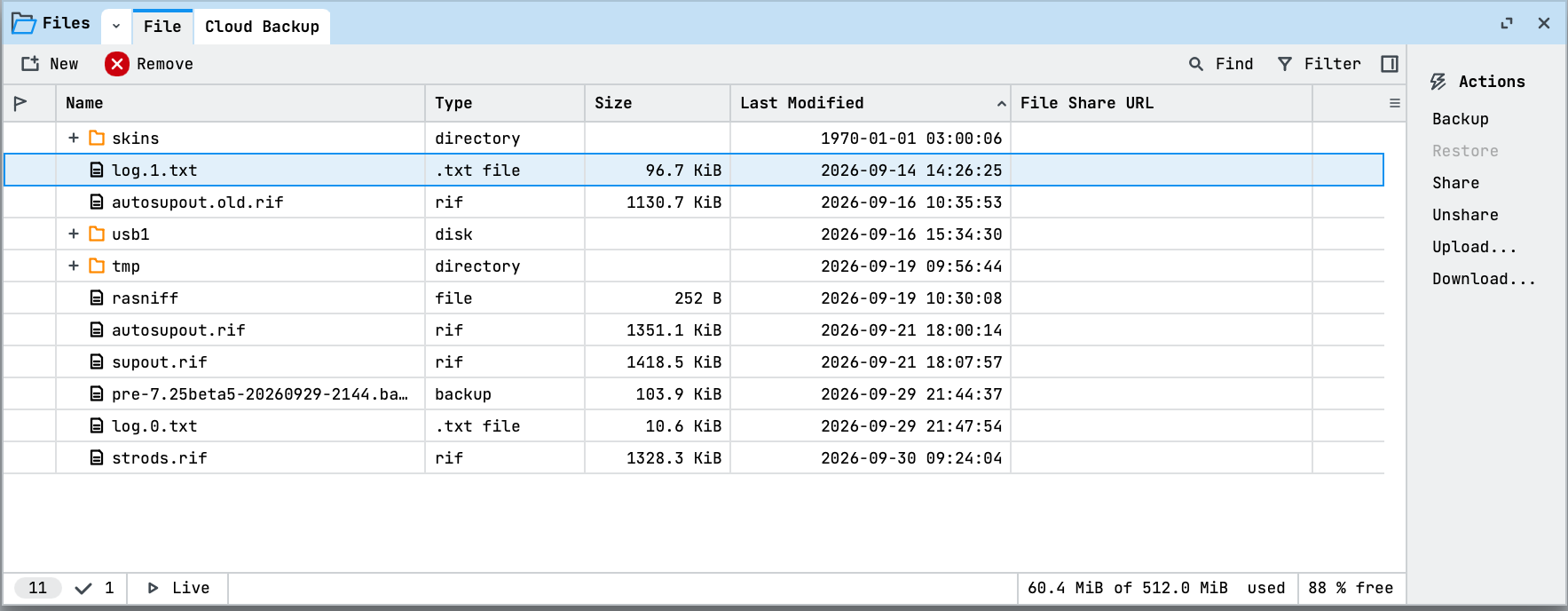
Open Files in the left menu. The File tab lists file names, types, sizes, and modification times:
- Select New, then Text File or Directory, to create an entry.
- Select Upload... in the right panel to copy a file from your computer to the router. To save a router file on your computer, select its row and select Download.... Remove deletes the selected entry from the router.
- Check the storage usage at the bottom of the window before uploading large files.
Uploading a file stores it on the router; it does not import a configuration script or restore a backup automatically. Follow the relevant configuration procedure when you intend to apply the file.
Storage details
If the device has a directory named flash in its file list, store any files that have to survive a reboot or power cycle inside it: everything outside flash is kept in a RAM disk and is lost on reboot. This does not include .npk upgrade files, which the upgrade process applies before the RAM disk content is discarded.
On multicore devices with NAND flash memory (for example, CCR series routers and RB4011), RouterOS uses a write-back cache: file changes are buffered in RAM and written to the flash media later, which can be delayed by up to 40 seconds. This reduces CPU use and flash wear. However, a sudden power loss in that window can leave empty or zero-length files, because the changes were not written to the flash yet.
RouterOS compresses stored files on some devices to occupy less disk space. /file shows the original file size, but free-hdd-space in /system/resource is calculated from the compressed size, so it can show more free space than expected.
File operations
Create a file or directory
Use the /file/add command with type=file or type=directory:
[admin@MikroTik] > /file/add name=my-file.txt type=file
[admin@MikroTik] > /file/add name=my-dir type=directory
Read file contents
get returns the contents property only for files up to just under 60 KiB; for larger files it returns nothing. To read larger files, use the /file/read command, which returns a chunk of the file as a string:
[admin@MikroTik] > :put [/file/get text.txt contents]
123456

[admin@MikroTik] > /file/read file=text.txt offset=2 chunk-size=3
  data: 345
Head or tail a file
Use /file/head and /file/tail to print the first or last n lines of a file (10 lines by default):
[admin@MikroTik] > /file/head test.txt n=3 numbered
 1: 1
 2: 2
 3: 3
Copy a file or directory
Use the /file/copy command. Directories are copied recursively, with all their contents:
[admin@MikroTik] > /file/add name=test1.txt type=file
[admin@MikroTik] > /file/add name=dir1 type=directory
[admin@MikroTik] > /file/copy test1.txt name=dir1/test1copy.txt
[admin@MikroTik] > /file/copy dir1 name=dir2
[admin@MikroTik] > /file/print
Columns: NAME, TYPE, SIZE, LAST-MODIFIED
# NAME                TYPE       SIZE  LAST-MODIFIED
0 dir2                directory        2026-09-25 12:12:20
1 dir1                directory        2026-09-25 12:12:20
2 test1.txt           .txt file     0  2026-09-25 12:12:20
3 skins               directory        1970-01-01 03:00:05
4 dir1/test1copy.txt  .txt file     0  2026-09-25 12:12:20
5 dir2/test1copy.txt  .txt file     0  2026-09-25 12:12:20
All parameters are documented in the /file CLI reference.