DHCP Relay
CLI reference:/ip/dhcp-relay/ipv6/dhcp-relay
A DHCP relay forwards requests from DHCP clients on one network to a DHCP server on another network, and delivers the replies back to the clients. Use it when one central DHCP server serves several networks it is not directly connected to. For how a relay and the DHCP server work together, see DHCP concepts.
DHCPv4 Relay
Sub-menu: /ip/dhcp-relay
The DHCP relay listens for DHCP requests on its interface and forwards each request to every DHCP server listed in dhcp-server; it does not choose one of them. It writes local-address, or an address of its interface when local-address is not set, into the gateway address field (giaddr) of the forwarded request. The DHCP server sends its replies to that address and uses it to tell relays apart: set the server's relay property to the relay's address, as shown in the following example. New relays are created disabled, so enable them after adding.
All relay properties are described in the /ip/dhcp-relay CLI reference.
Relay agent information (option 82)
With add-relay-info=yes, the relay adds the relay agent information option (option 82) to the requests it forwards. The circuit ID is the MAC address of the relay interface the request came in on, and the remote ID is the MAC address of the client, or the text set in relay-info-remote-id.
A RouterOS DHCP server shows these values in the lease (active-agent-circuit-id, active-agent-remote-id) and passes them to the lease script. A static lease can match a client by them (agent-circuit-id, agent-remote-id) even when its MAC address differs, and with dynamic-lease-identifiers=opt-82 the server identifies clients by option 82 alone.
Configuration example
In this example, one router, DHCP-Server, gives out addresses for two networks, 192.168.1.0/24 and 192.168.2.0/24, which are behind another router, DHCP-Relay.
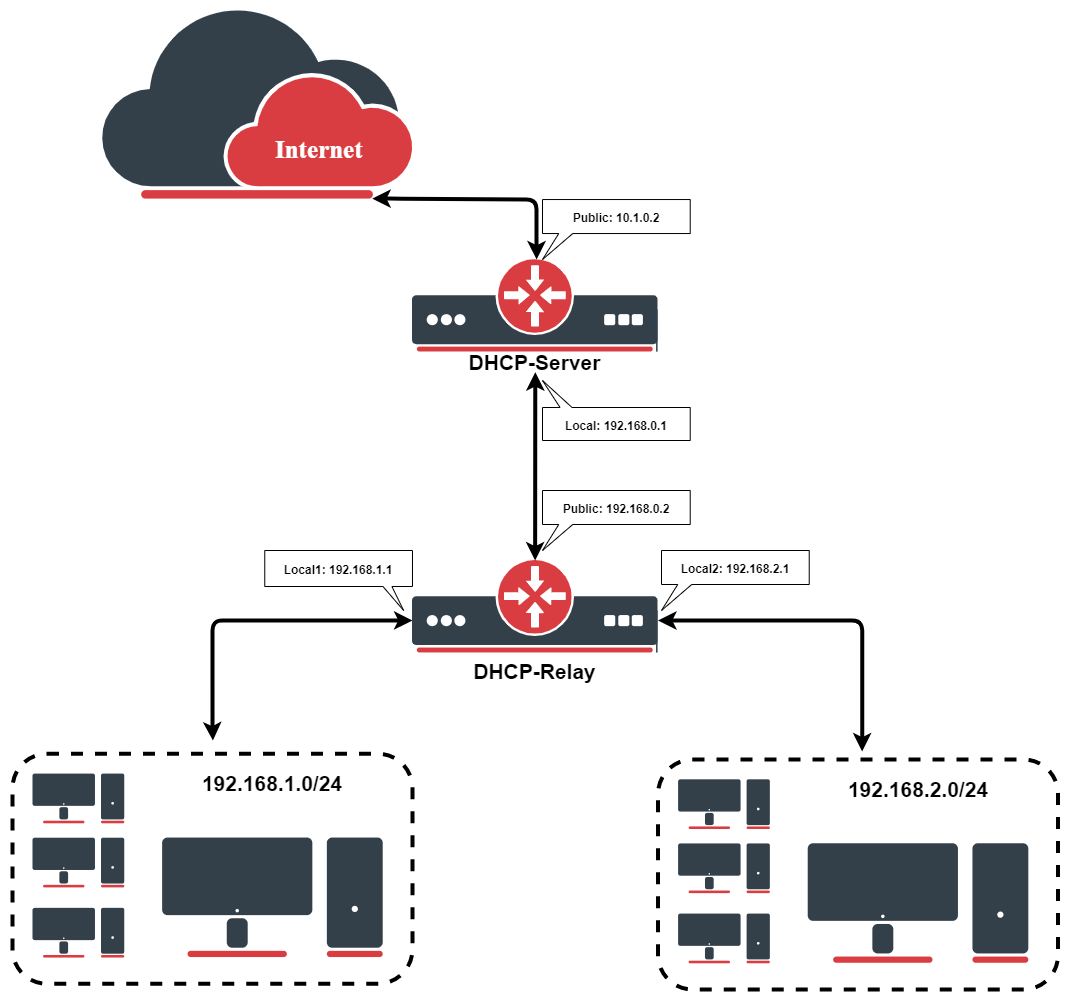
The routers have these addresses. On DHCP-Server:
/ip/address/add address=192.168.0.1/24 interface=To-DHCP-Relay
/ip/address/add address=10.1.0.2/24 interface=Public
On DHCP-Relay:
/ip/address/add address=192.168.0.2/24 interface=To-DHCP-Server
/ip/address/add address=192.168.1.1/24 interface=Local1
/ip/address/add address=192.168.2.1/24 interface=Local2
DHCP server setup
On DHCP-Server, add a pool, a DHCP server and a network for each relayed network. Both servers run on the interface towards the relay; the relay property makes each server answer only the requests relayed from its network, identified by the relay's address in that network:
/ip/pool/add name=Local1-Pool ranges=192.168.1.11-192.168.1.100
/ip/pool/add name=Local2-Pool ranges=192.168.2.11-192.168.2.100
/ip/dhcp-server/add interface=To-DHCP-Relay relay=192.168.1.1 address-pool=Local1-Pool name=DHCP-1
/ip/dhcp-server/add interface=To-DHCP-Relay relay=192.168.2.1 address-pool=Local2-Pool name=DHCP-2
/ip/dhcp-server/network/add address=192.168.1.0/24 gateway=192.168.1.1 dns-server=159.148.60.20
/ip/dhcp-server/network/add address=192.168.2.0/24 gateway=192.168.2.1 dns-server=159.148.60.20
The DHCP server does not need routes to the client networks: it sends its replies, also those to renewing clients, back to the router the request came from.
DHCP relay setup
On DHCP-Relay, add a relay on each local interface. New relays are created disabled, so add them with disabled=no:
/ip/dhcp-relay/add name=Local1-Relay interface=Local1 dhcp-server=192.168.0.1 local-address=192.168.1.1 disabled=no
/ip/dhcp-relay/add name=Local2-Relay interface=Local2 dhcp-server=192.168.0.1 local-address=192.168.2.1 disabled=no
Use /ip/dhcp-relay/monitor to see how many requests a relay forwarded and how many replies it delivered.
DHCP relay with VRF
When the interface towards the DHCP server and the client interfaces of the relay are in different VRFs, set dhcp-server-vrf to the VRF of the server side. This example uses the previous setup, with each interface of DHCP-Relay in its own VRF:
/ip/vrf
add interfaces=To-DHCP-Server name=vrf_server
add interfaces=Local1 name=vrf1
add interfaces=Local2 name=vrf2
/ip/dhcp-relay/set [find] dhcp-server-vrf=vrf_server
The server sends its replies to the relay's local-address, which is in a client VRF, but the replies arrive on the server-side interface in vrf_server. Redirect them to the relay's server-side address with dst-nat rules:
/ip/firewall/nat
add action=dst- chain=dstnat dst-address=192.168.1.1 dst-port=67 in-interface=To-DHCP-Server protocol=udp src-address=192.168.0.1 to-addresses=192.168.0.2
add action=dst- chain=dstnat dst-address=192.168.2.1 dst-port=67 in-interface=To-DHCP-Server protocol=udp src-address=192.168.0.1 to-addresses=192.168.0.2
Clients renew their leases with unicast messages to the server, so the VRFs also need routes to each other's networks:
/ip/route
add dst-address=192.168.0.0/24 gateway=To-DHCP-Server@vrf_server routing-table=vrf1
add dst-address=192.168.0.0/24 gateway=To-DHCP-Server@vrf_server routing-table=vrf2
add dst-address=192.168.1.0/24 gateway=Local1@vrf1 routing-table=vrf_server
add dst-address=192.168.2.0/24 gateway=Local2@vrf2 routing-table=vrf_server
Without the dst-nat rules, clients get no address; without the routes, they get an address but cannot renew it.
DHCPv6 Relay
Sub-menu: /ipv6/dhcp-relay
The DHCPv6 relay forwards the DHCPv6 messages that clients on its interface send to the servers listed in dhcp-server. It wraps each client message in a Relay-Forward message, which also carries the client's link-local address, an Interface-ID option and, by default, the client link-layer address (option 79, set with dhcp-options). The link address field of the Relay-Forward message is :: unless you set link-address, for example to an address of the client network if the DHCPv6 server should identify the client's network by it. The server answers the relay, and the relay passes the reply back to the client. This way one DHCPv6 server can serve several networks without a direct connection to each of them.
The relay receives client messages on UDP port 547. If the router filters incoming traffic, allow UDP port 547 on the client-side interface: the default firewall configuration of RouterOS drops it on interfaces that are not in the LAN interface list. The replies of the servers are accepted as part of the same connection. To route the clients' traffic, the router also needs IPv6 forwarding, which is enabled by default.
All relay properties are described in the /ipv6/dhcp-relay CLI reference.
Routes to delegated prefixes
When the relay router is also the gateway of the clients, it needs routes to the prefixes delegated to them. With store-relayed-bindings=yes, the relay reads the bindings from the servers' replies, lists them in /ipv6/dhcp-relay/routes, and adds a route to each delegated prefix through the client.