DHCPv6 Client
CLI reference:/ipv6/dhcp-client
Sub-menu: /ipv6/dhcp-client
The DHCPv6 client requests IPv6 configuration from a DHCPv6 server. It is typically used on the interface towards an ISP, to receive a delegated prefix for the local networks. The request property selects what the client asks for, and one client can request more than one of these:
prefix: a delegated prefix (DHCPv6-PD). The client adds the received prefix to a dynamic IPv6 pool (pool-name), from which you can assign addresses to local interfaces and advertise them to hosts. The pool lifetime follows the delegated prefix and is extended each time the client renews it.address: an IPv6 address, which the client adds to its interface as a dynamic /128 address.info: only other settings, such as DNS servers, without an address or a prefix.
The received DNS servers are used by the router's DNS resolver (use-peer-dns). DHCPv6 does not provide a default gateway, but the client can add a default route towards the DHCPv6 server with add-default-route.
The client identifies itself with the router's DUID, which the router's DHCPv6 server also uses, and with an identity association identifier (IAID) based on the interface the client runs on. For how DHCPv6 differs from DHCP for IPv4, see DHCP concepts.
Configuration Examples
Simple DHCPv6 client
This example requests a prefix and adds it to an IPv6 pool that hands out /64 prefixes:
/ipv6/dhcp-client/add request=prefix pool-name=test- pool-prefix-length=64 interface=ether13
When the client is bound, it shows the received prefix and the time until it expires:
[admin@MikroTik] > /ipv6/dhcp-client/print
Columns: INTERFACE, STATUS, REQUEST, PREFIX
# INTERFACE  STATUS  REQUEST  PREFIX
0 ether13    bound   prefix   2001:db8:7501:ff04::/62, 2d23h11m53s
The prefix is also added to the dynamic pool, with the lifetimes of the prefix:
[admin@MikroTik] > /ipv6/pool/print
Flags: D - DYNAMIC
Columns: NAME, PREFIX, PREFIX-LENGTH, ACTUAL-PREFIX, VALID-LIFETIME, PREFERRED-LIFETIME
# NAME PREFIX PREFIX-LENGTH ACTUAL-PREFIX VALID-LIFETIME PREFERRED-LIFETIME
0 D test- 2001:db8:7501:ff04::/62 64 2001:db8:7501:ff04::/62 2d23h11m53s 2d15h59m53s
You can now assign addresses from this pool to other interfaces, as the following example shows.
Use received prefix for local RA
Consider the following setup:
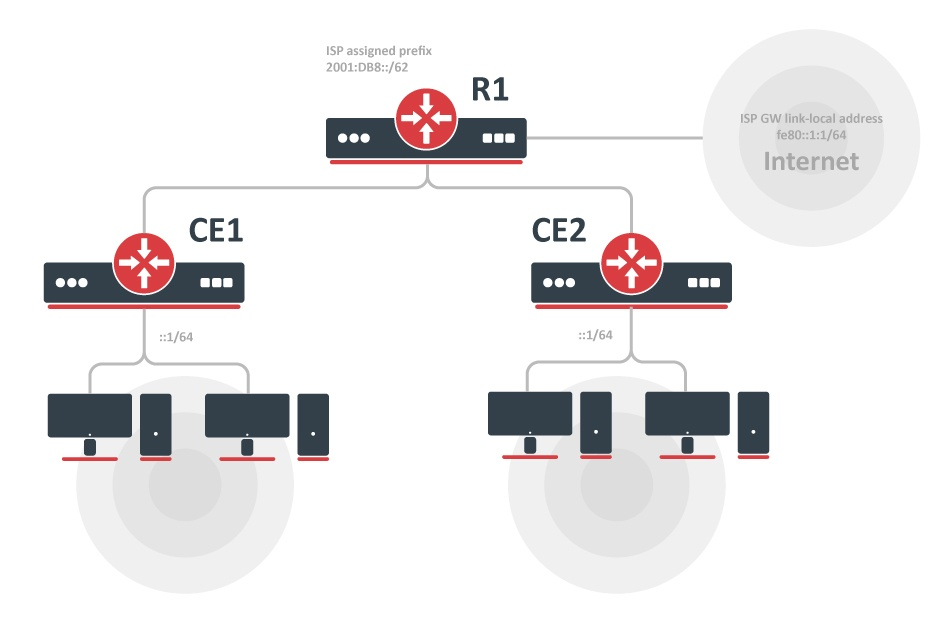
- ISP is routing prefix 2001:DB8::/62 to the router R1.
- Router R1 runs a DHCPv6 server to delegate /64 prefixes to the customer routers CE1 and CE2.
- DHCP client on routers CE1 and CE2 receives a delegated /64 prefix from the DHCP server (R1).
- Client routers use the received prefix to set up RA on the local interface.
Configuration
R1
/ipv6/route
add gateway=fe80::1:1%to-ISP

/ipv6/pool
add name=myPool prefix=2001:db8::/62 prefix-length=64

/ipv6/dhcp-server
add prefix-pool=myPool disabled=no interface=to-CE-routers lease-time=3m name=server1
CE1
/ipv6/dhcp-client
add interface=to-R1 request=prefix pool-name=my-
/ipv6/address
add address=::1/64 from-pool=my- interface=to-clients advertise=yes
CE2
/ipv6/dhcp-client
add interface=to-R1 request=prefix pool-name=my-
/ipv6/address/add address=::1/64 from-pool=my- interface=to-clients advertise=yes
Check the status
Check that each CE router received its own prefix.
On the server:
[admin@R1] /ipv6/dhcp-server/binding> print
Flags: X - disabled, D - dynamic
 #   ADDRESS            DUID          IAID  SERVER   STATUS
 1 D 2001:db8:0:1::/64  0019d1393536   566  server1  bound
 2 D 2001:db8:0:2::/64  0019d1393535   565  server1  bound
On client:
[admin@CE1] /ipv6/dhcp-client> print
Flags: D - dynamic, X - disabled, I - invalid
# INTERFACE STATUS REQUEST PREFIX
0 to-R1 bound prefix 2001:db8:0:1::/64
[admin@CE1] /ipv6/dhcp-client> /ipv6/pool/print
Flags: D - dynamic
# NAME PREFIX PREFIX-LENGTH
0 D my- 2001:db8:0:1::/64 64
The address from the pool is added to the LAN interface:
[admin@CE1] /ipv6/address> print
Flags: X - disabled, I - invalid, D - dynamic, G - global, L - link-local
# ADDRESS FROM-POOL INTERFACE ADVERTISE
0 G 2001:db8:0:1::1/64 my- to-clients yes
...
The pool usage shows that an address uses part of the pool:
[admin@CE1] /ipv6/pool/used> print
POOL PREFIX OWNER INFO
my- 2001:db8:0:1::/64 Address to-clients
Properties
All properties, status values and commands of the DHCPv6 client, including the variables a script receives, are described in the /ipv6/dhcp-client CLI reference. The following behavior needs more explanation.
Server-initiated renewal
With allow-reconfigure=yes, the client accepts Reconfigure messages from the DHCPv6 server and renews immediately when it receives one. A RouterOS DHCPv6 server with use-reconfigure=yes sends such messages by itself when its settings change, for example its lease time, so clients pick up the change without waiting for their renewal time.
IAID
To determine what IAID will be used, convert the internal ID of an interface on which the DHCP client is running from hex to decimal.
For example, the DHCP client is running on interface PPPoE-out1. To get the internal ID use the following command:
[admin@t36] /interface> :put [find name="pppoe-out1"]
*15
Now convert hex value 15 to decimal and you get IAID=21. To use a different IAID, set custom-iana-id for the address and custom-iapd-id for the prefix.