UPnP
CLI reference:/ip/upnp/ip/upnp/interfaces
Universal Plug and Play (UPnP) lets applications on the local network request port mappings from the router. When a client requests a mapping, RouterOS creates a dynamic destination NAT rule that forwards the requested external port to the client. Applications that accept incoming connections, for example games, peer-to-peer clients and voice or video calls, can then work behind NAT without manual port forwarding.
RouterOS implements the UPnP Internet Gateway Device (IGD) profile for IPv4. Clients discover the router with SSDP and request mappings over the WANIPConnection service. The UPnP service is disabled by default. RouterOS also supports NAT-PMP, a similar protocol common on Apple devices.
UPnP only takes care of the destination NAT side. The external interface still needs the usual source-NAT (masquerade) rule so that reply traffic reaches the client.
Security considerations
Any client that can reach the UPnP service on an internal interface can create a port mapping, without authentication, and not only for its own address: the internal address in a mapping can be any address, even one from a different subnet than the internal interface. Enable UPnP only on interfaces with clients you trust.
Set allow-disable-external-interface to yes only if your network requires it: any local client can then disable the router's external interface without authentication, and its port mappings are removed.
Keep the UPnP service disabled when you do not use it, as described in Securing your router.
Configuration example
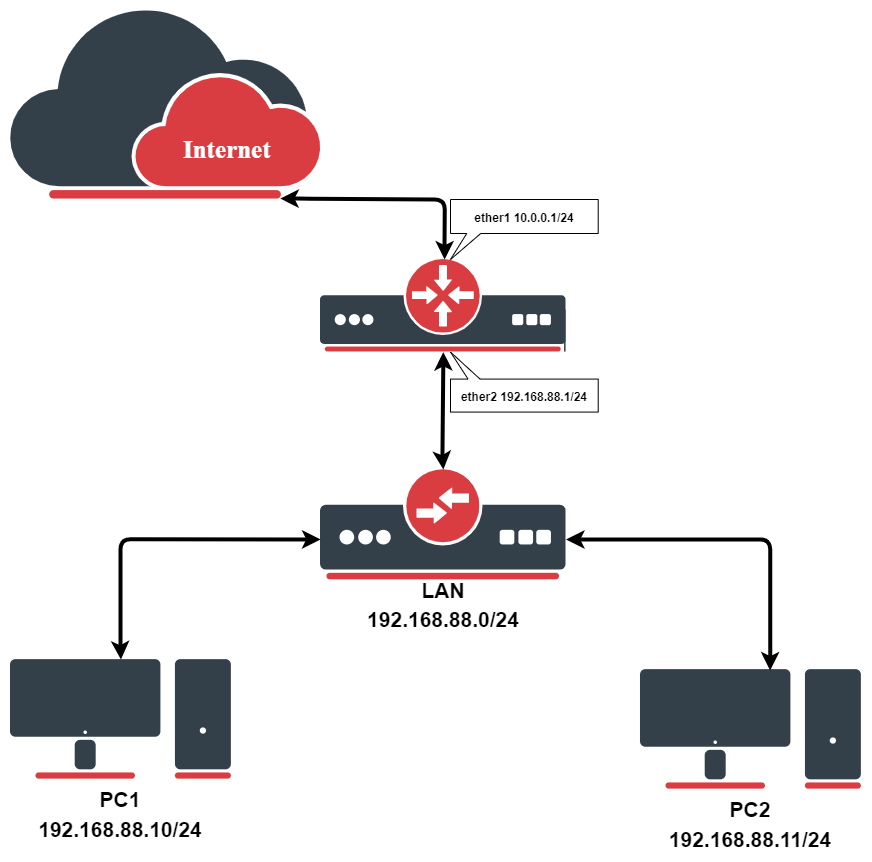
Enable the service and mark the Internet-facing interface as external and the client-facing interface as internal:
/ip/upnp/set enabled=yes
/ip/upnp/interfaces/add interface=ether1 type=external
/ip/upnp/interfaces/add interface=ether2 type=internal
When a client on the LAN, for example PC1 at 192.168.88.10, requests mappings for TCP and UDP port 55000, the router creates dynamic destination NAT rules:
[admin@MikroTik] /ip/firewall/nat> print where dynamic
Flags: D - DYNAMIC
0 D ;;; upnp 192.168.88.10: ApplicationX
chain=dstnat action=dst- to-addresses=192.168.88.10 to-ports=55000
protocol=tcp dst-address=10.0.0.1 in-interface=ether1 dst-port=55000
1 D ;;; upnp 192.168.88.10: ApplicationX
chain=dstnat action=dst- to-addresses=192.168.88.10 to-ports=55000
protocol=udp dst-address=10.0.0.1 in-interface=ether1 dst-port=55000
The rule comment records the address of the client that requested the mapping and the description it sent. The rules stay until the client removes the mapping or the UPnP service is reconfigured. A client can also request a mapping towards a different internal address than its own; to-addresses then holds that address.
If the external interface has several addresses, set forced-ip on the interface entry to choose which address is used for the mappings and reported to the clients.
In setups with VLANs, specify the VLAN interface itself as the internal interface: the client traffic, including the UPnP discovery, arrives on it.
Technical details
Discovery and service ports
The service sends SSDP announcements from each internal interface to the multicast group 239.255.255.250, UDP port 1900, which is where clients also send their discovery requests. The device description is served at https://<internal interface address>:2828/gateway.xml, and clients control the router over the same TCP port 2828. The control service listens only on the addresses of internal interfaces.
Both ports appear as dynamic entries in /ip/service while the service is enabled.
Port mappings
- Each mapping creates one dynamic
dstnatrule per protocol. The client requests mappings with theAddPortMappingaction and removes them withDeletePortMapping. - Only permanent mappings are supported: a request with a limited lease duration is rejected with the error
725 OnlyPermanentLeasesSupported. - A mapping requested with
NewEnabled=0creates the rule in disabled state. - Changing any setting in
/ip/upnpor the interface list restarts the service and removes all dynamic port mappings; clients have to request their mappings again. - By default the service reports an inactive placeholder mapping as the first entry when a client enumerates mappings, which works around client applications that misbehave when no mappings exist. Disable this with
show-dummy-rule=no. - Each external interface is advertised as its own WAN connection device, so several external interfaces can serve mappings at the same time.
For all properties, see /ip/upnp and /ip/upnp/interfaces in the CLI reference.